

Automation, Billing, and Stability Updates
Feature Updates
- Added custom domain renewal grace period: Domains remain active seven days after Business expiration; owners receive expiration and deactivation notices.
- Added connected-app event triggers: Automations and Routines can use event data; copied workflows support reconnection during credential setup.
- Added third-party app tool billing: Calls use provider-priced credits shown in credit history; failures, searches, and blocked calls are free.
Fixes & Improvements
- Improved connector stability: Expired, deleted, or replaced connections show disconnected, notify editors, and retain enabled status for reconnection.
- Improved connector events and Routines: Fixed event discovery, delayed runs, template installation, expired subscriptions, credit checks, and trigger test results.
- Improved lookup and rollup display: Lookup-based rollups show text and preserve numeric and Boolean types in standard and conditional rollups.
- Improved connected app credential stability: Fixed imports failing despite valid authorization and streamlined credential replacement and disconnection.
- Improved billing accuracy for long-running jobs: Prevented completed jobs from being charged repeatedly.
- Improved numeric lookup sorting and grouping: Values now sort numerically, with corrected grouping order for referenced linked records.
- Improved AI session stability: Enhanced model switching and recovery, especially for long-running Routines using non-default models.
- Improved real-time linked record titles: After bulk updates, many-to-one and one-to-one fields show saved titles without refreshing.
- Improved application security and reliability: Strengthened system protection and runtime stability for a more reliable experience.
GPT-6 Sol and Luna Are Now in Teable
 GPT-6 Sol and Luna replace GPT-5.6 Sol and Luna, bringing stronger coding skills, more reliable answers, and better performance on complex business tasks. In OpenAI’s factuality evaluation, GPT-6 Sol made about 50% fewer factual errors than its predecessor. Both models also communicate more clearly, with less jargon and fewer unnecessary details.These improvements help Teable AI handle work from analyzing business data and summarizing documents to building apps and running multi-step workflows. As part of this model upgrade, GPT-5.6 Terra is being retired.You can try GPT-6 Sol and Luna now in AI Chat, App Builder, AI Fields, and automation in Teable.
Connect 1,500+ apps to Teable AI
A major update is here: Teable now connects to over 1,500 apps, including YouTube, X, LinkedIn, Attio, Gmail, n8n, and Zapier. Bring your business data into Teable and let AI take action across your connected apps—all through conversation. Here are a few examples of how this update can transform the way you work.
1. Turn Gmail Inquiries into Sales Leads
Ask: “Find this week’s customer inquiry emails in Gmail. Add the sender’s name, email address, company, and requirements to this table, and suggest a follow-up for each.”2. Bring Attio contacts into Teable
Ask: “Import this week’s new contacts from Attio into this table, including name, company, email, lead source, and lead status. Summarize the number of contacts by source and lead status.”3. Draft, publish, and track LinkedIn posts
Ask: “Draft a LinkedIn post from this table. After I approve, publish it and save the post link and status back to the table.”X integrations, calculations, and performance optimization
Feature Updates
- Added X OAuth integration support: Connect services like X that require the deployment’s own OAuth app; configure API key integrations through credential forms.
Fixes & Improvements
- Improved chat card interactions: Pending authorization, connection, selection, credential, and question cards no longer block new messages; layouts and actions are clearer.
- Improved cross-table calculation consistency: Chained formulas, lookups, inventory, and allocations now update promptly when linked records change.
- Fixed unexpected scrolling when selecting an Assignee: The field being edited stays visible in record details.
- Improved integration connections: Clearer loading indicators and empty states, plus better mobile controls, make connections easier to understand.
- Improved table operation stability: Reduced false “Table not found” errors during field changes and improved pending or failed imports.
- Improved linked-record deletion performance: Faster, more reliable link removal across required, self-referencing, one-way, two-way, calculated, and recycled relationships.
- Fixed App Builder message queue failures: Queued messages now enter the generation process; previously affected messages must be resent.
- Fixed grid view misalignment during fast scrolling: Previously viewed records no longer briefly appear in the wrong position.
- Improved reconnection for idle tables: Recovery progress is shown, avoiding premature “table unavailable” messages.
- Adjusted Sheet feature availability: Due to compatibility limitations, the Sheet form designer, preview, and sharing panel are unavailable in this release.
- Fixed personal view loading: Personal views no longer occasionally remain blank with a loading placeholder; content appears without refreshing.
- Improved public template redirects: Outdated public template links now redirect to the Teable template page instead of returning a 404 error.
- Improved data operation performance: Faster table, record, field, and SQL query operations improve responsiveness with large datasets.
- Fixed expandable content: Recently measured expandable content now opens properly, improving page interaction stability.
- Improved real-time collaboration performance: Fewer unnecessary refreshes and polling requests during view configuration changes make collaboration smoother.
- Improved table list consistency: The table list reflects structural changes, including field updates, more promptly and accurately.
- Fixed member dropdown scrolling: Member lists in expanded records scroll again, making it easier to find and select members.
Continuous operation, performance, and stability upgrades
Feature Updates
- App Builder save failure guidance: Offers cleanup tips and sends failure details to AI when oversized versions cannot be saved.
- Continuous Routine execution: Routines run until completion, failure, or manual termination; histories now show start and end times.
Fixes & Improvements
- Improved template preview workflow: Creates a new copy and opens settings, matching Template Center; fixes grid record loading.
- Improved App Builder chat startup: Chats open in preview mode by default, with clearer environment clipboard labels.
- More reliable shared Base saving: Fixes failures when linked tables or fields are missing.
- More accurate Date field sorting: Sorts by full timestamps despite hidden times; date groups still follow display formatting.
- Improved bulk collaborator assignment notifications: Reduces duplicate emails, summarizes multiple records, and adds clearer wording and table links.
- Improved account deletion flow: Clearly lists owned spaces and required actions; fixes cleared desktop confirmations and broken mobile links.
- Improved shared chat unread notifications: Unread markers and reply alerts follow the latest questioner, preventing uncleared states for other viewers.
- Better complex Base performance: Speeds up Bases with complex linked records and Lookup calculations for smoother browsing and operations.
- Improved Secret rotation: Preserves existing credential bindings to avoid reconfiguration; new access permissions still require approval.
- Safer email verification code login: Adds security checks before sending or resending codes; related integrations must verify when enabled.
- More reliable app publishing: Optimizes publishing for projects with many bound Secrets, improving speed and success rates.
- Safer Formula saving and calculations: Checks edits before saving; failures remain drafts, preserving valid definitions and values without overwriting results.
- Fixed blank Record History panels: History now displays after changes to Formula, Rollup, and Conditional Rollup fields.
- More accurate audit logs: Distinguishes user-created personal access tokens from automatic token refreshes, helping administrators track actions accurately.
- Reliable external app connections: Fixes Gmail and API Key connections, prevents canceled connections reusing unrelated accounts, and ensures Agent access.
Collect data from 800+ websites with Teable AI
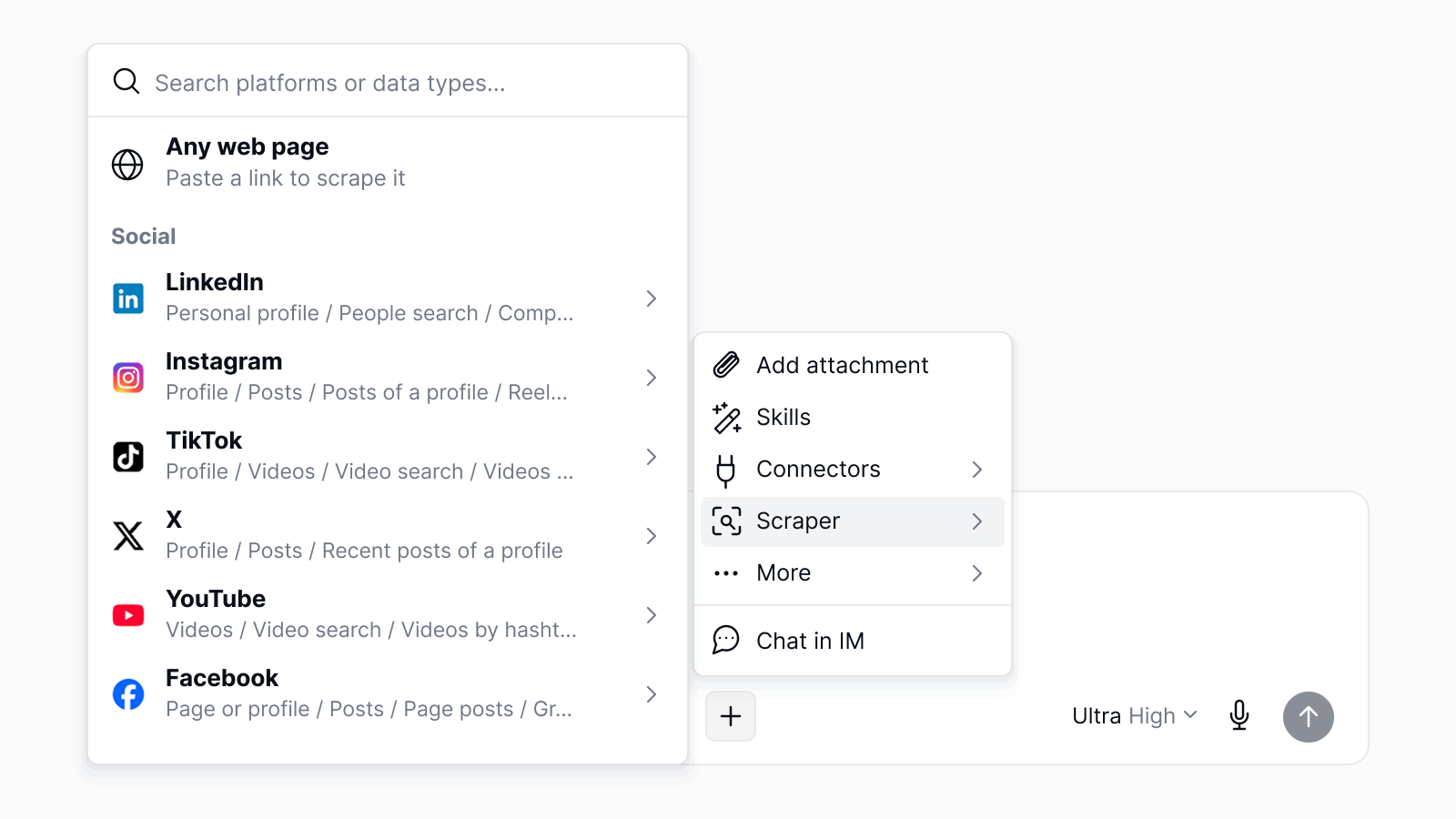
Describe the data you need. Teable Agent scrapes it from 800+ public websites and platforms—including LinkedIn, Amazon, Google Maps, Instagram, TikTok, X (Twitter), and YouTube—all in one place.
1. Find Beauty & Skincare Influencers on YouTube
Ask: “Find 50 YouTube beauty and skincare influencers in the US with 100K–1M subscribers. Add their channel name, subscriber count, channel URL, and contact email to this table.”2. Find Local Businesses on Google Maps
Ask: “Find 50 top-rated coffee shops in New York City. Add their name, rating, review count, address, phone number, website, and Google Maps URL to this table.”3. Compare Products on Amazon
Ask: “Find 100 popular wireless headphones on Amazon. Add the product name, price, rating, review count, and product URL to this table.”Image Generation, Account and Experience Upgrades
Feature Updates
- Added queued image generation: Track, cancel, select models, and deliver images to galleries across chat, CLI, App Builder, and routines; pay only for delivered images.
Fixes & Improvements
- Improved account deletion: Unified web flows guide space transfers or trashing; no trash emptying or manual exits required. Subscription safeguards remain.
-
Improved
.teaproject imports: Preserve integration and secret placeholders without credentials for easy authorization; legacy exports remain supported. - Improved integration and automation management: Manage authorization in the Integrations dialog and enable automation per workflow.
- Improved App Builder previews: Show last-saved previews on startup, preserve usable previews after setup failures, and reduce incorrect stopped/failed statuses.
- Updated media generation APIs: Create, retrieve, and cancel one task per request; batch, continuation, and retry flows are no longer supported.
- Improved image generation reliability: Better handling of failures, rejected requests, stalled tasks, and duplicate results improves output and billing reliability.
- Improved chat readability: Clearer attachments and mentions, contained long content, and collapsed tool/image rows reduce layout shifts; failures remain expandable.
- Improved routine status displays: More accurate execution statuses reduce transient error indicators during loading.
- Improved restricted view visibility: Inaccessible views no longer appear in table views or recently visited lists.
- Improved account and shared-link security: Strengthened account, authentication, and shared-link protections; existing password-protected links may require password re-entry.
- Improved login experience: Returning signed-out users reach the login page; switching authentication tabs preserves entered email addresses and passwords.
- Improved permanent deletion: Permanently deleting tables or bases also removes related comments and comment subscriptions, preventing orphaned content.
- Fixed import entry visibility: The import entry now displays and opens correctly when importing is the only available action.
- Fixed attachment access: Restored Aliyun OSS attachment links while preserving downloads through other supported storage services.
- Fixed imported field references: AI classification and generation fields no longer reference source projects, preventing misleading circular-reference errors when copying/publishing templates.
- Improved favicon clarity: Sharper favicons in browser tabs, link previews, and high-density displays.
- Fixed field-level permissions: Applying permissions no longer incorrectly hides/locks fields or unexpectedly restricts records without field restrictions.
Login, Automation, and Performance Optimization
Feature Updates
- Added email verification code sign-in: After email setup, registered users can sign in with a code for easier access.
- Added Sign in with Apple: Once configured, web sign-in supports Apple alongside Google, GitHub, and OIDC.
- Added Routine authorization scopes: Personal access tokens and OAuth apps can authorize Routine access for easier automation integration.
- Added Routine CLI management: Use the CLI to update, enable, disable, or start Routines within existing permissions.
- Added Routine result display: Run details show the assistant’s final response when available for quick result review.
Fixes & Improvements
- Optimized image uploads: Upload support now matches the selected AI model tier’s capabilities, ensuring compatible image features.
- Fixed App Builder file handling: Resolved file link and download issues, ensuring generated files open in the appropriate previewer.
- Improved automation script editing: Edits persist after closing dialogs, and workflow tests use the latest saved configuration for consistent results.
- Improved notification display: Stacked notifications now remain clearly visible when multiple messages appear simultaneously.
- Fixed AI chat button display: Prevented the send button from being compressed in constrained layouts, improving chat usability.
- Improved Routine’s Chinese experience: Refined Simplified Chinese terminology, editor styling, and form consistency for easier configuration.
- Improved product and API documentation: Replaced “Base” with “Project” and refined API route titles and authentication examples.
- Strengthened app and automation permission isolation: Prevents cross-project, space, integration, or tenant access; workflows using broad inherited permissions require review.
- Improved record query stability: Supports timeouts for slow record, count, and aggregation queries, with clearer errors to prevent resource overuse.
- Optimized record query performance: Skips unnecessary total counts by default while retaining them when required, reducing database load.
- Improved record pagination reliability: Deleting cursor records no longer causes missing or truncated results; invalid or mismatched cursors show errors.
- Fixed multi-value filtering: “Contains” and “does not contain” now work when JSON or multi-value field content includes apostrophes.
- Improved calculated field stability: Enhances calculation reliability and efficiency, clearing calculation warnings only after related fields finish recalculating.
- Optimized view updates: Views restored through undo, redo, or trash appear immediately, with fewer unnecessary table and view refreshes.
Improved right-to-left support
Teable now supports Hebrew as an interface language, alongside comprehensive improvements to the right-to-left (RTL) experience for Arabic and Hebrew. From page layouts and navigation to how content is displayed, these refinements make the interface feel more natural and intuitive for users who read and work in these languages.We believe localization should extend to every interaction, so people across languages and cultures can turn their ideas into reality in ways that feel familiar.- Layouts that follow your language. Sidebars, menus, and dialogs adapt to right-to-left use.
- Better typing in AI Chat and App Builder. Chat inputs follow your interface language’s text direction.
- Clearer mixed-language content. Cell values and record names automatically detect text direction, making Arabic or Hebrew easier to read alongside English.
AI imaging, performance, and experience optimization
Fixes & Improvements
- More accurate Routine status: Routines show completed promptly after chat generation, reducing service-switching delays during deployment.
- Improved email automation trigger validation: Required-field errors appear only after editing connection fields, reducing premature warnings.
- Improved CLI help: Clarified Skill scope options and environment defaults for easier, more accurate command usage.
- Improved chat tool call display: Tool calls remain visually grouped across steps and subsequent reasoning, improving clarity and traceability.
- Expanded AI image support: Added tailored options and image-to-image capabilities for GPT Image, Gemini, Seedream, Recraft, Muse, Grok Imagine, and Arrow.
- Improved Scrape Data menu: Redesigned icons and layout prevent truncation and enable in-panel configuration for clearer, easier setup.
- Improved Grid loading performance: Reduced unnecessary requests when opening Grids, smoothing status updates during formula, lookup, and rollup calculations.
- Improved form validation: Errors remain in-form instead of appearing unhandled; missing fields consistently show “Required” for quicker resolution.
- Improved AI image generation stability: Enhanced validation, result handling, Arrow SVG output, and preservation of uploaded file types and extensions.
- Email trigger connection changes: “When a new email is received” blocks Gmail/Outlook setup or reauthorization; existing records and IMAP remain.
Automation tasks, chat, and stability upgrades
Feature Updates
- Added Scheduled Routines: Create, schedule, run, pause, and monitor Agent tasks with templates, run history, sidebar navigation, Agent, and CLI tools.
Bug Fixes & Improvements
- Improved Routine scheduling: Refined time zones, daylight saving time, recurrence rules, one-time schedules, and synchronization for reliable execution.
- Improved Routine quota handling: Routines automatically pause after five consecutive quota failures and cancel future runs to prevent waste.
- Improved Routine reliability: Enhanced recovery, deletion cleanup, manual runs, and navigation to activity and run history.
- Enhanced chat management: Web and mobile now support pinning, renaming, archiving, deleting, activity indicators, and manual user sorting.
- Improved chat consistency: Refined message history, tool output, feedback, queued messages, retries, and streaming recovery.
- Improved long-message rendering: Increased streaming response efficiency, especially for mobile reading.
- Improved chat permissions and read status: Unauthorized actions show clear messages; background replies remain unread after switching conversations.
- Improved chat change summaries: Deleted resources now appear unavailable instead of linking to invalid destinations.
- Fixed duplicate image attachments: Resolved duplicate images when pasting content into the upload area.
- Improved attachment editing and recovery: Fixed stuck image replacement and failed-upload recovery, ensuring attachments can be edited, removed, and sent.
- Improved expanded-record interactions: Fixed Single-select dropdown scrolling and prevented accidental closure when pressing Escape.
- Improved field adjustment stability: Deleting or reordering fields while resizing columns no longer crashes the grid or misapplies widths.
- Improved global search results: Search now respects field visibility, excluding hidden-field content from matches and result counts.
- Improved Hosted Connection authorization: Added smoother retries for denied, canceled, blocked, or failed authorization; existing Hosted Gmail authorizations remain supported.
- Improved linked-field cleanup: Deleting linked fields or stored link data now cleans up related links more completely.
- Improved Schema integrity checks: Restored missing tables when valid schema data remains and safely handled partially deleted linked fields.
- Improved performance for high-traffic tables: Reduced duplicate operations and improved concurrent viewing while preserving permissions and fresh-data requirements.
- Improved mobile login and navigation stability: Added system-browser login with PKCE, consent, reusable sessions, shared authentication, and smoother account switching and embedded experiences.
- Improved mobile embedded pages: Simplified table headers, highlighted Settings, and displayed plan, usage, billing, limits, and self-hosted license information read-only.
- Improved calculation issue summaries: Added clearer errors, database context, affected-field counts, occurrence counts, and complete field identifiers.
- Updated Public API reference documentation: Show only endpoints supporting access-token authentication, helping developers find available APIs faster.
-
Unified help and plugin documentation links: Standardized links on
help.teable.aiwhile preserving supported deep links.
Security, performance, and stability updates
Feature Updates
- Added secure credential support for Email automations: Email triggers can use authorized credentials, avoiding stored passwords and diagnostic exposure.
- Added Chat resource change summaries: After each conversation, Chat summarizes resources created or modified by the Agent.
Bug Fixes & Improvements
- Improved large-table performance and stability: Reduced lag, timeouts, and failures when editing, inserting, pasting, or reordering records in older views.
- Improved comment count reliability: Comment counts now update more promptly and accurately when records are edited.
- Improved calculation activity refresh stability: Enhanced refreshes during reconnections and high activity while enforcing access permissions.
- Optimized table search: Shows only published, available indexes; correctly falls back when none exist and improves large-table response times.
- Fixed Number field display settings: Bar or ring chart settings are now cleared when switching back to standard number display.
- Fixed Agent operation progress: Progress cards now display correctly when creating an app and performing other actions simultaneously.
- Improved Chat navigation stability: Prevents resources created in other Bases from causing unexpected redirects or persistent processing states.
- Fixed user field mode switching: Grid views load correctly and existing assignments remain when switching between single-select and multi-select.
- Improved App Builder export security: Copies and downloads exclude authorized credentials and connection secrets; owners must provide them separately.
Scraper Expansion and Stability Improvements
Feature Updates
- Expanded Scraper capabilities: Added discovery for X profiles, Facebook content, Amazon sellers, Walmart reviews, and Crunchbase people, with localized labels.
Bug Fixes & Improvements
-
Improved long-tail Scraper dataset access: Search shows discovery modes and supports raw dataset IDs with
discoverBy. -
Improved Scraper CLI workflow:
teable scrape runreturns snapshot IDs immediately; useteable scrape status --waitto await completion. - Improved Scraper safety and billing accuracy: Refined limits and pending-request reuse to prevent duplicate charges during concurrent status queries.
- Improved large-workspace table analysis stability: Reduced database stalls and temporary 503 errors, making analysis more reliable.
- Improved computation task tracking: Ensured consistent batch reruns within stages and clarified serial retries for easier troubleshooting.
- Clarified complexity metric naming: Renamed “Dirty Records” to “Estimated Complexity,” making computation workload easier to assess.
- Improved app and automation credential wording: Renamed secret “Rotate” to “Edit” without changing how updates work.
- Fixed user avatars in credentials and configurations: Owner avatars display correctly, with initials shown when no avatar exists.
- Improved credential usage lists: Shows only additional resources, truncates long names with tooltips, preserves actions, and displays access grant times.
- Improved computed field updates under high concurrency: Enhanced data processing to reduce timeouts and update failures.
- Fixed Lookup and Rollup field inconsistencies: Unified handling of saved and transformed options, cross-Base references, and version changes.
- Improved table loading and connection stability: Reduced unnecessary requests during initial loads, reconnections, and frequent operations for smoother use.
- Fixed computation activity notifications: Prevented subscription errors from triggering unrelated global notifications.
- Fixed User field filters after type changes: Preserves filters and values across selection modes, preventing failures and Grid loading issues.
-
Fixed empty-search loading issues: Opening search with
Cmd+Fno longer loops Grid row loading or resets filters, sorting, and grouping. - Improved shared view loading reliability: More consistent field and record loading reduces missing or out-of-sync data.
URL recognition, credentials, and search optimization
Feature Updates
- Automatic URL detection: Clickable links work across text fields, including Formula, Rollup, and Long Text, with CJK and touch support.
- Automatic links for AI-created URL fields: New website and URL columns use auto-linking plain text fields; existing configurations remain supported.
- Centralized credential management: Manage reusable personal API keys and third-party connections in Settings › Integrations, with resource permissions and usage tracking.
- Secure credential binding: Apps, automations, and transferred resources retain placeholders; collaborators bind credentials and use aliases for multiple users.
- AI credential confirmation: AI-assisted building requests confirmation before using credentials and masks keys in test output.
- Scraper data access: The chat “+” menu adds a Scraper option for curated datasets, localized prompts, and permission-based access.
- Natural-language Scraper discovery: Find datasets beyond the curated catalog and view required inputs more clearly for faster data collection.
Fixes & Improvements
- Improved all-field search scope: Uses configured indexes, includes newly added fields, and limits unindexed ILIKE searches to 20 eligible fields.
- Improved text search compatibility: Records with inconsistent or unsupported date values are no longer skipped or cause failures.
- Clearer calculation timelines: Improved status labels and task relationships show progress from source updates through processing to completion.
- Fixed idle table calculation status: Idle tables no longer remain on “Checking calculation status” when other tables have queued tasks.
- Improved credential usage display: Summaries now count only hidden resources, with better truncation for long resource names and aliases.
- Improved Scraper reliability: Unavailable posts no longer appear as verification failures, and LinkedIn scraping avoids premature timeouts.
- Improved table query reliability: Applies sensible defaults when query options are omitted, preventing parameter-related errors.
- Faster Table Query Ops overview: Shows only recent data by default, improving page load times and administrative responsiveness.
- Faster calculations and conditional aggregations: Improves high-load processing for quicker data updates and statistical results.
- More stable real-time table activity: Better handles load spikes and delayed calculation activity, reducing connection errors and repeated retries.
- Improved sharing and batch requests: Ignores inaccessible private activity data, preventing one permission issue from failing the entire request.
- Fixed OAuth authorization: App Builder integrations always show authorization prompts, and Google Sheets proceeds beyond selection after authorization.
- Consistent OAuth service support: Aligned App Builder Chat, General Chat, App Builder Agent Computer, and related CLI commands.
- Improved resilience during brief database outages: Reduces intermittent errors across tables, records, comments, sharing, and chat during connection recovery.
- Fixed date-grouped summaries: Group-level values now match visible daily and monthly groups instead of appearing incorrect or empty.
- Fixed filtered comment counts: Corrected legacy single-value date lookup fields while preserving permissions, pagination, collapsed groups, and substring search.
Calculation, Search, and Stability Optimization
Fixes & Improvements
- Improved calculated field stability: Fixed idle tables remaining stuck on “Checking calculation status” after Lookup or linked record updates.
- Improved multi-level calculation accuracy: Fixed missing or delayed downstream formula updates during multi-step Lookup and calculated field recalculation.
- Optimized calculated field performance: Reduced unnecessary calculations, Lookup, and Rollup updates when no records or results changed.
- Improved calculation status messaging: Prevented false warnings, clarified empty tasks, and retained unresolved errors for accurate progress tracking.
- Improved calculation activity reliability: Displayed errors clearly and preserved existing status after check failures or timeouts.
- Prevented redundant invalid tasks: Stopped retries for tasks tied to deleted or missing Bases, improving stability.
- Improved shared document stability: Enhanced error handling for collaboration, loading, and activity replay failures, with clearer permission messages.
- Improved AI settings: Fixed crashes when provider data is missing and allowed administrators to save empty custom provider configurations.
- Improved full-field search performance: Optimized large-table searches across lists, counts, groups, and aggregations, including numbers, rounded values, and short keywords.
- Improved search task responsiveness: Statistical queries now stop when users change or cancel searches, reducing wasted time and resources.
- Improved restricted-user access: Fixed false permission errors for readable calculated fields and improved reliability after permission changes or reconnection.
GPT-6 Is Now in Teable
 GPT-6 Astra brings a major leap in tackling complex business tasks. Compared with GPT-5.6 Sol, it completes 2.3x as many multistep business workflows on AutomationBench, with scores roughly 34% higher on data science tasks and 50% higher on database migration tasks in OpenAI’s evaluations.For Teable users, this means more capable AI for analyzing data, building apps, and creating workflows. It understands your requirements better, stays on track through longer tasks, and produces results that more closely match your business needs.You can try it in Teable now.
Query Deduplication and AI Import Optimization
Feature Updates
- Added Lookup field deduplication: Removes duplicate values from multiple linked records for cleaner, more readable results.
- Added AI import recommendations: Prioritizes AI import when creating tables from existing content for faster, more accurate organization.
Bug Fixes & Improvements
- Improved Cuppy context window indicator: Uses a neutral gray progress ring to clarify automatic context compression.
- Improved filter layout: Value inputs use available row width, with better Current User and statistical field filtering.
- Improved public automation Webhook stability: Fixed persistent 429 errors below documented rate limits, ensuring throttling states recover and reset properly.
- Improved AI import reliability: Better handles quota-related rejections and edge cases for more stable, consistent results.
- Optimized large-table search: Improved full-field search across lists, counts, groups, aggregations, shared views, and concurrent queries.
- Optimized statistical query cancellation: Reduces unnecessary processing when search criteria change or queries are canceled, improving responsiveness.
- Improved Rollup conversion stability: Fixed switching from “Unique Array” to “Count All” and validates formats against new result types.
- Improved nested formula stability and performance: Optimized repeated empty checks for Attachment, User, or Lookup fields, reducing computed-field update timeouts.
- Fixed Lookup field filtering: “Contains any → Current User” now correctly filters referenced User fields.
New Pricing: More AI Credits. Save 44% Yearly.
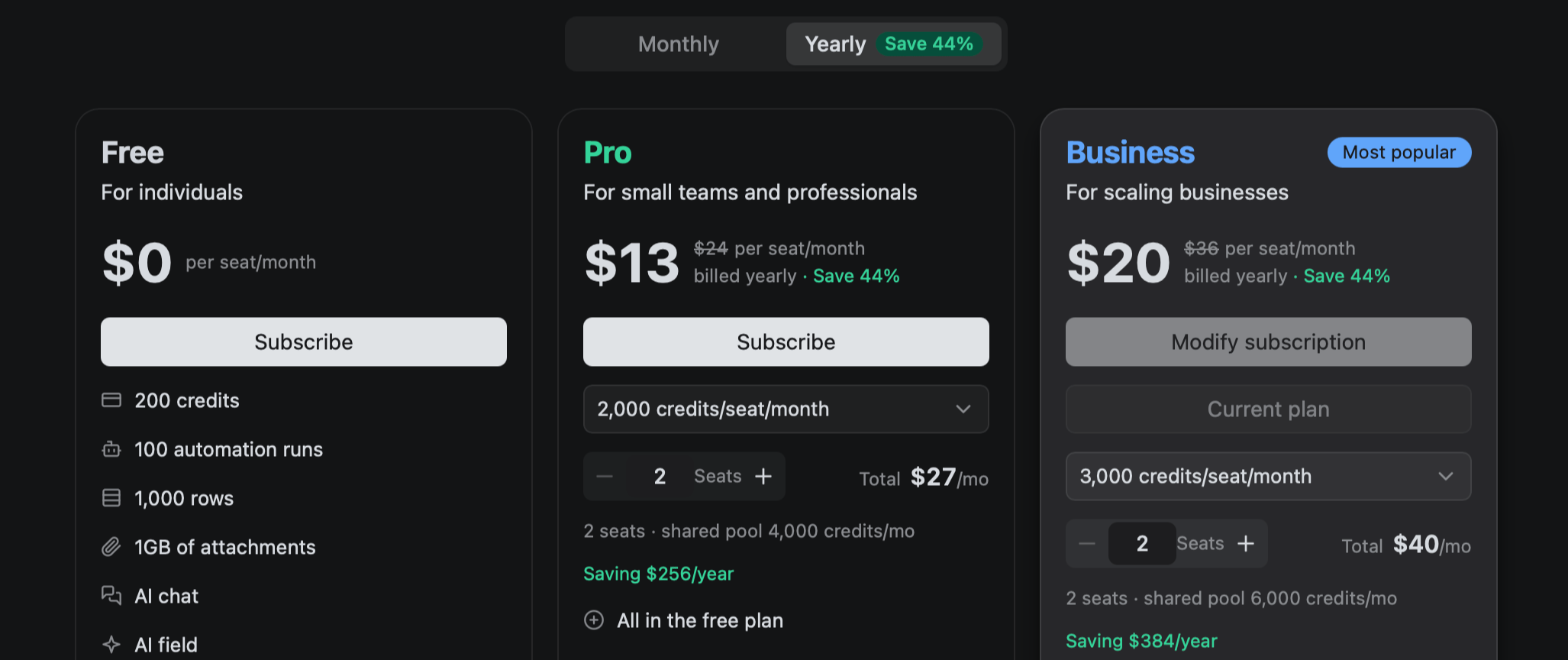
More AI Credits, a deeper yearly discount: yearly billing saves approximately 44% compared with monthly billing, while delivering 50% more AI Credits per dollar than before—making team growth more cost-effective and predictable.
1. What’s Changed
We are introducing new pricing for Cloud and Self-hosted plans, with more AI Credits included. Yearly billing saves approximately 44% compared with monthly billing:- Pro (Cloud)
- Monthly: $12 → $24
- Yearly: $120 → $160 ($10 → $13.33/month)
- AI Credits: 1,000 → 2,000 per seat/month
- Business (Cloud and Self-hosted)
- Monthly: $24 → $36
- Yearly: unchanged at $240 ($20/month)
- AI Credits (Cloud only): 2,000 → 3,000 per seat/month
2. How Seats and Credits Work
A Teable Cloud subscription is now based on two things: the number of paid seats your team needs and the amount of AI Credits included with each seat. All Credits are combined into one shared monthly pool:Purchased seats × Credits per seat = your team’s shared monthly CreditsFor example, five Pro seats include a shared pool of 10,000 Credits per month. Owner, Creator, and Editor roles occupy paid seats, while Viewers and Commenters remain free.If your team needs more AI capacity, you can select a higher Credit level directly within your plan. Larger Business Credit levels also include volume pricing. For new subscriptions, this replaces the previous model of purchasing recurring Credit add-ons separately.3. Why We’re Making This Change
Since the beginning of the year, Teable’s paid user base has grown more than 60×. Teams are increasingly relying on Teable AI for important workflows, applications, and day-to-day operations, raising expectations for product quality, reliability, and model capability.This update enables us to keep investing in a faster and more reliable product, continued access to leading AI models, and better support for production and business-critical workflows.At the same time, the larger yearly discount gives long-term customers a substantially lower and more predictable cost, helping us invest consistently in the product they depend on.4. Existing Customers Get More at the Same Price
Existing customers keep their current price and automatically receive more AI Credits (for Cloud customers)—no action required.For example, existing Pro yearly customers remain at the equivalent of $10 per seat/month, while included Credits double from 1,000 to 2,000 per seat/month.Seat changes keep the legacy price. Switching plans, billing cycles, or Credit levels moves the subscription to current pricing.We’re grateful to the customers who have grown with Teable. We’ll continue honoring that trust by bringing long-term customers more value with every meaningful product and AI upgrade.Automation, attachments, and intelligent collaboration
Feature Updates
- Webhook synchronous responses: Automation triggers support custom responses for Feishu/Lark, Slack, WeCom, and DingTalk URL verification; existing defaults remain unchanged.
- Attachment deletion in previews: Delete files while previewing; automatically switch to adjacent attachments for smoother review and organization.
- Multi-Base Chat agents: Discover and use accessible Bases in the current Space, or specify a target Base per command.
Bug Fixes & Improvements
- Improved computed-field pausing: Allows safe writes during pauses; blocked writes return clear conflict messages and recommended retry times.
- Standardized Secrets Manager terminology: All languages use “Name” for Secret identifiers and “Secret” for values, reducing configuration confusion.
- Stable table and schema updates: Better handles timeouts, missing columns, and rollbacks, reducing failures, misleading messages, and manual recovery.
-
Reliable calculations and backfills: Fixed multi-value Lookup, linked-record Rollup, and
max/min/and/orfailures; timed-out calculations retry automatically. - Fixed formula field creation: Failed creation no longer makes related tables temporarily unavailable, allowing continued data access and operations.
- Improved Webhook testing and configuration: Tests show received requests; editing some settings preserves authorization and response configurations.
- Linked-record Rollup results: Compressed results show readable titles, preserve duplicates, and match UI/API behavior; integrations using legacy structures may need updates.
- Improved conditional Rollup filters: Preserves nested groups after reopening, works in narrow panels, and aligns Lookup-number results with API filters.
- Attachment preview compatibility: Displays file icons in thumbnails and previews when images fail to render, preventing blank or broken content.
- Chat agent Base detection: Improves discovery for Base-level users and prevents Base context leaking into shared or restored sessions.
- Fixed API Access page: Opening tables from the app sidebar no longer hangs; Advanced now uses the selected table.
- Fixed long text field actions: Referenced fields now open record context menus while preserving native browser menus for selected read-only text.
- Improved Field AI errors: Clarifies cancellation reasons for billing, quotas, authentication, account issues, and image-generation failures.
- Reliable CLI Artifact operations: Fixed operations using personal access or OAuth tokens; permissions and Space/Base restrictions are always enforced.
- Consistent Artifact permissions after moves: Artifacts follow their Base across Spaces and retain applicable access and sharing rules.
- More stable App Builder chat: Improves recovery after interruptions, prevents persistent “Recovering” states, and enhances rich-content display stability and security.
- Improved mobile settings: Refined layouts and navigation for smoother browsing and operation on mobile devices.
- Faster wide-table queries: Requests for limited fields load less unnecessary data, reducing resource usage and accelerating record queries.
Artifact and stability upgrades
Feature Updates
- Cross-session Artifact updates: Agents update existing Artifacts, preserve history, and see names in tabs; Artifact API/CLI dropped legacy chat parameters.
- HEIC attachment thumbnails: Generates PNG previews when supported; otherwise shows placeholders to prevent display issues.
- App Builder publishing guidance: Preview/Live switching is smoother and remembered per app; apps without Live versions receive clear publishing guidance.
- AI field concurrency settings: Space admins can configure concurrency; above-limit values are retained while the effective limit is displayed.
Bug Fixes & Improvements
- Updated API table creation defaults: Tables created without records via API are empty; UI-created tables retain three blank records.
- Faster large-table browsing: Lists and grids load less via cursor pagination; API clients must request totals or use the count endpoint.
- Refined substring search: Prioritizes text and text-returning Formula/Lookup fields; wide-table or unsupported-field results may change.
- Improved record-query performance and stability: High-traffic reads use fewer resources while preserving existing query behavior and improving access efficiency.
- Fixed recent Base ordering and duplicate collaborators: New copies appear first; duplicates merge under the highest available role.
- Improved conditional Rollup configuration: Fixes nested OR and dynamic-match saving/calculation issues and improves narrow-screen controls.
- Improved Rollup validation: APIs enforce UI source-field and aggregation rules with clear errors; invalid legacy configurations require client updates.
- More reliable computed-field updates: Formula, Lookup, Rollup, and summary fields recalculate reliably after linked or dependent data changes.
- Faster conditional Rollup calculations: Multiple Rollups sharing linked records recalculate more efficiently, reducing timeout risks.
- Improved Computed Outbox diagnostics: Reliable task and error links, shared links, and Copy for Agent output accelerate troubleshooting.
- Fixed linked-record selection state: Selections and checkboxes remain synchronized across tab switches, reopened pickers, and asynchronous loading.
- Streamlined Agent Computer browser tasks: AI tasks use built-in browser tools, eliminating downloads and path setup for faster, consistent execution.
- Fixed AI chat external-link dialog layout: Controls no longer overlap, improving readability and usability.
- Improved short-link redirects: Links now redirect directly to canonical targets, reducing intermediate loading and wait time.
- Fixed Auto Number filtering: “Greater than” no longer breaks loading or row counts; saved values display correctly when reopened.
- Secured editable shared views: Record and field changes, including range paste, clear, and delete, are restricted to authorized views.
- Fixed cross-Base Lookup/Rollup configuration: Linked tables remain available when reopened; empty external Base references follow current-Base handling.
- More accurate selected-row summaries: Aggregations reliably honor filters, sorting, search, row ranges, and collapsed groups, with improved Timestamp support.
- Fixed Single Select Rollups: Unique values retain first-seen order; Count includes only unique non-empty values, potentially reducing results.
- Improved linked-field failure resilience: Record creation and schema updates remain stable when imports or deletions create inconsistent references.
- Faster AI-assisted workflows: Reduced redundant refreshes and requests across script editing, publishing, chat, and automations for smoother interactions.
- Fixed record comment permissions: Authorized collaborators can comment; read-only users only view discussions, and shared links hide comment controls.
- Improved comment deletion and image uploads: Deleted comments stay removed; uploads show clearer progress and errors, with sending blocked until completion.
- Improved App Builder workspace recovery: Temporary connection issues preserve workspaces and drafts; corrected version-history alignment prevents publishing failures.
- Improved permission matrix usability: Clearer status icons, tooltips, and better narrow-screen sidebar usability.
- Fixed record archiving and export permissions: Authorized collaborators archive without delete rights; archive exports respect permissions, and views update promptly.
- Unified Skill and Teable CLI instance configuration: Instructions, commands, authentication, settings, and errors now use the current instance address.
Introducing Artifacts: Share Data Reports Anywhere
Turn your Teable data into visual reports with AI, refine them through conversation, and share them with a link.
1. Create Artifacts with AI
Ask Teable AI to create a report, chart, summary, or comparison from your data. It generates an Artifact that you can open directly from the chat.2. Keep Refining the Same Artifact
Continue chatting to update the same Artifact instead of starting over. Every update is saved as a new version, so you can review or restore earlier results. You can also find all your Artifacts in Manage artifacts.3. Share Artifacts Anywhere
Create a link and share your Artifact outside Teable. Allow anyone with the link to view it, limit access to members of your space, or add password protection.Hebrew Support and Multilingual Experience Optimization
Feature Updates
- Added Hebrew interface support: Community and Enterprise now localize settings, preferences, calendars, announcements, static pages, and SDK.
Bug Fixes & Improvements
- Improved right-to-left interfaces: Enhanced icons, fields, panels, forms, menus, selectors, gradients, and keyboard navigation in Arabic and Hebrew.
- Improved multilingual text editing: Input direction follows Arabic and Hebrew interfaces while content direction remains automatically detected.
- Completed Arabic translations: Added missing Arabic text across pages and controls, reducing mixed English content for fuller localization.
- Optimized self-hosted license mobile layout: Improved small-screen display for easier credential viewing and management.
- Improved relationship graph accuracy: Shows only context-relevant relationships and excludes unrelated parent trees, clarifying data associations for administrators.
Agent queue, compute, and stability optimizations
Feature Updates
- Added Agent queues: Queue or guide 30 messages across tabs and reconnects; App Builder and Agent-to-Agent show status, senders, and controls.
Bug Fixes & Improvements
- Improved Rollup filter accuracy: Fixed OR filters including unrelated linked records, ensuring expected Rollup results.
- Improved Workflow stability: Optimized snapshots and run lists at scale, reducing loading and archived-data calculation errors.
- Improved copied-table sharing settings: Copied views are unshared by default, preventing accidental exposure while preserving source-table links.
- Improved Chat reliability: Removed invalid Bot Chat records to reduce errors.
- Improved table schema update stability: Enhanced transaction failure recovery to prevent updates from getting stuck.
- Improved view access for restricted collaborators: Views remain accessible despite unauthorized filter fields, which stay hidden; operations use masked data.
- Optimized deleted-table navigation: Prevented hangs when reopening deleted tables; inaccessible tables now redirect to an available Base table.
- Improved hybrid-mode calculation accuracy: Lookup and Formula fields now refresh after large insertions, preventing blank or stale values.
- Improved bulk-write data consistency: Incomplete calculated-field updates now retry under high concurrency, improving imports and API bulk writes.
- Improved calculated field dependency accuracy: Fixed Lookup fields incorrectly appearing as final write nodes in calculation lineage graphs.
- Improved complex-formula table stability: Fixed hangs or timeouts when creating records with nested array formulas containing multiple user fields.
- Optimized Workflow trigger table selector: New tables now appear faster in Workflow trigger table lists.
- Improved bulk update performance: Skips unnecessary recalculation when Number fields have no dependent calculated fields.
- Improved permission-based view operations: Fixed blank grids and validation errors; group titles no longer expose restricted data.
Content Creation, Table Import, and Optimization
Feature Updates
- New Artifacts: Create, preview, revise, version, protect, and share HTML or Markdown from chats with short links and revocable permissions.
- Native Google Sheets import: Securely import public or private worksheets via onboarding, AI chat, or CLI, with type detection, progress, and failure reports.
Bug Fixes & Improvements
- Improved member selector: Shared forms, kanban, plugins, and editable links can search members with access through nested or parent departments.
- Improved computed field and bulk update stability: Large recalculations recover safely after interruptions, reducing operational impact and resuming incomplete updates.
- Improved calculation progress and errors: Restored progress accurately and prevented misleading “Internal server error” messages during Airtable imports or recalculation.
- Fixed SWITCH formula errors: SWITCH now returns mixed types, including strings, numbers, booleans, datetimes, link fields, and lookup fields.
- Improved Base duplication reliability: Fixed naming conflicts and improved consistency when duplicating or deleting records and linked data.
- Improved view loading and sorting: Fixed personal view loading and stabilized sorting in masked views for smoother browsing.
- Improved record history: Deleted linked records now show “Record deleted” instead of outdated titles, clarifying historical changes.
- Improved computed field dependency view: Lookup fields are no longer omitted, providing a more complete picture of calculation dependencies.
- Improved share-to-earn points claims: Strengthened eligibility and weekly quota checks, with clearer failure feedback.
- Optimized Google Sheets imports: Improved narrow-screen and multilingual usability; handled blanks, problematic headers, empty sheets, authorization issues, and partial imports.
- Improved CLI documentation and validation: Clarified aliases, scopes, paths, deletion, skills, Agent Computer availability, providers, and configuration errors.
Mobile experience, computing, and stability optimizations
Bug Fixes & Improvements
- Optimized calculation lineage view: Shows only fields affecting downstream updates and clarifies status when no tasks are pending.
- Improved calculated field update stability: Makes formulas using numeric columns and text operations more reliable and accurate.
- Fixed lost field settings: Field updates and conversions now preserve options, including Markdown display settings for Long Text fields.
- Improved mobile plan purchasing: Fixed incomplete scrolling in plan dialogs on small screens, enabling full plan access and checkout.
- Improved deleted-table consistency: Deleted tables are now reliably logged and immediately searchable for quick status confirmation.
- Optimized mobile view toolbar: View options now use touch-friendly bottom drawers, with improved narrow-screen selectors and filters.
- Improved locked-view feedback: Clearer touch prompts explain why unavailable toolbar actions are restricted.
- Optimized onboarding: Clarified exit and skip flows, highlighted “I’ll write it myself,” refined recommendations, and updated all translations.
- Streamlined post-onboarding flow: Blank Bases open full-screen AI chat; existing Bases open their first table or mobile chat drawer.
- Improved mobile onboarding stability: Prevented blank resource pages and interrupted chats after AI-generated content redirects.
- Fixed linked record responses: Many-to-one links now return a single linked record instead of an array.
- Improved conditional lookup accuracy: Corrected field reference direction parsing for lookups within the current table.
- Optimized archived data loading: Stops unnecessary scans after enough results and prevents timeouts on large archive pages.
- Fixed linked lookups in shared views: Lookup fields now correctly identify tables referenced by linked record fields, preventing load failures.
- Improved grouped views for restricted users: Loads accessible records and skips or degrades grouping when fields are unreadable or hidden.
- Optimized mobile plans and pricing: Improved tabs, plan cards, billing details, and side menus for easier plan and billing management.
- Improved multilingual labels: Fixed localization for sorting, grouping, and search labels, with correct singular and plural forms.
- Optimized calculated field lineage graph: Corrected dependencies and connections, with automatic layouts for clearer field relationships.
- Improved query recommendations and Deep Analysis: Shows IDs beside Space, Base, and table names, and includes saved table views.
- Fixed linked record field filtering: Keeps selected records readable and supports switching from “is” to “contains” without filtering errors.
- Improved table deletion and recovery: Redirects collaborators to valid pages and provides recovery options, preventing broken links and repeated errors.
CLI, Import, and Stability Updates
Feature Updates
-
Added CLI import location selection: Use
--folder-idto import data into a target folder for flexible automation and archiving. -
Added CLI device-code login: Securely authenticate with
teable auth login --device-codein SSH, containers, cloud IDEs, CI, private deployments, and custom domains. - Added persistent Agent Computer configurations: Preserve, list, restore, update, and remove tool configurations and runtime states across environment rebuilds.
- Added folder imports: Import CSV, Excel, and Airtable data directly into a selected folder from its Add menu.
Fixes & Improvements
- Improved import location stability: Imports now reliably target specified folders when folders and tables update simultaneously.
- Improved large Excel imports: Added real-time row progress, fewer timeouts, persistent results, and per-sheet row-limit summaries.
- Improved record links: Links copied from Kanban, Gallery, and Calendar now open correctly, including shared-view and linked-record scenarios.
- Improved Lookup and Rollup field reliability: Fixed linked-record-title “Contains” filters, stale conversion metadata, and failures from missing or inconsistent dependencies.
- Improved AI image-generation compatibility: Prevented aspect ratios from producing resolutions unsupported by GPT Image 2, increasing success rates.
- Improved record deletion reliability: Records can still be deleted when undo history cannot be fully saved.
- Optimized record-copy notifications: Copying records with assigned users no longer triggers incorrect new-assignment notifications.
- Improved post-deletion view states: Automatically switch to another view, or show a clear empty state when none remain.
- Improved calculated field update compatibility: Fixed table-update failures when recalculating formulas combining date or time values with text.
- Improved multi-field search accuracy: Results now follow active view filters, with consistent pagination, grouping, and summaries.
- Fixed tracking-field sorting: “Last modified time” and “Last modified by” now sort by their displayed tracking values.
- Improved calculation task stability: Strengthened Worker recovery and retries; Airtable imports now wait for table configuration before calculations resume.
- Improved Table API compatibility and permissions: Optimized copy/paste, export, calendar, search, comments, history, archiving, undo/redo, trash, and related operations.
Teable Now Supports Arabic, Italian, and Spanish
More languages for more teams worldwide.Teable now supports Arabic, Italian, and Spanish, bringing the total to 11 languages. To change your language, click your avatar in the bottom-left corner and open Preferences.
Multilingual, performance, and stability upgrades
Feature Updates
- Added Arabic support: Added Arabic UI translations; the interface currently remains left-to-right.
- Added Spanish and Italian support: Enterprise Edition now includes complete translations in both languages.
Fixes & Optimizations
- Improved multilingual experience: Refined all translations, reducing mixed-language content and English fallbacks for greater consistency and readability.
- Improved localization and messaging: Refined plurals, validation messages, dates, calendars, relative times, and errors for greater accuracy and local relevance.
- Improved grouped view performance: Accelerated loading and operations when grouping large tables by low-cardinality fields for smoother browsing.
- Improved link field pasting: Fixed blocked text pasting while the link picker is open.
- Improved record list, grouping, and aggregation sorting: Accelerated numeric, date, user, and formatted-date fields without changing order or null placement.
- Fixed Cuppy permissions in permission-matrix databases: Collaborators can use granted CRUD permissions, while unauthorized actions remain blocked with clearer errors.
- Improved post-onboarding page loading: Added a skeleton screen to reduce perceived waiting.
- Fixed mobile Airtable import database selection: Users can scroll normally to browse and select the complete database list.
- Improved post-signup routing: Template and AI generation destinations continue correctly instead of mistakenly entering onboarding.
- Improved onboarding continuity: Prompts and attachments persist through refreshes and signup redirects, preventing duplicate chats and enabling seamless continuation.
- Improved new-user Base generation: Free users retain prompts and attachments; failures show a blank space instead of indefinite loading.
- Improved field search: Results, counts, pagination, sorting, grouping, and aggregation respect filters and permissions, refreshing after changes.
- Improved AI Agent output stability: Streaming recovers from network or gateway interruptions without duplicated or corrupted text.
- Strengthened AI Agent credential protection: User-provided task credentials are more secure and immediately usable after submission.
- Improved app and Base links: Generated links use better formatting, reducing invalid or inaccessible links.
- Improved SQL query API: Standardized successful-status responses and added compressed responses for large results, improving reliability and efficiency.
- Fixed attachment downloads: Safari preserves original files, and compatible object storage services return correct file types.
- Improved Grid View stability: Fixed crashes when rapidly modifying fields or inserting fields from the column menu.
- Improved linked-table deletion reliability: Deletion completes when display columns are unavailable, reducing schema-update failures and manual recovery.
- Improved large-table performance: Accelerated record-list reading, filtering, and sorting for smoother large-scale data handling.
- Clarified “Copy records” permission: Distinguishes copying selected data to the clipboard from creating record duplicates.
- Improved Ask User stability: Submissions immediately end waiting, timeout handling is consistent, and malformed formatting no longer crashes pages.
- Improved linked-record reliability: Fixed deletion in copied or imported Bases, with cleanup and messaging for cross-Base, trashed-table, and deleted-field links.
- Improved Excel import compatibility: Supports title banners, leading blank rows, non-first-row headers, and duplicate or similar column names.
- Fixed date grouping display: Records group correctly when field and server time zones differ, preventing misplacement or hiding.
Calculations, Relationships, and Performance Optimization
Bug Fixes and Experience Improvements
- Improve Formula and Lookup field update stability: Ensure reliable backfilling despite storage type mismatches, reducing failures and stalls.
- Optimize mobile Space page layout: Keep navigation clear and usable when the header contains extensive information.
- Improve desktop Base access: Make the Base entry more prominent for faster access.
- Improve numeric Lookup field update stability: Prevent invalid values from causing update or conversion failures.
- Optimize Lookup field configuration updates: Improve stability when adjusting display settings, reducing unnecessary failures.
- Optimize Lookup and Rollup performance for large tables: Accelerate conditional processing, reducing timeouts and update failures.
- Fix numeric Lookup field display errors: Apply default number formatting when absent, preventing page crashes.
- Improve linked table update stability: Skip trashed referenced tables while continuing updates for other active tables.
- Fix usage period display: Correct billing period and timezone handling across usage dialogs, charts, and history for all plans.
- Optimize App Builder preview guidance: Reopen chat after selection and guide users to accessible Preview instead of unavailable local URLs.
- Improve Excel import stability: Handle duplicate or similar column names to prevent table creation failures in complex files.
- Fix Link field recalculation: Required single-record Link fields recalculate when records are empty but display values remain, refreshing dependent fields.
- Improve browser translation stability: Reduce errors from rewritten page content and stabilize onboarding in unsupported-language regions.
- Optimize table operations with many fields: Speed up record creation, duplication, and form submission for smoother data entry.
- Improve table creation recovery: Reliably resume creation when retrying after an invalid state, reducing repeated failures.
- Fix app publication status syncing: After unpublishing, promptly update the sidebar badge and share icon across collaborators and page refreshes.
- Fix automation percentage copying: Direct percentage field mapping now preserves original values instead of reducing them 100-fold.
- Optimize bulk deletion and redo performance: Accelerate large operations while preserving Recycle Bin restoration and clearing capabilities.
- Optimize Formula field loading and calculation: Reduce unnecessary requests and improve progress visibility and stability during large cascading calculations.
- Improve invalid Formula value handling: Avoid pointless retries and provide clearer failure messages for easier troubleshooting.
- Fix shared app saving: Saved apps appear immediately; duplicates no longer fail; copied folders are ordered last with conflict-free names.
- Improve real-time table loading errors: Show centered, localized notifications with clearer explanations for missing tables or restricted access.
Onboarding, performance, and stability improvements
Feature Updates
- Added missing options when creating linked records: Add missing options directly without leaving the current workflow.
- Added first-time guidance for new Cloud users: Step-by-step profile setup, data imports, AI-recommended automations and apps, and team invitations.
Bug Fixes & Improvements
- Improved mobile record comments: Comments now fill the drawer, respect safe areas, and hide record navigation when opened.
- Improved Markdown readability: Refined spacing, list styles, and heading hierarchy for clearer structure and easier reading.
- Improved field schema safety: Protected system-managed columns can no longer be deleted, reducing accidental data loss.
- Fixed bidirectional one-to-one Link deletion: Removing Link fields no longer damages shared table schemas or record access, keeping data stable.
- Improved multi-row pasting: Reliably paste over 17 rows; stops if target records are missing or inaccessible, preventing incorrect writes.
- Improved field type conversion performance: Accelerated conversions that preserve values, such as converting Single Select fields to Text.
- Improved invalid record link handling: Removes invalid parameters and loads tables when records are invalid or inaccessible, preventing server errors.
- Fixed App Builder task statuses: Completed generation tasks now update correctly instead of remaining “Running.”
- Improved cross-base Lookup and Rollup performance: Optimized conditional calculations and refreshes results promptly after source record changes.
- Improved App Builder GitHub integration: Added repository validation, clearer errors, sensitive-file protection, and automatic cleanup of stale merged branches.
- Fixed date sorting in grouped views: Dates spanning multiple years now sort correctly, ensuring accurate grouping.
- Improved calculated field update reliability: Preserved value types for Lookup, Formula, Link, and Rollup during schema and data changes.
- Improved inline table creation from records: Required fields are validated before saving, preventing unusable tables from incomplete records.
- Improved field deletion in large tables: Faster deletion retains undo support for smoother high-volume operations.
- Improved wide-table view duplication: Reduced unnecessary data processing to accelerate copying views with many fields.
- Fixed duplicate-value messages for unique fields: APIs now return the conflicting field and localized guidance for faster resolution.
- Improved automation date condition stability: Fixed crashes and made date filters more reliable in triggers and condition editors.
- Improved sign-up and login experience: New users land on sign-up, with clearer switching between account creation and login.
- Improved large-table duplication performance: Duplication is approximately 48% faster for tables with 50,000 records and 20 fields.
- Improved performance for bases with many fields: Accelerated form submissions and record duplication for smoother operations.
- Optimized calculated and Rollup field creation and duplication: Reduced processing delays in large tables for faster configuration and copying.
- Fixed column configuration in collapsed groups: Double-click or right-click columns when all groups in a grouped grid view are collapsed.
- Improved Lookup field reliability: Fixed update triggers for legacy Lookup fields and streamlined conversion to basic fields for stable updates.
Build AI Features in App Builder
Apps built with App Builder can now use AI directly, without requiring your own AI API key.
1. Add AI Directly to Your App
Describe the AI feature you want, such as AI chat, summaries, or text generation. App Builder will build it directly into your app.2. No AI API Key Setup
Teable connects your app to AI and manages the key. AI features work in both preview and published apps. Using Teable-provided models consumes Credits from the Space where the App is located.Shared Skills and Performance Upgrades
Feature Updates
- Added shared Skills management: Install Skills in a Space, Base, or personal account, with configurable access permissions.
- Added asynchronous compute task processing: Enable on demand to maintain stability during task surges or bulk writes.
- Upgraded context usage display: A ring indicator below the input shows usage percentage and progress when clicked.
Fixes & Improvements
- Improved high-write-volume table stability: Enhanced bulk-write handling to reduce timeouts and service outages during peak loads.
- Fixed context compression status display: The divider persists after refresh, usage updates promptly, and compression failures display accurately.
- Optimized mobile top bar layout: Resized and repositioned the top bar and chat button to prevent overlap with the statistics bar.
- Fixed mobile dark mode display: Corrected the chat button color for a clearer, more consistent interface.
- Improved shared Skills experience: Accelerated discovery and enhanced runtime isolation between Skills for greater efficiency and stability.
- Optimized field change performance: Faster field conversions and deletions reduce wait times when restructuring complex tables.
- Optimized computed field updates: Reduced duplicate calculations during cascading updates, improving performance for tables with extensive linked data.
- Improved multi-field text search: Accelerated searches across multiple fields while maintaining accurate filters and matches.
Multi-app generation, bulk downloads, and stability improvements
Feature Updates
- Tab selection added: Composer shows hints and accepts highlighted Skills or Slash Commands with Tab, preserving focus and mobile selection.
- Multi-app generation progress added: Chat now shows separate progress for each app generated from one prompt.
- Batch file downloads by chat added: Displayed files are grouped by chat and can be downloaded in batches.
Bug Fixes & Optimizations
- Calculations stabilized: Large cells no longer block unrelated Formula, Lookup, or Rollup updates; Compute Activity retains errors until successful refresh.
- Record creation near table limits optimized: Safe writes are preserved, while operations that cannot complete safely are rejected.
- Date-time field backfill fixed: Schema updates no longer fail when calculated backfill values involve date-time fields.
- Record writing and related calculation performance optimized: Accelerated inserts, Upserts, and cascading Lookup or Formula calculations in highly linked tables.
- Personal access token permissions strengthened: Scoped tokens now strictly enforce configured action and resource permissions, preventing unauthorized access.
- Calculation field processing reliability improved: Improved frequent updates and stale dependencies, reducing failures and repeated retries.
- Search results optimized: Private or functional pages such as login, settings, developer, and Base appear less often.
- Question card option display fixed: Fixed mismatches between highlighted and submitted options, ensuring the final choice displays correctly.
- Attachment and avatar loading stability improved: Improved caching for public images, private previews, and updated avatars, ensuring more reliable loading.
- CSV import failure messages optimized: Failures now show the original cause instead of remaining in progress or displaying unrelated errors.
- Table opening and statistics fixed: Resolved inaccessible tables and restored statistics and aggregation features.
- AI text and image automation errors improved: More accurate feedback now covers input, capability, attachment, response, rate-limit, and timeout failures.
- Linked record write validation strengthened: Required links are validated during writes, and display values remain intact when titles refresh.
- Record copying fixed: Records containing linked or Lookup fields with date-time comparisons can now be copied successfully.
- Lookup and calculated field updates stabilized: Large Lookup groups and broad cascades no longer trigger server errors during bulk updates.
Enhanced performance, real-time responsiveness, and stability
Feature Updates
- Set minimum scheduled task interval: New or updated automations and email polling require 10-minute intervals; existing schedules remain unchanged.
Bug Fixes & Improvements
- Improve bulk selection performance: Deleting, clearing, copying, and pasting tens of thousands of selected records is now faster and smoother.
- Reduce duplicate member notifications: Merge duplicates across undo, redo, bulk moves, imports, and table copies while preserving valid assignment alerts.
- Optimize field type conversion: Convert Single Select fields to Text faster in large tables, with undo and redo support.
- Accelerate view duplication in large tables: Improved performance reduces waiting time.
- Improve view stability with field permissions: Ignore inaccessible fields in saved filters or sorts, preventing errors while enforcing permissions.
- Fix statistics after archiving: Statistics, counts, and rollups now update promptly, with more reliable archiving, undo, and redo.
- Improve calculated field cascading: More reliably generate chained lookup values while improving overall calculation performance.
- Optimize member field operations: Copying, pasting, or filling clears unmatched former base or space collaborators instead of failing.
- Improve record search: Faster searches and more accurate highlighting align with records and fields on the current page.
- Fix email trigger configuration: Settings now save and update correctly when input values are cleared.
- Improve real-time view updates: View creation, duplication, restoration, updates, deletion, filtering, grouping, and sorting now appear without refreshing.
- Stabilize operations during table loading: Field edits, AI assistance, and schema changes avoid repeated connection and “Table not found” errors.
- Fix occasional table creation freezes: Tables with initial records now create reliably without blocking later imports or table creation.
Brand customization and stability improvements
Feature Updates
- App Builder branding: Published apps support custom favicons, titles, and descriptions for tabs, metadata, and previews; default: Teable Build favicon.
- Extended Automation Script runtime: Nodes can now run up to 180 seconds, supporting more complex, time-consuming automation tasks.
Bug Fixes & Improvements
- Improved Grid grouping and sorting reliability: Changes sync instantly across view settings, pages, and collaborators, including rapid consecutive edits.
- Improved sidebar after AI table creation failures: Inaccessible entries are removed on refresh, preventing confusion and disruption.
- Improved Grid linked-record labels: Truncated labels no longer overflow adjacent cells, and ellipsis styling is now consistent.
- Fixed records grouped by user: Eliminated duplicate “Add record” rows, renumbering, and misplacement; collaborator and multi-user fields now group consistently.
- Improved user-name display: Last Modified By and Editor show names instead of IDs across record view, API, and collaborator fields.
- Improved AI Chat reconnection: Responses recover more reliably after brief network interruptions, reducing unexpected streaming failures.
- Improved multi-level Lookup updates: Chained Lookup fields now synchronize latest values accurately during concurrent linked-record updates.
- Improved user field parsing and validation: Recognizes restricted collaborators, phone numbers, and Enterprise department members; rejects unrelated or deleted users.
- Improved calculation performance under high load: Better handles busy databases, reducing slow or stalled writes during large linked-record updates.
- Fixed AI Chat duplicates: Prevents duplicate assistant rows when sending after stopping; message state remains consistent during resending and recovery.
Announcing Data Archiving: Unlimited Rows, Now Possible
Don’t need some records right now, but don’t want to delete them? Archive them. They remain available and no longer count toward your Row Limit.
1. Archive Records Instead of Deleting Them
Select the records, right-click, and choose Archive. This is useful for old sales leads, student records from courses completed over 90 days ago, API logs older than 90 days, and other data you may need later.2. View Archived Records Anytime
Open the table menu in the upper-right corner, then go to History → Archive to view your archived records.3. Archived Records Don’t Count Toward Your Row Limit
If your space uses 500,000 rows and you archive 100,000, only 400,000 rows count toward your usage.You can keep adding new records while preserving your historical data.Base Migration and Stability Improvements
Bug Fixes & Improvements
- Expanded Base import support: Import Bases without tables and with only Webhooks, enabling more automation migration scenarios.
- Improved Base import/export reliability: Preserve field descriptions and AI configurations during export and re-import, reducing repeated setup after migration.
- Improved record creation stability: Optimized workspace row counting and refresh, reducing delays/failures; unlinked tables no longer consume row quotas.
- Fixed calculation status updates: Errors now update after permanent Base/table deletion or storage migration, keeping administrators’ attention counts accurate.
- Improved high-load write stability: Optimized writes during busy periods, preventing long waits or stalls and smoothing record creation and updates.
- Optimized Lookup and cascading updates: Improved multi-level Lookup and external-link query/update efficiency, accelerating complex relational data processing.
Computational Stability and Performance Optimization
Fixes & Improvements
- Improved task stability in read-only mode: Pauses calculations during write conflicts and automatically resumes after database recovery.
- Fixed computed field updates in migrated Bases: Legacy records now recalculate correctly after imports or migrations.
- Optimized record operation performance: Improved query and processing efficiency for smoother large-scale record operations.
- Improved Outbox failure statistics: Fixed inaccurate counts for missing tasks while preserving failure history for troubleshooting.
- Improved field operation stability: Optimized conflict handling during creation, duplication, and deletion to prevent calculation interruptions.
- Improved computed field stability: Deleted tables no longer cause repeated failures, while restored tables automatically resume updates.
- Optimized computed Lookup performance: Accelerated backfills on large tables, reduced timeouts, and enabled resuming interrupted updates.
- Optimized computed and lookup field updates: Accelerated small-scale and multi-link changes while maintaining stability for large data tasks.
- Improved computed field processing stability: Optimized calculations during database load, reducing unnecessary retries and increasing update reliability.
- Optimized record operation performance: Accelerated reading, creation, and deletion, especially for large tables and bulk operations.
Failure Record Management and Stability Improvement
Feature Updates
- Added recovered delivery failure management: Hides recovered failures by default, with counts and a visibility toggle for easier troubleshooting.
Bug Fixes & Improvements
- Improved conditional rollup editor stability: Fixed crashes after hard refresh when calculating date field minimums or maximums.
- Optimized conditional rollup loading and format compatibility: Prevented errors while link fields load or saved settings mismatch.
- Improved link field cleanup reliability: Optimized cleanup of invalid link fields and missing database objects, reducing deletion failures and inconsistencies.
- Improved SMTP error messages: Shows clearer causes and provider rejection details after delivery failures, accelerating email troubleshooting.
- Improved generation task stability: Prevented tasks from stalling when linked bases are missing or deleted.
- Fixed image loading on shared pages: Cover images, logos, and plugin logos now load correctly from absolute URLs.
- Optimized mobile login experience: Supports device safe areas and keeps login/registration switching controls visible and accessible.
- Improved table filter stability: Fixed filters not saving or applying in new views or views without existing conditions.
- Optimized calculated field refresh failure handling: Reduces redundant retries and reports failures sooner for faster troubleshooting.
- Fixed incorrect prompts when editing Long Text fields: Prevented batch confirmation dialogs without AI use when editing or toggling Markdown.
Brand Customization and Performance Optimization
Feature Updates
- Expanded calculation activity access: View details via Teable API Keys or personal access tokens, respecting existing space and table permissions.
- Custom app branding: Teable Build and App Builder support custom favicons up to 5 MB, browser titles, and page descriptions.
Bug Fixes & Improvements
- Improved large-table read performance: Faster sorting, grouping, searching, and paginated views, with accurate pagination for smoother, reliable browsing.
- Improved legacy column compatibility: Views with legacy column metadata now open normally without manual cleanup.
- Fixed number field creation: Number fields now create successfully and display correctly in grid view, even with incomplete field information.
- Fixed filter view notifications: Prevented false alerts when opening table filter views containing Lookup fields referencing Link fields.
- Improved automation reliability: Dependency changes from Lookup, Rollup, or Link fields trigger automations reliably; same-table calculation changes still do not.
- Improved calculation field stability: Fixed update interruptions and repeated calculation failures involving conditional Rollup, Lookup, and field-reference filter configurations.
Deployment, AI, and Stability Improvements
Bug Fixes & Improvements
- Simplified self-hosted deployment: Docker starts without preconfigured keys while existing encrypted data remains accessible. Production deployments should use dedicated keys.
- Improved Pro upgrade guidance: All roles see upgrade options; non-owners selecting “Upgrade to Pro” are prompted to contact space owners.
- Improved view filter stability: Incomplete filter conditions no longer disappear during setup, making filter editing more reliable.
- Fixed linked record search in shared views: Searches follow Link field settings and table permissions for accurate, authorized results.
- Improved unavailable table handling: Better handling of unavailable related tables reduces errors and improves reliability.
- Improved conditional update performance: More efficient processing makes related operations respond faster.
- Unified calculated field statuses: Single-field and field-list APIs consistently return pending statuses for Formula, Lookup, Rollup, and other calculated fields.
- Improved conditional Lookup recovery: Restore fields from Trash with matching conditions and resolved results intact, preventing configuration or data loss.
- Improved AI Chat stability: Queued messages resume after stopped responses; better temporary-failure and busy-state handling reduces interruptions.
- Improved usage limits: APIs, bulk editing, imports, exports, and streaming now share localized notices and accurately enforce row quotas.
- Faster AI Chat image uploads: Attachments complete independently, so slow or failed uploads no longer block others or subsequent conversations.
- Improved cache configuration detection: Configuring a Redis URI automatically enables Redis; select other services through the cache provider configuration.
- Fixed incomplete linked record display: The linked record picker shows more available records, improving accuracy especially for cross-Base links.
- Improved conditional Lookup and Rollup compatibility: Unsupported field-reference comparisons no longer disrupt reading or updating unrelated records.
- Fixed empty table duplication: Tables without records can now be duplicated reliably for quick structure reuse.
- Improved saved view loading: Fixed occasional “Socket Error” failures when loading records in saved views with scalar Lookup filters.
Announcements, Archiving, and Performance Upgrades
Feature Updates
- Targeted in-app announcements: Schedule, localize, and withdraw multilingual announcements for specific users via banners, Toasts, modals, or sidebar cards.
- Recycle Bin snapshots: View complete deleted-record snapshots and filter by resource type, operator, deletion time, creator, or creation time.
- Business record archiving: Browse, restore, permanently delete, or export archived records to CSV, with longer retention and lower active-table load.
- Improved published app management: Adds prominent quick access, clearer unpublished-change alerts, and better version history and rollback.
Bug Fixes & Improvements
- More stable table filtering: Fixes errors when deleting the last filter, clearing filters, or opening views with incomplete date filters.
- Improved filter synchronization: Toolbar summaries update immediately, and filter changes sync more reliably across connected clients.
- Improved AI generation cancellation: Stopping chat, App Builder, or Agent generation is handled normally, preventing errors in other windows.
- More reliable checkpoint generation: Improves checkpoint reliability under high load, reducing state-save failures on busy databases.
- Faster large-table calculations: Improves calculated field processing in highly linked tables, reducing write stalls, memory pressure, and 503 errors.
- More accurate calculated fields: Fixes dependency propagation across comparisons, linked records, Lookup, Rollup, circular dependencies, and partial recalculations.
- Faster Lookup updates: Shortens Lookup propagation after single-record updates, displaying linked data sooner.
- Optimized conditional Rollup calculations: Avoids unnecessary large-scale recalculations in complex dependencies, improving responsiveness and reducing resource usage.
- More stable field type conversion: Fixes prolonged freezes when changing field types in tables containing calculated fields.
- Consistent time handling: Fixes time offsets in scheduled tasks, metadata updates, and database workflows across non-UTC deployments.
- Improved AI workflow creation: Places generated nodes near source nodes and lets creation commands specify folders.
- Stronger sharing permission controls: Sharing controls honor user and access token permissions, disabling unavailable options with explanations.
- Improved field creation auditing: Field creation logs now include field names, types, and options for clearer schema auditing.
- Fixed orphaned linked field deletion: Linked fields can now be deleted after their referenced tables are removed.
- Broader core data compatibility: Improves formulas, Lookup, Rollup, filtering, sorting, grouping, search, aggregation, link validation, field lifecycles, and Base duplication.
- Consistent null writes: Cleared text, checkbox, attachment, user, link, and multi-value fields save as null, with reliable required-field validation.
- Improved linked-record writes: Link updates accept single-link and multi-link inputs, supporting integrations, imports, and cardinality changes.
- Stricter date validation: Strict writes reject invalid dates; conversions save them as null instead of silently changing them.
- Improved date field conversion: Text-to-date and formula-to-date conversions skip invalid dates, preventing isolated errors from blocking entire conversions.
- Fixed Rating field conversion: Prevents invalid stray values and standardizes decimal rounding for consistent ratings.
- Stronger record and field permissions: Enforces table, row, and field permissions for record operations, including masked fields and disabled grants.
- Fixed user avatar compatibility: Updating records for users without custom avatars no longer fails; initial-based default avatars remain available.
- Fixed grouped view loading: Adds required grouping field data, preventing some grouped views from failing to open.
- Improved view stability: Improves reliability for creation, updates, sharing, imports, duplication, real-time updates, plugin views, and concurrent editing.
- Improved self-hosted registration: New users reliably join eligible auto-join Spaces as Viewers, including Spaces with SSO enrollment.
- Improved unsubscribe page usability: Pages remain usable after preferences update successfully, even if a later refresh fails.
- Fixed duplicate automation runs: Prevents repeated action chains and duplicate messages, Webhooks, or emails.
- Improved Formula automation triggers: Source-field changes updating Formula results now trigger automations correctly without duplicates or loops.
- More reliable bulk deletion undo and redo: Reliably restores or repeats large deletions, reducing recovery errors and unexpected timeouts.
- Optimized large imports and table duplication: Reduces unnecessary initial history and database load without affecting routine edit history.
- Improved mobile attachment previews: Widens spreadsheet viewing, improves horizontal scrolling, prevents navigation overlap, and correctly fits rotated images.
- Faster Base loading and navigation: Reduces duplicate requests and safely opens previously visited, pinned, or eligible default Bases.
- Fixed invalid Base links: Invalid direct links return to the standard entry flow, avoiding redirect loops and unnecessary errors.
- Improved field validation messages: Improves localized required and unique-field errors, identifying duplicate fields in bulk and selection-based operations.
- Stronger secret management: Improves secret handling and secure credential rotation, reducing risks from long-lived credentials.
- Improved real-time grid loading and updates: Reduces synchronization bandwidth and improves loading and responsiveness on slower networks.
App Builder Now Supports Visual Editing
App Builder now lets you refine your app directly in the preview, making small changes faster and helping reduce Credits used during optimization.
1. Edit Page Text Directly
Edit supported text directly in the app preview, then save the changes to your app without going back to the source code.2. Select an Element and Tell AI What to Change
Select an element directly in the app preview, then describe what you want to change. AI can use the selected element as context, so you can make more precise updates without explaining where it is in the app.GPT Price Cuts, Automatically Passed on to Teable Users 🚀
OpenAI has reduced the price of GPT-5.6 Luna by 80% and Terra by 20%. Since Teable’s AI stack is powered by GPT models, these savings are automatically reflected in Teable—no action required.The latest update enables Terra delivers quality comparable to GPT-5.5 at half the cost and with 60% shorter completion times. In agent workloads, Luna significantly improves cache reuse, reduces output tokens, and cuts costs by up to 87%.This makes everyday AI tasks and large-scale AI Field workflows in Teable faster, more affordable, and easier to scale, including use cases such as generating personalized emails and marketing copy.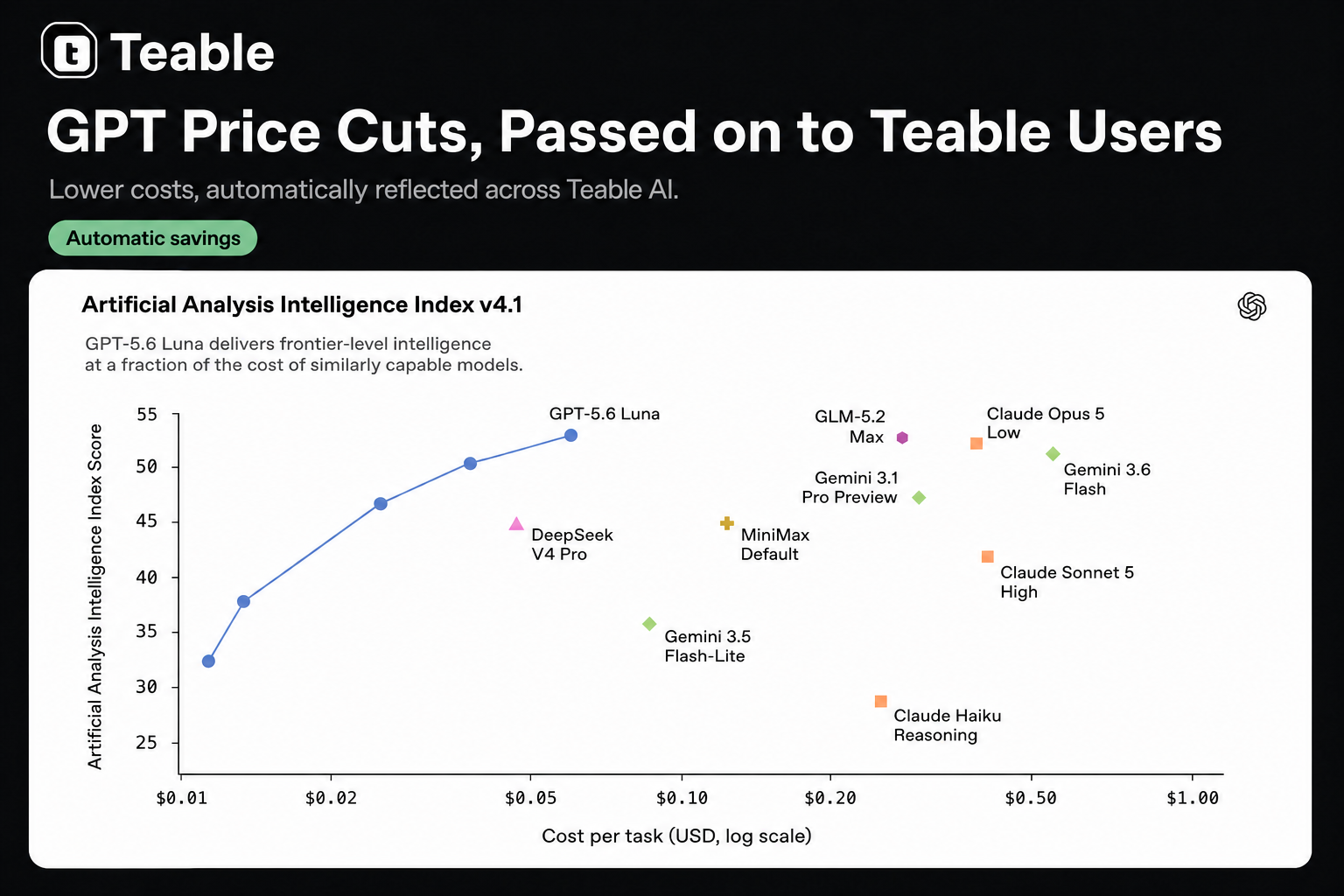
Permission Management, Performance and Experience Optimization
Feature Updates
- New permission matrix configuration tool: Export, edit, preview, compare, validate, and apply permissions via CLI with anti-lockout protection.
Bug Fixes & Improvements
- Improved mobile shared-page actions: Key options like sign-in are easier to find and use on small screens.
- Restore default icons: Remove custom emoji icons from tables and Bases to quickly restore defaults.
- Improved initial table loading: Tables open faster, with blank rows fixed in some loading scenarios.
- Improved automation reruns: Rerunning workflows preserves the current tab and task context for continued review and processing.
- More stable bulk cell clearing: Clearing many cells is smoother and more responsive, reducing freezes and failures.
- Unified Base content loading states: Consistent feedback appears when opening, refreshing, or switching tables, automations, apps, and dashboards.
- Fixed Grid view loading on scroll: Records beyond the first 100 display correctly when many fields are visible.
- Improved desktop Chat expansion: Content selection restores the sidebar without losing context; folder interactions retain the expanded layout.
- Faster Base opening from spaces: Reduced initial load times and improved access in data-saving mode and on extremely slow networks.
- Optimized question and confirmation cards: Faster display, simpler options, better unanswered-prompt handling, and reduced spacing and page shifts.
- Synced Agent Computer resources: New AI Chat and App Builder Agent Computers use System Administration’s CPU, memory, and temporary-disk limits.
- Fixed selection field conversion: Option values no longer temporarily disappear after switching between Single Select and Multiple Select fields.
- Improved grouped Grid view interactions: Expanding or collapsing groups refreshes only affected areas and preserves scroll position for smoother layouts.
- Improved complex Base stability: Reduced redundant calculations and resource usage during frequent updates with many computed fields and conditional rollups.
- Fixed automation variable selection: Conditions after scheduled triggers now select the correct variables, ensuring workflows evaluate and run properly.
- Improved AI Chat responsiveness and recovery: Answers complete faster, with stronger error recovery for more stable conversations.
Collaboration, auditing, and stability improvements
Bug Fixes & Improvements
- Standardize IM terminology: Rename the chat entry to “Chat in IM” and consistently use “IM bot” for clearer access and usage.
- Improve read-only template previews: Remove irrelevant calculation states and unnecessary checks, reducing 403 errors and smoothing template viewing.
- Improve record query reliability: Fix unstable sorting, filtering, and searching for records missing creation or modification data.
- Optimize button field change warnings: Warn only when updates may affect calculations or overwrite data, avoiding warnings for display-only changes.
- Fix grouped grid view loading: Restore access when grouped fields are hidden and footer summaries are enabled for restricted users.
- Improve Agent Computer generation stability: Better handle runtime and notification failures, reducing retries, task interference, and lost final results.
- Improve enterprise SSO login reliability: Generated apps now show clear authorization errors instead of loading indefinitely, enabling faster troubleshooting.
- Standardize collaborator invitation notifications: Send invitations via email and in-app messages, with pop-ups for unread requests.
- Improve Self-hosted audit logs: Deletions retain record IDs and sources; Space and Base creations, updates, and deletions are fully logged.
- Improve Self-hosted audit log stability: Optimize logging to reduce errors without affecting completed user actions.
- Optimize the light-mode favicon: Improve browser-tab visibility and recognition, helping users quickly find the correct page.
Teable Skill for AI Agents
Connect Claude Code, Codex, Cursor, and other AI agents directly to your Teable directly — create tables, query data, build automations and apps all through conversation. No browser switching needed.Just tell it what you need. For example:Simple Starter Prompts
- Create a simple CRM table in this base.
Local Files → Teable
- Upload all invoices in this local folder to
<Receipt Table>{paste table URL}and extract key fields.
Cross-Platform Data → Teable
- Import new GitHub issues into
<Bug Tracker>{paste table URL}.
Clean or Organize Teable Data
- Check
<Task Table>{paste table URL}and mark overdue tasks.
Synchronization, navigation, and stability improvements
Feature Updates
- Added space AI concurrency limits: Admins set per-space limits; five tasks run concurrently by default, and excess requests queue fairly.
- Added admin-initiated password resets: Authorized admins generate expiring one-time links, emailed via SMTP; unavailable when password login is disabled.
- Improved grid view column reordering: Changes apply instantly; failed saves restore the original order and display an error.
Bug Fixes & Improvements
- Improved Lookup field synchronization: Values recalculate reliably after source changes, including filtered and conditional Lookups, with faster bulk updates.
- Improved Claw bot chat stability: Chats migrate to accessible Bases after removal, while completed replies are delivered more reliably.
- Improved AI task execution: Enhanced scheduling, cancellation, recovery, progress accuracy, and exception handling for deleted Bases or stalled generation tasks.
- Improved Base navigation and loading: Persistent, cancellable loading indicators prevent duplicate navigation while preserving native new-tab behavior.
- Improved SSO callback handling: Expired callbacks now return authenticated users to the app and unauthenticated users to login.
- Improved view switching: Prevents stale rows, settings, controls, or permissions from flashing and restores recent layouts smoothly during loading.
- Improved quota billing stability and performance: Ensures accurate charges, refunds, limit checks, and quota allocation across billing periods and add-ons.
Invitation notifications, performance, and stability
Feature Updates
- Added Space and Base invitation notifications: Receive in-app invitations and quickly open the relevant Space or Base.
- Added Audit Log refresh: Manually refresh logs and view full actor, Space, and Base names.
Bug Fixes & Improvements
- Improved app publishing consistency: Synchronizes concurrent editing, generation, and publishing so published apps match the latest preview.
- Optimized invitation limits: Prevents subscribed organizations from being disabled during batch invitations; Community Edition is exempt from hourly auto-disable.
- Fixed “Record History” opening issues: Prevents sidebar crashes and clarifies labels for “Record History” and “Recycle Bin.”
- Improved Kanban “Stack by” dialog closing: Close it with Esc, by clicking outside, or by selecting “Done.”
- Improved date field batch updates: Accelerates batch updates for records containing date fields, making large-scale operations smoother.
- Improved concurrent request stability: Enhances query reliability when multiple requests run simultaneously, reducing failures and errors.
- Improved table switching: Provides smoother loading, faster data display, safer caching, and accurate row-count loading states.
- Fixed tables with search indexes failing to open: Ensures stable access to tables with search indexes enabled.
- Improved member invitation interactions: Click anywhere in the email input area to focus and start typing.
- Improved table navigation stability: Prevents loading freezes and opens the last-used or default view when none is specified.
- Improved invitation notification accuracy: Prevents duplicate or incorrect notifications when email or batch invitations fail.
- Improved calculated field performance: Increases speed and stability under high concurrency for lookup, linked-record, repoint, and fanout updates.
Introducing Teable 3.0: The AI Spreadsheet for Business
Teable 3.0 is a major step forward for real business work with AI. You can build 100% business-fit AI workflows and custom apps, creating a true AI business data hub. With Teable, you can also connect any system or migrate data into one place.Whether you’re a small business or an enterprise, Teable helps your team become truly AI-native.What’s new in Teable 3.0
- Connect & Migrate Anything — Move from Airtable, spreadsheets, files, and other systems into Teable. Data, table structures, attachments, and linked records can be migrated into one AI-ready workspace.
- Complex Task Capabilities — Teable can now handle long-running tasks, such as handling dozens of Excel or CSV files at once, or processing PDF documents of up to 100 pages.
- Super Automation — Automate custom workflows that fit your business, from contract expiration reminders to weekly sales reports, Slack updates, approvals, and operational processes.
- Custom Apps That Fit Your Business — Build dashboards, booking pages, portals, internal tools, and business apps directly on top of your data.
- Business-Aware Email Agents — Generate and send personalized follow-up emails in bulk using your customer data and business context. Personal inboxes and unsubscribe links are supported.
🙌 Support Our Product Hunt Launch
If you like what we’re building, your upvote would mean a lot to us: Teable 3.0 on Product HuntAI Context, Short Links, and Performance Optimization
Feature Updates
- Added Teable Chat App context: Uses authorized, @mentioned Apps’ code, structure, and configuration for accurate AI help while excluding sensitive settings.
- Added short links for sharing and templates: Simpler links make content easier to share and use.
Bug Fixes & Optimizations
- Improved Recycle Bin stability: Fixed errors with bulk-deleted records and improved reliability when loading or restoring large batches.
- Improved cross-Base calculated field updates: Prevented updates from blocking or failing, ensuring timely, accurate data.
- Improved view switching performance: Reduced duplicate loading and unnecessary refreshes for smoother view switching.
- Improved field calculation status: Clarified progress and changes, simplified the activity panel, and added translations.
- Improved Recycle Bin previews for bulk deletions: Shows sample deleted records and the remaining count for easier review.
- Improved large table performance: Accelerated loading for tables with many columns, making complex tables smoother to browse and edit.
- Fixed manual sorting: Record order now remains consistent after real-time updates or page reloads.
- Improved self-link record picker: Shows only fields visible in the current link and returns complete records.
- Improved table description layout: Reduced maximum width to avoid covering view tabs, clarifying headers and simplifying navigation.
- Unified link field visibility: API visibility changes preserve linked tables’ primary fields in link fields and shared link settings.
- Improved attachment and data import stability: Improved trusted-source attachment access and import request reliability, reducing runtime configuration failures.
- Fixed shared Base copy failures: Copies succeed despite out-of-scope plugin panels, including only shared content and skipping invalid items.
- Fixed views stuck on “Calculating”: Improved Formula and Lookup field recovery to prevent prolonged calculation states.
- Improved formula-based Lookup fields: Enabled editing and conversion, with more reliable loading, saving, display settings, and error handling.
Enhanced Airtable import experience
Feature Updates
- Added Airtable import feedback: Importing into the current Base opens the imported table; other Bases return access links for quick review.
- Added Airtable imports via Personal Access Token: Import with valid target permissions and integration Scope, enabling flexible, secure migration.
Bug Fixes & Optimizations
- Improved Airtable migration stability: Enhanced transfers, downloads, record reading, and error handling; interruptions and timeouts now retry or stop safely.
- Fixed OAuth login failures: Prevented “Failed to create user record” errors for first-time users with domain or open login enabled.
- Optimized app login and user creation: Unified new-user creation while preserving existing App Token writing capabilities for better compatibility.
- Optimized project documentation: Updated the README cover image and community layout for a clearer, more browsable project overview.
- Improved column sorting: Reordering or moving columns no longer fully refreshes records, reducing loading states, flicker, and duplicate requests.
- Improved table responsiveness: Records remain visible when only column settings change, avoiding unnecessary skeleton screens and ensuring uninterrupted data browsing.
- Improved question summary statuses: Accurately distinguishes answered, pending, skipped, unselected, timed out, and canceled states for quick progress checks.
- Improved attachment summaries: Displays sizes in clearer units like MB and GB, with better spacing in narrow columns.
- Improved AI message handling stability: Consecutive AI messages are processed in sending order, reducing context confusion and unintended task execution.
- Fixed AI interaction issues: Resolved skipped publishing confirmations, disappearing question cards, and apparently stalled agents for smoother, more stable workflows.
- Optimized guided interactions: Improved attachment handling and alignment in interactive dialogs for consistency and readability beside standard chat messages.
- Improved Trash cleanup reliability: Optimized large workflow history cleanup and handling of non-retryable failures and temporary database connection errors.
- Improved URL import security: Restricted local, private-network, internally redirected, and untrusted storage resources, reducing external content import risks.
- Improved field management stability: Fixed recurring errors when creating, updating, or deleting fields for more reliable configuration and maintenance.
Performance, search, and stability improvements
Bug Fixes & Improvements
- Improve large-scale operation performance: Optimize rollup field copying, inline table creation, and bulk deletion for smoother workflows.
- Optimize rollup field updates: Accelerate backfilling and on-demand reads for calculated field updates while ensuring accuracy.
- Optimize bulk deletion: Eliminate redundant processing while preserving batch controls, undo/redo, real-time updates, audits, automations, and trash.
- Fix referenced field deletion crashes: Confirmation dialogs now open reliably, with stable confirm and cancel actions.
- Fix first OAuth login for generated apps: New domain/open-login users can create accounts without the “Failed to create user record” message.
- Fix hidden fields in expanded records: Authorized users can view them when enabled, with content loaded only when needed.
- Preserve hidden field preferences: Existing “Show hidden fields” settings, including legacy preferences, remain after updates.
- Optimize hidden field loading in shared views: Access follows shared-table scope, preventing failures when expanding linked records from other tables.
- Fix access tracking for new Bases: New Bases are correctly marked as visited, ensuring consistent subsequent workflows.
- Improve embed configuration: Add bottom spacing and prevent settings popovers from being obscured or unusable.
- Correct OAuth scopes: Access tokens now include only explicitly approved permissions, preventing unauthorized additional access.
- Optimize large workspace integrity checks: Reduce repeated linked-field metadata scans, improving reliability and lowering database load.
- Improve table search on large datasets: Increase speed and result reliability under high traffic for a more stable experience.
- Improve automated email reliability: Recover automatically from mailbox connection failures and skip invalid email results, reducing workflow interruptions.
Calculated fields and stability optimization
Feature Updates
- Added visible calculation status for computed fields, including formulas, lookups, and rollups.
Fixes & Improvements
- Improved table selection with search highlights: Selected rows or cells are easier to distinguish from search results.
- Improved summary display in narrow columns: Key values like percentages are prioritized to reduce misleading truncation.
- Fixed group field values for new records in grouped views: New records inherit the correct group value even when hidden.
- Improved computed result updates after linking records: Lookup and formula fields update faster after user info changes.
- Fixed save failures when only editing field names or descriptions: Edits no longer trigger unnecessary computed field backfills.
- Improved editing stability for rollup and computed field settings: Reduced errors when editing related field configurations.
- Fixed configuration loss after renaming nested lookup fields: Single-select options and displayed record values are preserved.
- Improved Cookie handling stability: Enhanced compatibility and stability across deployment environments, reducing related issues.
Stability and Performance Optimization
Fixes & Improvements
- Fixed select option editing: Clicking existing Single select or Multiple select options now opens the dropdown reliably.
- Improved formula field stability: Fixed failures in nested Lookup and IF formulas with certain numeric results.
- Improved many-to-many link stability: Fixed reverse link fields not updating promptly after large-scale background update failures.
- Improved high-volume link field handling: High-cardinality Link fields now calculate and display more reliably.
- Improved formula and lookup update speed: Multi-stage linked record updates now refresh calculations and cascades faster.
- Improved calculation task stability: Paused calculation tasks are no longer repeatedly awakened, reducing invalid scheduling.
- Fixed table recycle bin menu issues: Recycled tables now only show relevant actions like restore and delete.
- Fixed deleted table restoration issues: Restoring a table now only restores fields and views from that deletion.
- Improved AI response performance: AI Proxy SSE and streaming responses now reduce unnecessary caching and parsing.
- Improved high-frequency background paths: Settings reads, tracking, data cleanup, and session lookups are now lighter.
- Enhanced session file matching checks: Session file lookups now use stricter ID validation to reduce mismatches.
Security and stability optimization
Fixes & Improvements
- Improved shared access experience: Anonymous visitors now see node descriptions when first opening shared content.
- Improved cross-database migration reliability: Moving a Base now better preserves data, schemas, fields, relations, and permissions.
- Improved Agent task progress display: Each new task shows independent progress, avoiding interference from previous task status.
- Fixed Lookup field configuration errors: Switching target fields after selecting a date field no longer causes page errors.
- Improved Lookup field configuration updates: Existing Lookup configurations are handled more reliably when switching target fields.
- Improved AI field batch generation performance: Reduced database load from linked updates during large-scale AI content generation.
- Improved complex field dependency calculations: Dependency handling is more efficient, making large Base recalculations more stable.
- Fixed calendar view color panel display: Color options now display correctly.
- Unified calendar view color experience: Calendar colors now match single-select and multi-select field colors.
- Strengthened Base access permission checks: Prevents accessing other Base resources through incorrect Base paths.
- Fixed workflow permission issues: Strengthened checks for viewing, running, testing, copying, enabling, disabling, and deleting workflows.
- Fixed table permanent deletion permissions: Tables can only be permanently deleted by authorized users in their Base.
- Improved Self-hosted audit log loading speed: Grouped audit log browsing is faster and smoother.
- Improved long-running Agent task status sync: Task status is more consistent across page recovery, snapshots, and real-time updates.
- Fixed Lookup field display issues: Lookup fields based on select fields no longer show empty UI while APIs return data.
- Improved view filter stability: Views no longer crash when filtering by affected Lookup fields with missing options.
- Improved Lookup field option sync: Lookup fields better preserve and display options after source field option changes.
AI Memory and File Downloads
Teable AI can now remember what you ask it to remember across conversations and let you download generated files.
1. Remember Instructions Across Conversations
Ask AI to remember recurring instructions, such as formatting or processing rules. It will remember them in the same Base, even after you clear the conversation or start a new one.2. Download AI-Generated Files
You can now download AI-generated files, including PDFs and JPGs, directly from the chat.AI, app building, and performance optimization
Feature Updates
- New Teable Skill: AI Agents like Claude Code and ChatGPT can connect to Teable Base and manage data, tables, fields, views, records, automations, and apps.
- App Builder preview supports direct element selection: Select page elements on the canvas and attach them to Chat for targeted edits.
- App Builder supports inline static text editing: Edit static text directly in preview, with clearer save and discard actions.
Fixes & Improvements
- Improved table search experience: Search options, feedback, hints, and row visibility explanations are clearer.
- Improved self-hosted license entry points: License purchase and management are unified for easier access and understanding.
- Fixed Rollup field filters not applying: Filters in Rollup field “More options” now save correctly and affect calculations.
- Improved Lookup and Rollup condition update performance: Faster recalculation for many linked records, especially in large related tables.
- Improved email automation sending performance: Resource reuse is more efficient for bulk emails, reducing execution time and improving stability.
- Improved App Builder inspector stability: Element selection and text editing are more reliable after navigation, saves, syncs, or regeneration.
- Improved cross-database Base move stability: Base data, fields, relationships, permissions, and metadata migrate more reliably across databases.
- Improved AI Agent execution efficiency: Reduces unnecessary command lookups, repeated validation, and context usage for faster Teable operations.
-
Improved bulk record creation guidance: Clearer JSON and
jqvalidation suggestions reduce retries and errors for complex imports. - Fixed inconsistent streaming tool parameters: Tool parameters stay consistent across live events, saved snapshots, and restored UI sessions.
- Improved Lookup and linked calculation field update latency: Calculation fields update more promptly with many linked records.
- Fixed record history cleanup boundary issue: Histories for same-day created or updated, then permanently deleted tables are cleaned more accurately.
- Improved AI response speed and automation stability: Faster first AI responses and more stable scheduled automations under heavy load.
- Fixed hidden App Builder mobile AI chat entry: Users can now open AI chat normally on mobile.
- Improved chat panel dragging: The divider no longer gets stuck when releasing the mouse over the preview area.
- Fixed record history filter dropdown scrolling: Field and user filters in dialogs can now scroll and select all options.
- Fixed mobile photo thumbnail orientation: New or regenerated thumbnails now respect EXIF orientation in Gallery and Grid views.
- Improved image metadata handling: Image dimension information is normalized more consistently during upload.
- Improved self-hosted license page dark mode styling: The page now better matches the overall product style.
Copy and calculation performance optimizations
Bug Fixes & Improvements
- Preserved external link field data: Keep linked record values when copying tables with external link fields.
- Improved table copy performance: Faster copying for tables with self-links or external link fields.
- Improved Base copy experience: Large Base copies are processed more efficiently with faster progress updates.
- Improved self-link record copy stability: Self-link relationships are preserved more reliably during copying.
- Expanded copy performance coverage: Added safeguards for external link field copy performance to prevent regressions.
- Fixed public shared form submission errors: Reduced 500 errors caused by route detection issues.
-
Optimized conditional Rollup performance: Faster
count,sum, andaveragecalculations with field-reference conditions. -
Improved complex Rollup stability: Optimized calculations with filters, grouped records,
array_joinsorting, limits, and Lookup sorting. - Faster copying for tables without links: Copy tables without Link fields faster and preserve record IDs reliably.
- Ensured correct linked table copy results: Link, Lookup, Rollup, and cross-table references remain isolated and correct.
- Fixed FIND / SEARCH formula issues: Improved stability for JSON fields like multiple select and linked records.
- Improved large-scale formula recalculation reliability: More stable cascading recalculations for text search formulas.
Template, field, and stability updates
Feature Updates
- Improved template date timezone adaptation: Templates now adjust date timezones based on the user environment.
- Added manual attachment storage refresh: Admins can manually refresh attachment storage usage when billing data is delayed.
Fixes & Improvements
- Fixed record creation failure in legacy tables: Legacy tables no longer fail when “Created by” is empty or database-generated.
- Fixed linked record paste display: Pasted linked records now show titles immediately instead of temporarily showing “Untitled”.
- Improved formula field calculation: User names from creator or editor fields are more reliably treated as text.
- Fixed isolated link field deletion: Link fields can now be deleted after the linked table is removed.
- Improved conditional lookup field performance: Reduced timeout and temporary table unavailability risks when adding certain conditional lookup fields.
- Fixed clearing field default values: Defaults can now be cleared for Single Select, Multiple Select, Number, Member, Checkbox, and Date fields.
- Improved new records after clearing defaults: New records no longer reuse previously configured default values.
- Fixed new option display in Grid view: New Single Select or Multiple Select options no longer disappear until refresh.
- Improved select field editing: Newly added options stay visible, matching the display after refresh.
- Improved template publishing stability: Fixed occasional page unresponsiveness after publishing templates.
- Improved CLI automation trigger updates: CLI updates now only change trigger configuration without adding extra script actions.
- Improved file and attachment reading stability: Reduced slow responses, oversized messages, and failures from large files or images.
-
Improved formula field performance: Optimized formulas like
CONCATENATEto reduce slowdowns in specific filtered views. - Fixed Lookup date grouping display: Existing Lookup date/time values no longer appear as “Empty” when grouped.
- Improved multi-value Lookup date grouping: Date/time values in multi-value Lookup fields now display correctly in group titles.
- Fixed linked record clicks in Grid view: In edit mode, clicking linked record tags now opens record details.
- Improved record history stability: Large legacy history cells load and clean up more reliably; oversized content shows a truncation marker.
- Improved computed field error handling: Known deterministic computed SQL generation failures now skip retries and enter error handling.
GPT-5.6 Is Now in Teable
 GPT-5.6 replaces GPT-5.5 as Teable’s default model, bringing stronger performance to complex app-building and agentic tasks. When working with large tables, documents, and unfamiliar data, it can better understand relationships, plan steps, and complete the same work with fewer actions: app-building steps are reduced by roughly 25%, tool actions by 35–48%, and stuck runs by 15%; million-context reasoning improves by about 70%, while abstract reasoning on unfamiliar tasks scores about 18x higher.Teable now supports GPT-5.6 Sol and Terra. This gives Teable AI a stronger model foundation across AI Chat, App Builder, AI Fields, and automation, with different model tiers available for different levels of task complexity.You can try it in Teable now.
History, AI, and Stability Optimization
Fixes & Improvements
- Improved history stability for large tables: History archiving, cleanup, and compression now run automatically in the background.
- Improved record history pagination and reading: Fixed pagination and timeout issues for more stable history viewing.
- Improved history handling for deletion and import: Fixed history issues during permanent deletion and imported record creation.
- Fixed App Builder public app login redirect: Public apps no longer redirect to Teable login when login is disabled.
- Improved billing stability: Charges and refunds are more reliable under high concurrency, reducing duplicates and failures.
- Fixed Date field display issue: Date-only fields no longer include time values in formulas or copied results.
- Fixed date filtering issue: Date conditions like “after or equal” are more stable, preventing automation script failures.
- Fixed attachment preview issue: Onboarding attachments can be previewed more reliably after entering the app.
- Improved AI streaming responses: AI-generated content now streams more smoothly, reducing frontend waiting and lag.
- Improved AI content saving reliability: Generated content is better preserved even if streaming is interrupted or fails.
- Fixed linked record display issue: Linked records in the first column no longer temporarily show as “Untitled” after Number field updates.
- Improved required field setup prompts: Failed required field saves now show clearer messages about missing configuration.
- Added localized error prompts: Required field validation messages now follow the user’s language.
- Fixed App Builder public access issue: Published App Builder apps no longer redirect to Teable login when login is disabled.
- Improved billing stability: Charges and refunds are more reliable, reducing delays, duplicates, and refund errors.
- Fixed date field display issue: Date-only fields no longer unexpectedly include time values in formulas or copied results.
- Fixed date filtering issue: Automation scripts no longer fail when using date conditions like “equal or after.”
- Fixed onboarding attachment preview issue: Onboarding attachments now preview more reliably in apps, reducing expired-link loading failures.
- Improved AI app creation: AI now turns user needs into clearer, structured prompts for more accurate App Builder generation.
- Improved Agent Computer startup speed: Reduced unnecessary startup checks so AI Agent returns the first response faster.
- Improved connector menu display: The “Connect everything” entry is clearer and less likely to be confused with integrations.
- Improved Agent file reading: Large files are read more reliably, reducing failures caused by excessive content length.
-
Fixed workflow record retrieval issue: Missing or invalid
create timeno longer causes workflow record retrieval failures. - Standardized workflow node time format: Node timestamps now use ISO format for more stable validation and service handling.
- Fixed required single-select field creation issue: Existing records now receive defaults before required constraints are applied.
- Fixed Enterprise License validation issue: Existing self-hosted License Keys remain valid after upgrades, avoiding false “license is invalid” errors.
- Fixed duplicate website onboarding attachments: Website-provided attachments no longer appear twice in auto-submitted prompts.
- Fixed false “unpublished configuration changes” prompt in App Builder: Published apps no longer require redeployment when configurations are unchanged.
- Improved environment variable change detection: Encryption metadata or timestamp-only changes are no longer treated as configuration changes.
- Fixed Airtable import failures caused by duplicate select options: Imports are more stable when trimmed option names conflict.
- Fixed duplicate message sending: Resolved cases where Teable AI could send duplicate messages.
- Fixed required single-select record creation issue: Records can now be created when required single-select fields have defaults.
- Improved recovery entry for abnormal tables: Recovery actions remain available when tables enter an error state.
- Strengthened comment permission controls: Comment details, reactions, updates, deletion, and references are now strictly scoped.
- Improved Link field data repair: Missing linked records are handled more reliably during cleanup or repair.
- Improved record history processing stability: Fixed cases where history processing could stop, allowing pending data to continue automatically.
- Improved large history table processing: Optimized memory usage when processing large history datasets for long periods.
- Improved temporary file handling for large tables: Reduced temporary disk usage for tables containing large JSON content.
- Improved data writing and refresh reliability: Better error handling prevents missing data, unreleased resources, and incorrect error attribution.
Skills Are Now Available
Teable now supports Skills in AI Chat. Type/ to call a skill and let Teable AI handle specific tasks with more focused instructions.1. Process Files with Built-in Skills
Use XLSX, PDF, DOCX, and PPTX skills to help Teable AI understand and process different file types more accurately.2. Create Your Own Skills
Use Skill Creator to turn repeatable AI workflows into reusable skills. For example, you can turn an email-screenshot-to-lead workflow into a skill and reuse it later with/.Performance, AI, and stability optimizations
Bug Fixes & Improvements
- Improved notification experience: Toast close buttons no longer cover actions; layout, spacing, and duration are more consistent.
- Improved Self-hosted audit log performance: Grouped audit logs load faster with Previous/Next pagination to reduce duplicates and empty pages.
- Fixed AI table reading issues: AI no longer reads or references incorrect rows when Command+F search is active.
- Improved app chat initialization: Chats are created more reliably when creating, copying, or resetting apps.
- Fixed app rollback error: Rolling back after clearing a conversation no longer incorrectly returns 500.
- Enhanced chat ID validation: External chat IDs are verified against the current app to prevent incorrect associations.
- Improved frozen column experience: Frozen areas adapt to visible space and show clearer warnings when space is insufficient.
- Improved foreign key repair: Fixed cases where auto-repair appeared available but remained blocked, improving relationship recovery stability.
- Enhanced foreign key constraint repair validation: Added target table metadata checks to reduce post-repair relationship issues.
- Limited space and username length: Added maximum length validation to improve data consistency.
AI, Billing, and Stability Optimization
Feature Updates
- Improved AI voice input experience: Transcription now starts after recording ends, making AI chats start more smoothly.
- Added manual billing usage calibration: Manually refresh record counts in billing usage details to ensure 100% accuracy.
- Added integration authorization entry: Connect services like Slack directly in chat without copying raw OAuth links.
Fixes & Improvements
- Improved switch validation prompts: Shows clearer blocking reasons when tables lack available fields or primary fields.
-
Fixed linked space detection: Fixed missing inbound linked spaces when multiple
foreignTableIdvalues exist in field configuration. - Improved skill import and management UI: Related workflows are clearer and easier to use.
- Improved select option editing stability: Fixed misleading “Outbox transaction failed” errors caused by computed field recalculation failures.
- Improved lookup field usage in formulas: Single-value lookup fields are handled more reliably as numbers, booleans, or dates.
- Improved large Grid view duplication: Fixed timeouts and “operation scope too large” errors when duplicating large Grid views.
- Fixed Agent Computer file download errors: Fixed 500 errors when filenames, paths, or URL parameters contain Chinese characters.
- Improved non-English filename downloads: Improved response headers and file type handling for files with non-ASCII characters.
AI, Permissions, and Stability
Feature Updates
- Improved Teable Agent resource link recognition: Agent now better recognizes Teable table, app, automation, and record links.
Bug Fixes & Optimizations
- Fixed organization permission inheritance: Members now correctly receive permissions from departments or user groups, including parent departments.
-
Fixed date formula evaluation issues:
IS_BEFORE,IS_AFTER, andIS_SAMEnow return correct booleans in logical functions. - Improved status/date formula stability: Time-based process states are now more reliable.
- Fixed record insertion after attachment upload: Reduced “Attachment not found” errors when inserting records after uploads.
- Fixed inaccessible or undeletable error tables: Tables in error states can now be removed for easier recovery.
- Improved chat response speed: Cached information is prioritized to reduce wait time.
- Improved chat attachment handling: Files sent through guided input are now preserved, displayed, and passed into chat.
- Fixed attachment upload blocking in queued chats: Improved upload stability in queued chat scenarios.
- Fixed duplicate AI replies: Reduced duplicate responses after the first instruction.
- Fixed aggregation result loading failures: Tables with mixed-case field names now load summary results more reliably.
- Fixed saving shared Bases as copies: Users can now save copies when shared links allow “Save as copy”.
- Improved app card display in AI conversations: Related app cards now appear below messages with context preserved.
- Improved CLI help and documentation: Clarified scope, base parameters, skill import, GitHub skill paths, login config, and SQL table naming.
- Improved Agent Computer startup experience: Enhanced app preview prewarming for faster, more stable app opening.
- Unified SQL query experience: SQL query permissions are now consistent across UI and CLI.
- Improved table content display in AI Chat: “Add to chat” now shows field names instead of column positions.
- Improved AI Chat selection markers: Row and column selections are clearer, helping AI understand referenced ranges.
AI, formulas, and workflow optimization
Feature Updates
- Restored BYOK AI model support: Agents now support Anthropic and OpenAI-compatible message models with custom keys.
Bug Fixes & Optimizations
- Fixed Personal Access Token permission selection: The permission scope selector now scrolls properly for all resource permissions.
- Optimized Agent model selection: Agents now select the matching model more accurately based on the configured model key.
-
Improved workflow stability: Reduced cases where workflows stay
runningdue to temporary database connection issues. - Optimized workflow recovery: The system now recovers interrupted or stale workflow runs for more consistent queues and history.
- Improved workflow failure logging: Failed steps now retain error details more reliably for easier troubleshooting.
- Optimized formula and lookup recalculation performance: Reduced large SQL generation and duplicate calculations to lower database memory pressure.
- Fixed formula error retention: Formula error details are now preserved more reliably during updates for easier troubleshooting.
- Optimized space collaborator list display: Fixed compressed, stretched, or misaligned collaborator tags for better readability and consistency.
File management and stability optimization
Feature Updates
- Agent Computer file management: View storage usage, remaining capacity, and file details like name, size, update time, and directory.
- Cuppy Bot file management: Manage Bot file resources more easily from the Cuppy Bot admin page.
- Self-hosted LicenseKey auto-renewal: expired self-hosted LicenseKeys now renew automatically from Teable Cloud, without email-based manual updates.
Bug Fixes & Improvements
- Improved Agent Computer upload experience: Increased default upload limits and improved validation for attachments, file operations, and storage quotas.
- Fixed Android text selection: The system copy/cut toolbar now appears when selecting text in cells on Android browsers.
- Improved publish progress display: Fixed possible status bar flickering for more stable publish progress.
- Improved access after base duplication: Duplicated bases now appear at the top of Recent for quicker access.
- Improved automation retry guidance: Failure recovery now better explains full rerun limits and suggests checking failed node logs first.
- Improved skill configuration experience: System skills are clearer, with improved interface copy.
- Improved App Builder previews: Mobile and tablet previews better match real devices, with smoother resizing transitions.
- Fixed record creation failures: Fixed possible internal server errors when creating records in tables with computed fields.
- Improved computed field stability: Optimized same-table computed field references to reduce record creation failures in complex tables.
- Fixed legacy table update errors: Fixed failures when updating regular fields in legacy tables containing formula fields.
-
Improved formula field update handling: Record updates now preserve formula logic, preventing errors like
column can only be updated to DEFAULT.
Computing, Recovery, and AI Optimization
Feature Updates
- Visible Trash Recovery Progress: Large table or data restores now show real-time progress and status.
Fixes & Improvements
- Improved Formula Field Refresh: Formula fields recalculate immediately after linked records are updated.
- Fixed Record Update Consistency: Updated records now return the latest computed field values.
- Fixed Record Creation Failures: Field identifiers conflicting with SQL syntax no longer easily cause internal server errors.
- Improved View Loading Stability: Invalid deleted-field columns are ignored to prevent view loading or rendering failures.
- Improved OAuth Token Revocation: Revoked tokens expire more reliably, improving account access security.
- Fixed Grid Paste Range: Pasting after bottom-up selection now fills the entire selected range correctly.
- Improved Large Selection Operations: Selection counts are more accurate and large cell operations are more stable.
- Fixed Reappearing Deleted Attachments: Deleted uploaded attachments no longer reappear when creating a new record.
- Improved AI Chat Recovery Stability: Reduces duplicate sends, duplicate attachments, and chats stuck in “Processing” after refresh or reconnect.
- Improved Conditional Lookup Performance: Cross-linked-table field comparisons are faster and more stable, reducing timeouts.
- Fixed Table Freezing After Field Deletion: Tables are less likely to hang or fail refreshing during related calculations.
- Improved Calculation Stability: Optimized calculations using row sorting and attachment lookups, reducing refresh failures after schema changes.
- Improved Record Recovery Stability: Deleted records now restore with the correct data connection, reducing false “Database connection unavailable” errors.
- Improved Agent Computer Log Viewing: Runtime logs are easier to view for real-time monitoring and troubleshooting.
- Improved Agent Computer Startup Performance: Runtime components load on demand, reducing unnecessary startup overhead.
- Improved AppBuilder / Agent Computer Recovery: Sessions recover more reliably after interruptions, reducing context loss and repeated recovery failures.
Recycle Bin & Field Recovery Optimization
Fixes & Improvements
- Improved table trash recovery: Fixed cases where tables could not be restored after deleting fields.
- Enhanced field value recovery stability: Improved safety and efficiency when restoring field values in bulk.
- Improved Link field recovery: Deleted symmetric Link fields are now included in recovery to reduce incomplete related data.
Table features & performance optimization
Feature Updates
- Added “Add to Chat” for cells: Send a selected cell’s content directly to chat.
- Added table description editing: Add purpose notes and usage details to help teams understand tables.
- Improved node information display: Node panels now show clearer ID labels by node type.
Fixes & Improvements
- Improved complex field calculation performance: Lookup, Rollup, and Formula fields now respond faster and more reliably.
- Improved bulk record deletion performance: Deleting many selected records is faster with less lag.
- Improved bulk attachment update performance: Updating many attachment fields at once is more stable.
- Improved complex text wrapping: Thai and other complex scripts wrap better in grid cells.
- Improved Agent Computer startup and execution: Faster cold starts and quicker responses after commands finish.
- Improved Agent Computer session stability: Reduced lost conversations, unexpected new sessions, and “No conversation found” errors.
-
Improved App Builder recovery: Better restores
.env.local, source drafts, and in-progress AI chat generation after restarts. - Fixed collaborator display after space switching: Collaborator lists now refresh correctly when switching spaces.
- Fixed Email field issues in API filters: Selecting Email fields no longer creates invalid filter conditions.
- Fixed importing linked titles with Formula primary fields: Data with Formula primary linked titles now imports correctly.
- Fixed CSV import without headers: The first row imports as data when header usage is disabled.
- Fixed record list loading with permission matrix: Record lists load more reliably in BYOBD scenarios.
- Fixed unavailable settings after converting Formula to Text: Field information now refreshes correctly after type conversion.
- Fixed calculation tables possibly freezing after field deletion: Related calculation tables now refresh and load data more reliably.
AI Build and Import Optimization
Feature Updates
- AI Builder supports adding guidance during runs: Add instructions while an Agent runs without interrupting the task.
- New file info panel: View creator, creation time, last modifier, and last modified time from the node context menu.
- Improved AI Builder publishing: Preview content is saved before publishing to keep the published app consistent.
Fixes & Improvements
- Fixed duplicate input after disabling unique validation: Fields now allow duplicates correctly after uniqueness is disabled.
- Fixed linked record deletion failures: Related data is cleaned more thoroughly to reduce foreign key constraint failures.
- Improved bulk deletion performance: Reduced redundant processing for common deletion scenarios of around 1,000 records.
- Improved Airtable Base selector loading: Search box and grid layout stay visible to reduce layout shifts.
- Fixed Airtable connection checks: OAuth is less likely to close prematurely when adding accounts or reconnecting integrations.
- Improved Airtable import flow: Source selection is clearer, share link guidance is friendlier, and multilingual prompts are improved.
- Improved Airtable OAuth authorization: Authorization pop-ups close more reliably during import, setup, and reconnection.
- Improved filter condition selector styles: Unified font sizes for better visual consistency and readability.
- Improved automation condition panel styles: Inputs, dropdowns, buttons, heights, fonts, and colors are more consistent.
- Improved login configuration preview: Login method and provider changes apply more reliably with fewer unnecessary iframe refreshes.
- Fixed login settings issue: Login can still be disabled after the linked user table is deleted.
- Improved login settings validation: Next is disabled when “Allowed email domains” is selected without entering domains.
- Improved Agent Computer creation and recovery: New Agent Computers no longer incorrectly reuse tokens from old tasks.
- Improved projection view record reading performance: Grouping metadata is reduced by default; integrations can request it explicitly.
AI Import and Stability Improvements
Feature Updates
- New AI external system connection support: Teable AI now imports data from HTTP-based external systems into Base, including auth, pagination, mapping, tables, and records.
-
New Airtable connection and import support: Users can connect Airtable in chat and import bases into Teable with the
/airtableskill, supporting core Airtable data.
- Personal custom Agent skills now supported: You can now create, import, enable, and sync skills for easier workflow reuse.
- Important notices are more prominent: Critical admin and billing notices are now highlighted more prominently, reducing missed alerts.
- Agent Computer reminders are timelier: Browser notifications now alert you sooner when tasks finish or need your attention.
- Record history is easier to read: History entries now show clearer timestamps and more natural field names, with change filtering support.
Fixes & Improvements
- Improved single-select and multi-select handling: Deleting options or pasting invalid values no longer clears existing data.
- Improved CSV import experience: CSV imports now preserve column mappings more reliably, reducing interruptions and timeouts.
- Improved shared views: Shared view results now better match personal views, with safer hidden fields.
- Improved App Builder preview performance: App Builder previews now load faster, open smoother, and avoid unnecessary large-file transfers and flashes.
- Improved App Builder and App import stability: Import, restore, save, and preview flows are now more stable.
- Improved Agent Computer and AI generation recovery: Reloads, network issues, and service restarts now recover in-progress tasks more reliably.
- Improved AI Agent streaming output: Streaming output is now more stable for retries, errors, and file display.
- Improved large-data performance: Bulk field deletion, record deletion, base duplication, table creation, pagination, and grouped queries are faster.
- Fixed form and automation updates: Automated field updates, including dates, now refresh into tables more promptly.
- Fixed paste and batch operation issues: Currency formatting, text filtering, and ID-based select, copy, and delete actions are now more accurate.
- Fixed attachment and file issues: Attachment uploads, file downloads, and generated-file previews are now more reliable.
- Fixed collaboration and message display issues: Chat recovery, notification previews, key prompts, and collaboration refreshes are now more stable.
- Fixed record creation failures in some tables: A ‘relation already exists’ error is now resolved, improving write stability.
- Improved admin backend display: Table action buttons on the space management page are now aligned for a cleaner interface.
- Fixed AI Chat continuation after errors: After message or tool-call failures, you can continue chatting or retry without starting a new session.
Agent Computer, Supercharged
 We have fully rebuilt Agent Computer, significantly improving Cuppy’s processing speed and long-task stability. You will feel a smoother experience in every conversation with AI, across both AI Chat and App Builder:
- Improved Agent Computer stability: When Agent Computer is unavailable or abnormal, the system automatically recovers and retries, reducing stuck conversations or failed requests.
- Improved App Builder stability: The runtime environment can recover on demand, reducing issues caused by dependency installation and environment errors.
- Improved App Builder preview stability: While AI is writing code, you can see app changes in real time instead of seeing only a placeholder.
- Improved App Chat startup and first-response speed: In large-table scenarios, repeated loading is reduced, so chat startup and first response are faster.
- Improved AI task stability: When the network briefly disconnects or WebSocket reconnects, tasks are less likely to be incorrectly marked as failed, reducing “response interrupted” messages.
- Reduced false AI Autofix triggers: Some non-critical preview messages no longer incorrectly trigger autofix cards, making issue diagnosis more accurate.
- Improved Agent Computer isolation: Reduced unexpected reuse of old state between runs, making execution results more stable and controllable.
- Improved project save, export, and rollback reliability: Reduced errors when handling large projects, and prevented failed reads from being treated as empty projects and overwriting app code.
Selection Summary in Grid View
Teable now shows Sum, Average, and Filled as soon as you select numeric cells in Grid view, so you can quickly check totals, averages, and filled cells without formulas or extra fields.Use it for everyday data checks like expenses, sales totals, budgets, ad spend, working hours, inventory counts, project estimates, and reporting reviews.Selection Summary Improvements (5)
Selection Summary Improvements (5)
- Large selections can now be calculated accurately, even when some rows are not loaded yet.
- Small loaded selections still show results instantly.
- Results follow the current Grid order, including personal views.
- Grouped views now calculate selected ranges more accurately.
- Empty or all-null selections now show the correct result instead of staying in loading.
Import, Privacy, and Stability Improvements
Feature Updates
- Improved CSV append import: Large CSV imports are more stable, reducing failures from adding many records at once.
- Enhanced privacy for anonymous shared views: Forms, boards, plugins, and read-only user pickers now show names and avatars instead of emails.
- Adjusted user search in anonymous shares: User pickers still work, but search now supports names only, not emails.
Fixes & Improvements
- Fixed Formula field error state: Formula fields now recover after deleted references are replaced with valid expressions.
- Improved Base duplication: Reduces gateway timeout messages when copying older Bases that actually succeed.
- Improved CuppyClaw chat stability: Reduces incorrect “busy” prompts that prevent users from continuing conversations.
- Improved Agent Computer stability: Automatically recovers and retries when unavailable or abnormal, reducing stuck chats and failed requests.
- Fixed AI Agent chat continuation issues: Continuing or retrying chats is more stable when chat history is empty or missing.
App Build and Stability Optimization
Feature Updates
- App Builder supports larger preview mode: Added expanded preview to view apps in a larger interface before publishing.
- Clearer App Builder buttons: Added text labels to icon buttons for better readability and accessibility.
- More reliable App Builder version management: Improved stability for saving, loading, rollback, export, copy, build, and deployment.
- More accurate App Builder status messages: Shows realistic progress states like initializing, thinking, working, and committing.
Fixes & Improvements
-
Fixed first record creation in empty tables: Creating the first record no longer triggers generic
ERRORmessages. - Improved bulk field deletion performance: Deleting multiple fields in large tables is faster and less disruptive.
- Fixed field deletion issues in read-only views: Improved stability and reduced edge-case errors when deleting fields.
- Fixed row operation misalignment in personal views: Paste, clear, and delete now target visible rows more accurately.
- Improved linked record handling in CSV append imports: Linked records, Lookup values, and back-references update more reliably.
- Improved calculation updates after linked record imports: Related computed fields update more reliably, reducing data inconsistencies.
- Improved Base copy stability: Copying Bases with many fields or large structures is more reliable.
- Faster Base copying: Optimized batch processing and linked fields to reduce wait time for large Bases.
- Improved cross-Base link copying: Cross-Base links and relationship-based linked record behavior are preserved more completely.
- Fixed chat file downloads: Generated files now download from the correct location, reducing link and file errors.
- Improved App Builder stability: Runtime environments can recover on demand, reducing dependency and environment issues.
- Optimized Agent Computer isolation: Reduces unintended reuse of old state, making execution results more stable and controllable.
App Deployment and Stability Optimization
Feature Updates
- Real-time App deployment progress: App publishing now shows progress, reducing uncertainty while waiting.
- Enhanced App deployment: Improved self-hosted deployment, Custom Domain handling, and deployment feedback for smoother publishing.
- Chat file downloads: Files in App Builder Chat can now be downloaded.
Fixes & Improvements
- Improved bulk record update performance: Faster Bulk Record Update API responses for large records and mixed field updates.
- Improved attachment upload panel: Clearer upload errors, progress, status, and failure reasons.
- Improved image upload prompts: Updated icons and text to clarify “clear” and “delete” actions.
- Fixed copying cells after filtering: Copying selected cells in filtered views no longer includes hidden records.
- Improved view data caching: Copying data and record navigation now better match visible results after view changes.
- Improved organization member invites: Unified “add members from organization” button text and adjusted the search icon position.
- Fixed attachment upload styling in dark mode: Hover backgrounds now display correctly during bulk attachment uploads.
- Improved field error colors: Dark mode validation prompts are softer while remaining clear.
-
Fixed Single Select option limit: Higher
TABLE_LIMIT_SELECT_CHOICES_MAXnow correctly supports more Single Select and Multiple Select options. - Fixed permission filters affecting record creation: Permission rules based on lookup user fields now support record creation and updates more reliably.
- Fixed attachment display in formula fields: Formula fields referencing attachments now show readable filenames instead of blank or invalid content.
- Improved App Chat startup and first response: Reduced duplicate loading in large tables for faster startup and first responses.
- Reduced false AI Autofix triggers: Some non-critical preview prompts no longer incorrectly trigger Autofix cards.
- Improved AI task stability: Temporary network drops or WebSocket reconnects are less likely to falsely fail tasks.
- Improved App Builder preview stability: Reduced duplicate dev server starts, port conflicts, and false startup failures.
- Improved project save, export, and rollback reliability: Reduced large-project errors and prevented accidental empty-project overwrites.
- Prevented concurrent save overwrites: Version conflicts are detected when multiple sessions save or import simultaneously.
- Fixed adding records before duplicated tables are ready: Adding records is more stable while copied tables are still preparing.
- Improved real-time collaboration performance: Reduced unnecessary data refreshes during collaboration and bulk editing for smoother views.
- Improved search result consistency: “Show only matching rows” now respects visible fields in personal views.
- Fixed SMTP test email permissions: Workspace Owners can now verify SMTP settings normally.
- Improved App Builder model selection: Clearer hover feedback for model options and voice input, with more consistent icons.
- Fixed unique value validation language: Validation errors now follow the current interface language.
- Improved large-option field creation performance: Creating Single Select fields with many options is faster and more stable.
-
Improved ZIP import rules: ZIP import overwrites current project content after validation, supports 20MB files, ignores build artifacts, and requires root
package.json.
Import, audit, and performance optimization
Feature Updates
- Self-hosted audit log filtering: Added permission-related operation categories for quickly finding permission and role matrix changes.
- Large table pagination: Added page numbers, ellipses, and jump-to-page for easier browsing of large datasets.
- New App Builder chat notice: Shows chat history rules on first entry, clarifying each App Builder has separate conversations.
Fixes & Improvements
- Fixed grouped view row order issues: Filtering and grouping could show inconsistent row order, affecting wrong visible rows.
- Improved grouped view stability: Grouped views are more stable and predictable with filtered and sorted data.
- Improved self-hosted audit log details: Long JSON or text now stays in a scrollable area for clearer reading.
- Adjusted self-hosted audit log pagination: Audit logs now show 50 records per page, with page size selection hidden.
- Improved CSV import experience: Table creation and existing-table imports are more consistent, stable, and preserve field definitions better.
- Enhanced CSV import stability: Reduced issues in record history, calculated fields, and undo/redo after import.
- Strengthened table API permission checks: Users without base or table permissions cannot read schemas or modify records.
- Improved system field metadata consistency: User snapshot data in system fields is preserved more reliably after API operations.
-
Fixed
.teaimport issues: Older.teafiles could restore only the first table, leaving later tables empty. -
Improved
.teaimport stability: Old CSV columns from deleted or renamed fields are ignored to reduce import failures. - Improved large base import performance: Reduced unnecessary processing when restoring large bases, speeding up imports.
- Improved bulk update performance: API updates of up to 1,000 records with multiple fields now process faster.
AI Reading, Auditing, and Publishing Optimization
Feature Updates
- Improved AI file reading: Image results appear in chat, with preview, zoom, rotate, and download.
- Self-hosted admin audit logs: Search user actions by date, operator, space, Base, and action type.
- Improved published page display: Published URLs and custom domain status are clearer; custom domains appear first.
- Edit
teable.appsubdomain prefix: Change the subdomain prefix on the publish page and bind domains smoothly.
Fixes & Improvements
- Improved AI file reading UI: Removed invalid collapsed sections to reduce misclicks and page jitter.
- Improved copy success feedback: Success prompts now use a standalone black checkmark for cleaner visual feedback.
- Fixed record document view memory leak: Improved stability during long sessions and frequent table switching.
- Optimized table scrolling and selection cleanup: Reduced residual data after closing views and unnecessary memory growth.
- Improved Base copy stability: Complex Bases copy more reliably, especially with linked record fields.
- Fixed some Base copy failures: Copying is more stable when target fields are created during the process.
- Optimized linked field copy flow: Linked fields copy after target records are created, reducing timeouts and inconsistencies.
- Enhanced sensitive information protection: Self-hosted audit logs no longer store Access Token secrets or sharing passwords.
- Improved published page status and link refresh: Enhanced status display, localized text, and access link refresh experience.
- Optimized conditional Lookup fields performance: Improved record reading and grouping in large order tables and advanced-permission views.
- Optimized Lookup value reading: Record queries prefer saved Lookup values, reducing extra processing and improving reliability.
- Fixed duplicate metadata cleanup: Prevented duplicate cleanup of “last modified” metadata for more consistent record updates.
Import fixes and stability improvements
Fixes & Improvements
- Improved
.teafile import: Ensures apps are restored correctly when importing a Base. - Improved app linking accuracy: Links apps to the newly imported Base instead of the original Base.
- Fixed Base copy and export failures: Resolves failures caused by specific Lookup fields and Link fields.
- Improved Base schema migration: Makes Base schema copy and export more stable for migration and sharing.
- Fixed import and schema repair errors: Handles deleted linked fields more reliably during import and repair.
- Improved integrity checks: Avoids unnecessary repair failures caused by deleted fields or tables.
- Optimized field default value updates: Reduces recalculation and improves field setting stability.
- Fixed User field value issues: Prevents values from being cleared or appearing empty after switching from single-select to multi-select.
- Fixed formula field refresh issues: Ensures formulas depending on User fields refresh after User field configuration changes.
- Fixed linked record display issues: Prevents linked records from appearing as empty rows in record details when limited by a specified view.
- Improved linked record visibility: Shows visible field values while applying view filters only when selecting new linked records.
- Fixed renewal target errors: Returns clearer not-found messages when renewal targets are invalid or missing.
- Improved Base repair flow: Better handles deleted source tables and invalid field references during repair.
- Fixed incomplete repairs: Prevents outdated repair plans or field metadata from blocking repair progress.
- Improved repair stability: Automatically refreshes outdated information to reduce unresolvable field-related errors.
Sharing permissions and stability improvements
Feature Updates
- AI Chat sent messages now have clearer actions, supporting copy message content and copy to input.
Fixes & Improvements
- Fixed Link to records possibly failing to load in shared views with advanced permissions enabled.
- Improved shared view access control for lists, counts, groups, calendars, and aggregation results.
- Fixed possible failures when deleting records or selecting data in tables with many fields.
- Improved stability for delete, clear, paste, copy, and duplicate record actions, reducing unnecessary requests.
- Improved chat message action button styles and tooltips for a clearer, more consistent experience.
- Fixed unexpected horizontal scrolling when hovering over message action tooltips in the chat panel.
- Added multilingual text for new chat message actions.
- Fixed related apps possibly being lost when copying or saving a shared Base.
- Improved Link to records search for more accurate keyword and filter matching.
- Improved environment variables change detection: description-only edits no longer trigger unnecessary restarts or redeploy prompts.
- Fixed false configuration changed prompts after upgrading some legacy apps.
Shared editing, security, and AI upgrades
Feature Updates
- Shared views support editing: When “Allow editing” is enabled, signed-in visitors can add, edit, and delete records within the shared view.
- Shared forms support login-only submission: Restored “Require login to submit” in advanced form sharing settings.
- Unified Secrets management: AI Chat, App Builder, and Automation now centrally manage encrypted, scoped, write-only credentials.
- CuppyClaw bot management upgraded: Create and manage bots in Space Settings, bind Bases, and use preset or custom avatars.
- AI Chat messages are easier to reuse: Copy full user messages and assistant summaries; react and comment on assistant messages.
- Chat input supports full copy and paste: Paste messages with mentions, tables, attachments, and more as rich-text chips.
- Edit previous user messages: Restore sent user messages to the input box for editing and resending.
- Shared view info includes share links: AI workflows can directly get the shared view URL without manual construction.
- Audit log enhancements: Track key Base actions and filter by time, actor, Space, Base, and operation type.
- Self-hosted admins can remove enterprise licenses: Instances revert to Community edition with enterprise features disabled.
Fixes & Improvements
- Fixed a V2 issue where the “Nothing to undo” message could remain visible.
- Improved the bulk attachment download dialog layout and layering for clearer options.
- Fixed UI jumping caused by inconsistent control widths when switching prefix options.
- Improved table/view sharing panels to clarify current target, status, and permission scope.
- Strengthened shared view edit limits across editing, paste, attachments, forms, AI fill, undo, and redo.
- Fixed editable records being misclassified as read-only with lookup User fields and “Me” permission rules.
- Improved AskUserQuestion summary display so completed selections no longer appear as “Skipped.”
- Moved CuppyClaw / Chat in IM desktop entries to the chat box “+” menu.
- Fixed record cards closing unexpectedly when using select field popovers in expanded records.
- Fixed shared pages potentially crashing after refresh due to Google Analytics initialization.
- Improved Cuppy state handling during fast or concurrent tool calls, reducing stuck busy or unlocked states.
- Improved Agent run recovery, making it easier to continue after repeated sends or interruptions.
- Improved tool response retention in chat streams, reducing executable database commands treated as attachments.
- Fixed an extra corner artifact in the bottom-right of record detail comment panels.
- Improved rounded corners in comment panels and dialogs for a more consistent interface.
- Unified rename input styles in Automation and tables, including corner radius.
- Improved Secrets and environment variable handling, reducing false “unpublished changes” and workflow disruptions.
- Copying Apps, Workflows, or Bases now more reliably copies related environment variables without exposing plaintext.
- Improved inline code display in Markdown and text previews across themes.
- Fixed nearly invisible text in file previews in light mode.
- Improved large table view performance, reducing memory pressure and page freezes with high data volumes.
Links, permissions, and stability
Feature Updates
- Link fields now paste as readable text into text fields, improving cross-field copy and paste.
- The Share menu is clearer, making table and view sharing statuses easier to distinguish.
- The linked record picker now follows configured visible fields settings, hiding fields when selecting or viewing linked records.
- Chat can now recover from “no conversation” errors by rebuilding sessions from recent conversation history.
Fixes & Improvements
- Fixed an issue where “Select all” after searching in the linked record picker could link incorrect records.
- Fixed v2 permissions where edit access via lookup or conditional lookup rules might still block record updates.
- Improved lookup-related permission checks so editable fields and update scopes better match configuration.
- Fixed some base copy failures, improving stability when creating development or testing copies.
- In record details, clicking linked records under Selected no longer unlinks them, preventing accidental changes.
- In Selected, unlinking is now done only via the left checkbox for clearer actions.
- The All tab interaction remains unchanged.
Calculation and lookup performance optimization
Feature Updates
- App Builder now manages resources and updates app login settings more reliably, reducing unnecessary preview restarts.
Fixes & Improvements
- Fixed an issue where some users could not purchase add-ons such as Credits.
- Fixed an issue where tables could appear empty or become inaccessible after updating Select options referenced by many computed fields.
- Optimized updates for large computed fields to reduce the risk of bulk calculations affecting table availability.
- Improved Lookup field performance with large datasets, reducing wait times for matching and recalculation.
- Optimized field reference queries in bulk Lookup scenarios for smoother operations in large linked tables.
- Fixed a potential crash when editing some Lookup fields in the interface.
- Improved stability for computed field updates, reducing errors caused by temporarily unavailable tables.
Automation, CLI, and Stability Updates
Feature Updates
- Automation Run History now uses tabs for easier detail viewing, filtering, and troubleshooting.
- Automation errors can now be sent to AI Chat for failure insights and next-step suggestions.
- Teable CLI now supports custom Base URLs for private Teable deployments.
- Teable CLI adds Base management commands to create, view, list, update, and delete Bases, with Space filtering.
- Cloud free Space rules updated: each user can own up to 2 free Spaces.
- Copying statistics now shows “Copied” to clarify copy status.
- Added cross-Space reference restrictions: new cross-Space references are no longer supported for link, lookup, rollup, conditional lookup, or conditional rollup fields.
- When copying fields, tables, Bases, or moving Bases, cross-Space references are detected and readable values preserved where possible.
- More stable Base copying for Bases with many tables, records, and complex field configurations.
- More reliable Base export for large or structurally complex Bases.
Fixes & Improvements
- Fixed occasional permission errors in cross-Base automation actions, even when users have access to both Bases.
- Improved automation Token handling for more reliable cross-Base workflows while preserving permission checks.
- Improved AI Agent input and secret instructions for clearer API Key and Token handling.
- Fixed grouped-view cell copy-paste sometimes targeting the wrong record or row.
- Fixed AI-created public forms appearing fillable but returning 403 on submission.
-
Form submission permission now depends on view type; Form view remains submittable.
shareMeta.submit.allowis deprecated. - Improved toolbar layout on narrow screens to prevent grouping controls from being hidden.
- Improved grouped-view refresh consistency after data changes, reducing abnormal row positions after edits.
- Improved refresh logic for calculated fields like conditional rollup after record deletion.
- Improved AI Chat stability across multiple windows, reducing interruptions from concurrent messages or streaming replies.
- Fixed forced queued chat messages not appearing immediately; no page refresh is now required.
- Improved attachment cache loading to reduce failures during browser revalidation.
- Improved recovery for long AI replies after offline status, page switches, or device sleep.
- Improved Automation Run History permissions, i18n, deep links, and detail panel experience.
- Fixed undo failures when converting a text field to a single select field in large tables.
- Improved repair accuracy for relationship-related fields, reducing manual fixes after migration.
- Improved App chat recovery after context import failures, preventing incomplete Agent Computer creation.
- Context import failures now surface earlier, preventing entry into incomplete environments.
Teable Credits Up 10x!
With OpenAI’s latest update, GPT 5.5 exceeded our expectations across the board, marking a major leap in capability. After hundreds of internal task tests, we found GPT 5.5 delivers the best results we’ve seen so far, so we’re switching Teable to GPT 5.5 in this latest update.But the bigger breakthrough is efficiency:- Every Credit now goes 10x further with GPT 5.5.
- Failed AI runs no longer consume Credits.

AI experience and stability updates
Feature Updates
- AI Chat supports adding field names: Add field names from column headers to specify target fields.
- AI Chat supports table context: Add selected rows, columns, or cells from Grid view for better data understanding.
- AI Chat selections are clearer: Single rows or columns show labels like “Row 1”; click to highlight them.
- Improved mobile model selection: AI model selection now uses a clearer, easier-to-tap bottom sheet on mobile.
- AI Chat saves drafts per session: Unsent content is restored after refresh, with drafts kept separate by session.
- AI Chat input persists across pages: Unsent content remains when switching between App Builder, table chat, and node pages.
- AI Chat automatically refunds failed usage: Credits are refunded for system errors or empty replies, with records shown in usage logs.
- Clearer long-chat compression prompts: Context compression prompts appear in the response stream, then generation continues after compression.
- AI field abnormal usage detection: Potentially excessive Credits usage in AI fields or automation tasks is intercepted for confirmation.
- More controllable AI field batch autofill: Added batch limits and concurrency controls to reduce abnormal Credits usage risks.
- Improved AI image generation reliability: Enhanced retry handling and support for multimodal image generation attachments.
- Notification Center adds “All” category: View all messages by default to avoid missing notifications from previous category filters.
- Important notifications stay visible: High-priority billing and usage alerts require manual dismissal to prevent missing key information.
- Admins can send in-app notifications: Instance admins can send custom in-app notifications with longer, multi-line content.
- Longer Single select / Multi select option names: V2 supports option names up to 1,000 characters.
- New table data safety limits: Configurable limits for fields, views, formulas, records, options, and bulk writes improve stability.
Fixes & Improvements
- Improved login authentication config dialog: Adjusted spacing, colors, and layout for a clearer configuration process.
- Ask AI prompt dialog no longer blocks chat: AI responses are easier to view while asking questions.
- Fixed Markdown editing in feedback forms: Changes in the expanded editor save correctly, and deleted content stays deleted.
-
More stable Linked record updates: Updating with only
idno longer clears the existing displaytitle. - Fixed nested filter result counts: Fixed views showing correct records but 0 in UI or incorrect footer counts.
- Fixed drag fill in empty tables: Drag fill and value clearing work more reliably even with no table data.
- AI field auto-update deduplication: Simultaneous dependency changes merge into one generation, reducing duplicate tasks and Credits usage.
- More reliable AI field chained dependencies: Downstream fields wait for upstream results, reducing stale reads and duplicate generation.
- Fixed AI field auto-update after table duplication: Auto update AI fields still respond to dependency changes after copying tables.
- Fixed user avatar display in V2 cards: Creator and last editor avatars now display correctly in edit cards.
- Fixed empty values in number formulas: New records no longer fail when number formulas return empty values.
-
Fixed
SWITCH()number matching: Numeric fields now match equal numeric case values without requiringROUND(). - Fixed validation when deleting tables: V2 tables can move to trash even with duplicate linked field names.
- Fixed some unusable AI-generated tables: Missing physical columns from failed schema updates are automatically repaired when possible.
- Expanded record cards can close on outside click: In Grid view, click outside an open record card to close it.
- More consistent table safety limit validation: Table creation, view updates, CSV import, duplication, and schema import follow configured limits.
- Clearer validation for overlong option names: Imports, field conversions, and API typecast writes return clear errors when option names exceed limits.
- Improved session security: Sensitive session-authenticated operations now validate origins to reduce malicious webpage risks.
- Overall performance and stability improvements: Optimized high-frequency data access paths to reduce slow requests and high-load timeouts.
AI Voice and Markdown Optimization
Feature Updates
- AI text boxes now support real-time voice input, converting speech to text instantly.
- Chat now supports reasoning effort, letting users control response depth in the model selector.
- References in the Chat queue now appear as tags, making them easier to read.
- Editing queued Chat messages now returns focus to the input box for easier changes and sending.
- Selection statistics can now be copied directly for reuse.
Fixes & Improvements
- Regenerating AI responses now uses the currently selected model and reasoning effort.
- Multiple-choice Q&A cards now include a clear Next button for easier flow continuation.
- Fixed missing in-app and email notifications after adding members to collaborator fields in v2.
- Improved Markdown collaborative editing so others’ updates no longer interrupt or overwrite current input.
- Fixed possible overwrites of remote Markdown content when opening and closing cells without changes.
- Fixed Markdown editor state syncing when switching between multiple long text fields in the same record.
- Fixed content briefly disappearing when reopening edited Markdown long text fields.
- Fixed inability to delete fully selected rows with Delete or Backspace in Markdown mode.
- Improved theme card loading in personal settings to prevent layout shifts during preview loading.
- Improved Ask User Question options wrapping for better readability in narrow layouts.
- Fixed inconsistent Ask User Question animations for smoother transitions.
- Fixed layout issues caused by abnormal Ask User Question height in specific scenarios.
- Improved AI Chat input flow to reduce draft-state editing and sending issues.
- Improved AI input stability during voice input, allowing continued editing or direct submission.
AI Chat experience and stability optimization
Feature Updates
- AI Chat now supports queued messages: Send new messages while a reply is generating; messages send in order for smoother interaction.
- AI Chat now auto-converts long text to attachments: Pasted long text or Markdown is handled as a file to keep the input clean.
- Text and Markdown attachments now support preview: Open and inspect content directly in the file viewer.
- Added a Space limit: Each account can own up to 10 Spaces, with an in-product notice when reached.
Fixes & Improvements
- Improved billing transparency with clearer add-on quota details, clearer messaging, and more accurate add-on amounts.
- Optimized automation usage stats in run history to better align with billing calculations.
- Adjusted new Space initialization to create the default AI integration after Space creation for better stability.
- Refined AI Chat terminology: “Workflows” is now “Automations,” and “Context” is now “Nodes.”
- Clarified AI Chat sending states: easier to tell whether messages are queued, sending, or waiting for a reply.
- Fixed queued AI Chat messages briefly disappearing or being lost after refresh, chat switching, or auto-send.
- Improved AI recognition of table data, cell content, and references in chats.
- Fixed conflicts between chat attachments with identical filenames to keep labels, processing, and downloads consistent.
- Restored attachment preview in the admin-side session viewer so uploaded files can be opened again.
- Fixed selected AI models in Chat sometimes not taking effect when sending messages.
- Fixed manually entered content not submitting correctly in card-style AI Chat.
- Improved readability of AI Chat context tags in dark message bubbles.
@ Any Node in AI Chat
You can now @ any node in AI Chat and describe what you need. Let AI edit your tables, workflows, apps, or folders to complete complex tasks.
1. Work with Any Node, or Multiple Nodes at Once
Mention any table, workflow, or app you want AI to work on, then describe the result you need. You can also @ multiple nodes in the same message to complete complex requests in one conversation.2. Find Nodes as You Type
After typing @, enter a few letters to quickly find the node you need.3. Paste a Teable URL for Cross-Base Work
For cross-base data or automation tasks, paste the related Teable URL into AI Chat and describe what you want to do.AI Chat Input Improvements (6)
AI Chat Input Improvements (6)
- Rebuilt the AI Chat input with inline chips for tables, views, apps, workflows, folders, attachments, and selected rows.
- Table mentions now support a hover view picker, so you can mention a specific view from the related table.
- Added parent paths for mentioned tables, apps, workflows, and folders, making similarly named nodes easier to distinguish.
- Added inline file chips with upload progress and attachment previews directly inside the chat input.
- Added rotating input hints, including clearer guidance for @ context, pasted files, and dropped files.
- Improved the mobile mention picker so @ node selection works better on smaller screens.
Context Rendering & Reliability (5)
Context Rendering & Reliability (5)
- Past messages now render @ mentions, attachments, and row selections as inline chips instead of plain text markers.
- Fixed duplicate context chips when messages already include inline @ mentions.
- Improved chat history round-tripping so mentioned nodes and attachment chips stay readable after reopening a conversation.
- The “Configure with AI” flow can now insert the related workflow step directly into AI Chat as a mention chip.
- Unified chip styling across the editor, past messages, and onboarding prompts for a more consistent experience.
AI, automation, and stability optimization
Feature Updates
- AI model recommendation prompt: Suggest switching to GPT-5.5 for smarter results and more efficient compute usage.
- Enhanced table selection statistics: Selection stats are more stable and stay within the table area.
- Department search for organization collaborator invites: Search by department when inviting collaborators; parent paths help distinguish duplicate subdepartment names.
- Easier automation failure troubleshooting: Failure emails now link directly to the run record and open failure details automatically.
- Manual rerun for failed automation runs: Rerun failed tasks from run history after fixing configurations or actions.
- CLI record creation supports more field value formats: Supports more formats like user, link, and attachment, with clearer validation errors.
Bug Fixes and Improvements
- Improved chat content display: Fixed premature text truncation in chats and lists for better readability.
- Optimized formula field numeric comparisons: Improved stability and efficiency, reducing slow updates, locks, and timeouts in complex tables.
- More consistent numeric comparisons across related field types: Improved comparisons for formula, rollup, lookup, rating, and auto-number fields.
- Fixed formula field issues: Resolved empty formula values after record creation and failures creating formula fields in v2.
-
Optimized cross-Base reference validation: Reduced false field errors and prevented related formulas from incorrectly returning
NULL. - Fixed incorrect field error labels: Safely restored 35 affected fields with confirmed status in impacted Bases.
- Improved selection statistics accuracy: Stats remain accurate even when selections include records not loaded locally.
- Fixed selection statistics in grouped views: Stats now follow grouped and collapsed views, counting only visible records.
-
Fixed loading issue for empty-value selection stats: All-empty or all-
NULLselections no longer appear stuck loading. - Improved Grid drag-selection calculation accuracy: Reduced errors in decimal and large-number calculations.
- Fixed App Builder login issues: Improved OAuth callback stability, reducing login failures after environment restarts.
- Improved App Builder access speed: Reduced unnecessary requests for smoother app access.
- Improved Agent Computer creation stability in App Builder: Fixed dependency installation issues to reduce startup failures.
- Fixed App preview not refreshing after code import: Preview now updates immediately after importing changes.
- One login user table can now link to multiple Apps: Improved related selection and display experience.
- Improved tab readability in App Builder dark mode: Enhanced contrast and state distinction.
- Fixed HTML preview tab height issues: Made preview layouts more stable.
- Improved table mention experience: Reduced unnecessary loading in dialogs to minimize UI lag.
- Improved field description tooltips: Added a maximum width so long descriptions no longer stretch across the screen.
- Fixed template preview permission issues: Dashboards in shared or template previews now open normally with fewer unexpected 403 errors.
-
Fixed
.teafile import issues: Simple.teafiles with required linked fields now import more reliably. - Improved filter condition editing: Clicking outside a field dropdown closes only the dropdown, not the whole filter.
- Improved admin settings saving: Increased reliability of configuration updates.
- Fixed v2 Trash restore issues: Records deleted in v2 can now be restored normally from Trash.
- Improved attachment image preview stability: Fixed preview data loss after attachment cell updates during real-time collaboration.
- Fixed attachment preview issues after real-time sync: Attachment images now open more reliably after real-time sync.
- Fixed Created time field saving issues: 24-hour Created time fields with time zones now save correctly.
- Improved Created time field time handling: Reduced issues from timestamp and time zone type mismatches.
- Fixed AI feature restriction issues in self-hosted environments: Some existing Spaces are no longer wrongly restricted from AI features.
- Improved email verification flow and authentication copy: Account access prompts are now clearer.
- Improved clickable area in the Automations list: Card shadow areas are now clickable, reducing misclicks.
- Improved automation run history experience: Better filters and list display make failed runs easier to find and retry.
- Improved bulk delete confirmation dialog style: Made the deletion confirmation flow clearer.
- Fixed Button field conversion issues: reset count now applies correctly when converting Button fields.
- Improved API debugging error responses: Backend now returns more accurate errors for easier troubleshooting.
Built-in Login for App Builder
Teable App Builder now lets you add login to your app directly, without building it yourself.
1. Enable Login in One Click
Support email registration, Teable login, and Google login.2. Control Who Can Access Your App
For example, allow only invited users to sign in. This is useful for internal tools, client portals, private dashboards, and similar scenarios.3. Manage Logged-in Users with an Existing Table
If you already have a user table, you can use it directly to manage logged-in users.Next, we will launch logged-in user roles, so different users can see different interfaces and have different permissions after signing in.
Login Setup Improvements (5)
Login Setup Improvements (5)
- Redesigned login method cards with clearer descriptions.
- Improved the user table setup dialog.
- Made it easier to use an existing table for sign-in records.
- Improved login configuration interactions.
- Updated the default Teable logo on generated login pages.
Login Reliability & Safeguards (4)
Login Reliability & Safeguards (4)
- Added warnings when deleting fields used by app login.
- Added warnings when changing field types that may affect login email fields.
- Improved validation for missing or invalid email fields.
- Improved OAuth setup and profile handling for more reliable Teable and Google login.
AI image enhancement and import optimization
Feature Updates
- AI Image fields now support stronger image generation, including GPT Image 2 image-to-image using referenced attachments as visual input.
- AI image generation adds more aspect ratios and size options, better for thumbnails and visual assets.
- Base imports are clearer, showing each table’s progress and warning about computed fields that cannot be directly restored.
Fixes & Improvements
- Long Text fields now keep AI autofill settings after switching to Markdown display mode.
- AI autofill now stops or cancels tasks faster at space limits to avoid extra credit usage.
- Improved AI Credits validation to reduce cache delays and make overage protection more reliable.
- Fixed oversized icons in the record details page “More” menu for better visual balance.
- Fixed unstable use of referenced face photos in AI-generated thumbnails.
- Fixed incorrect navigation from remaining Credits to personal settings instead of current Space/Base billing or usage.
- Fixed incomplete Format Date application in workflow HTTP Request JSON Body; time and timezone are now preserved.
- Fixed disappearing content in Markdown preview while AI fields were still updating.
- Improved Long Text display so angle-bracketed text is no longer hidden as HTML in standard views.
- Improved Markdown display in table views for clearer and more consistent content.
- Improved import stability for complex Bases, including formulas, links, Lookup values, folder hierarchy, and legacy references.
- Improved large Base imports to reduce failures in data loading, relation recovery, and computed field backfilling.
Space settings and stability optimization
Feature Updates
- Space Owners can access space settings directly from Base Settings, including Plan, Billing, Authentication, and IM Integration.
- Chat history is sorted by latest update time, with the newest conversations at the top.
- After a space reaches its credit limit, AI auto-fill tasks stop earlier to avoid extra credit usage.
Fixes & Improvements
- After duplicating a field, the new field appears immediately and is visible to collaborators in real time.
- Fixed an issue where AI field error messages blocked the attachment upload area in expanded records.
- Improved folder move validation to prevent circular references and overly deep nesting.
- Improved Base folder tree selection and navigation.
- Fixed an issue in self-hosted environments where Slack Bot appeared configured but was unusable.
- Improved Agent Computer chat configuration to reduce errors caused by empty reasoning-depth.
- Improved chat history refresh so the sidebar updates faster after conversations end.
- Improved credit checks for AI tasks to enforce over-limit protection sooner.
App Builder and Stability Optimization
Feature Updates
- App Builder version history now shows each version’s changes, making selection and rollback easier.
- AI sets the app name only on initial creation and won’t rename it afterward.
-
Added CLI command:
teable app delete --app-id <appId>to delete an App directly.
Bug Fixes & Improvements
- AI auto-fix is more stable; error messages no longer disappear or repeat frequently.
- Improved App Builder version history, preview checks, and rollback experience.
- After locking Locked Kanban and Calendar, group fields and values can’t be changed.
- Fixed bidirectional sync issues for linked records in the v2 Database Engine.
- Pasted data now matches the selected cell range more accurately.
- Optimized linked data updates and paste actions to reduce missed syncs and delayed fixes.
- Improved renaming in the sidebar tree with smoother text selection.
- Improved App preview stability, reducing frequent restarts without changes.
Visual Navigation for Link Fields
Link Fields now provide clearer cross-table navigation. Jump directly to the linked table from the header, and follow a visual connection line when opening linked records.
1. Jump to the Linked Table Instantly
A new header shortcut lets you open the linked table in one click. Moving between related tables is now faster and more direct, without interrupting your workflow.2. See the Link Path Clearly
When you open a linked record, Teable shows a visual connection line to make the navigation path easier to follow. Even across multiple linked records, you can always understand the current context and where it came from.Integration setup and AI stability optimization
Feature Updates
- Improved the Hidden Fields panel: clicking a field name now jumps directly to its column for faster review.
- Updated Field Visibility interactions: use the existing toggle to show or hide fields. Target columns are now highlighted after navigation.
- Personal Settings and Workspace Settings are now combined into a single settings dialog for easier management.
- Reorganized the settings interface with clearer groups and a two-column layout, making Account, Preferences, Workspace, Members, Billing easier to find.
- Added a No Prefix option for bulk attachment downloads to keep original filenames.
Fixes & Improvements
- Fixed credit tracking for AI image generation with openai/gpt-image-2: Field AI generation now appears correctly in Credit usage summary.
- Improved data integrity checks and repairs: broken metadata references and invalid rollup references are now handled more safely.
- Improved resource metering for scraping tasks, with more accurate counts for failed or interrupted runs.
- Fixed sidebar folder rename focus behavior: focus now stays on the current folder after renaming.
- Improved attachment display and file size formatting for a clearer, more consistent file experience.
- Improved error messages in AI Chat and AI Field: invalid model or Provider settings now return clear validation errors.
- Improved stability for abnormal AI configurations, making legacy or manually edited issues easier to identify and handle.
- Fixed an issue where some menus in Space Settings displayed raw keys instead of proper labels.
-
Fixed failures in Base duplication or
.teaimports under specific error conditions, with automatic repair for legacy bad data. - Improved timezone validation compatibility: legacy supported timezones now pass validation correctly.
- Improved date-time filter stability in AI workflows, especially for range conditions like created time.
- Improved AI Assistant understanding of project context and preset skills, plus more accurate table and record search results.
- Optimized Agent Computer and field normalization in automations for better stability in filtering, attachments, and search.
- CuppyClaw now defaults to a horizontal layout on first launch of a blank page for a more consistent first-use experience.
- Improved record query stability in sharing and collaboration scenarios, reducing inconsistencies caused by expired caches.
- Improved Agent Computer stability during shutdown, startup, and recovery, with more reliable cleanup for long-running tasks.
- When reopening past conversations, the model selector now shows the actual model used instead of the current default.
- Fixed incorrect updates to bidirectional linked records in v2 database engine environments for more reliable sync and calculations.
- Updated product copy and setup instructions for the IMAP email trigger to reduce missing or inconsistent labels.
AI chat stability and Run Script guidance optimization
Feature Updates
- You can now send a new message while a response is still streaming, making conversations feel smoother and more natural.
- Multi-select replies now stay in sync more reliably during streaming, and interrupted responses recover more consistently.
- Improved the Script configuration experience with clearer input fields and editor states for easier setup and editing.
- Added visual feedback when a script triggers an AI conversation, making the AI conversation entry point easier to recognize.
- Refined parts of the interface, localized copy, and code highlighting for a more consistent and polished experience.
Bug Fixes
- Fixed an issue where external users with edit permission could not upload images or other attachments via shared Base links, causing uploads to stall at 0%.
- Fixed a chat input sync issue when switching between nodes, especially after opening Script configuration fields.
- Fixed an issue where the input box still showed a pause action after a response had finished.
- Improved editing stability for external collaborators in shared tables, especially in file collection workflows using personal email accounts.
- Improved stability when switching chat panels so new messages and assistant replies no longer disappear as easily after changing views.
- Fixed an issue in App Builder where some file edits appeared saved in preview but were not actually saved.
- Optimized the Next.js configuration guide in App Builder for a smoother getting-started experience.
- Fixed an issue where attachments added in the Base welcome dialog did not appear.
- Improved file handling in App Builder so uploaded files are now prepared for AI in advance and ready to use immediately.
New Trigger: When Email Receive (IMAP)
Introduced a new IMAP email trigger and improved reliability with clearer runtime error feedback.
1. Email Receive Trigger (IMAP)
A brand-new automation trigger: When email received. Connect any IMAP mailbox and automatically capture incoming emails into Teable — perfect for managing partnerships, customer support, and building a knowledge base.Automation Reliability (9)
Automation Reliability (9)
- Fixed automated emails failing to send when an attachment file was missing, and resolved a scheduling delay where triggers didn’t fire at the configured interval.
- Fixed a bug where changing the email-sending code broke multi-recipient delivery in automations.
- Improved the Email Receive trigger with better loop interval input, required-field validation, and a clearer 60-minute limit notice.
- Fixed batch record creation via paste not fully triggering
recordCreatedautomation events for all rows. - Added Gmail SMTP setup guide for sending emails within Automation Script actions.
- Fixed batch automation runs (28,000+ emails) experiencing a 30-minute delay on the first email due to slow pending-job loading.
- Improved the automation enable/disable toggle visibility — previously too subtle, causing users to miss that their automation wasn’t active.
- Automation scripts using OAuth integrations no longer fail due to expired access tokens — the system now automatically refreshes them behind the scenes.
- The “Get Records” action in automations now shows clear, actionable error messages when filter conditions are incomplete, instead of cryptic validation errors.
Trigger UX (1)
Trigger UX (1)
- Added the missing icon for the “When email received” trigger.
AI Chat Improvements and PDF Preview Support
Feature Updates
- PDF previews are more reliable: Older PDFs now show cover thumbnails more consistently, just like newly uploaded files.
- AI chat feels smoother: Responses, loading states, auto-scroll, and reconnecting after brief network drops are now more stable.
- Follow-up chats work better: Your latest message is now used correctly in the next AI response, so you do not need to repeat yourself as often.
- Code and file output is easier to follow: Streaming output is smoother, stays scrolled to the latest content, and flickers less.
- Files and errors are clearer: File names are cleaner, errors are less distracting, and retries respond faster.
- Mobile app previews are more stable: App previews load and display better on smaller screens.
- HTML previews can go full screen: Dashboards, charts, and other large previews are easier to view in chat.
- Automation failure alerts are less noisy: Repeated failures are grouped together, so you can spot ongoing issues without duplicate alerts.
Bug Fixes
- Fixed overflow in the Run Script unsubscribe list when showing 100 records per page.
- Fixed chat messages sometimes appearing in the wrong conversation for newly created apps.
- Fixed CLI row queries sometimes ignoring the current view filters.
- Fixed the CuppyClaw Beta modal on small screens so action buttons stay visible.
- Fixed publishing failures for apps with large images or videos.
- Fixed unreliable search for date fields in v2 global search.
- Fixed occasional v2 page loading errors when opening table views.
- Fixed formula and computed field issues caused by corrupted metadata or schema inconsistencies.
- Improved v2 record creation speed, especially for tables with computed fields.
- Fixed duplicate Stripe trial subscriptions when changing plans.
- Fixed button alignment in Grid view with Compact row height.
- Fixed automation debugging so script crash errors appear directly in Execution Result.
- Fixed automation script files being duplicated instead of updated in place.
- Fixed some formulas showing linked record IDs instead of record names.
-
Fixed formulas like
= BLANK()failing when there was a space after=. - Improved recovery for missing thumbnails on older PDF attachments.
External Editing with No Extra Cost
External collaborators can now edit with no extra seats required. Expand collaboration at no additional cost, with clearer table sharing and view sharing.
1. Editable Shared Tables
Collaborate externally without extra seats and scale collaboration more easily. Login is required, so every edit stays traceable.2. Share Specific Tables or Views
When sharing, you can control exactly what is exposed through shared tables or views, so collaborators only see the data they need.3. Duplicate & Delete Tables
You can now duplicate an entire table in one click, and delete tables you no longer need — keeping your base clean and organized.General Fixes & Improvements (6)
General Fixes & Improvements (6)
- Migrated all public-facing links from
teable.iototeable.ai, including docs, releases, and npm packages. - Fixed a billing page error that prevented users from viewing their plan details.
- Improved validation and permission checks when Link fields auto-create and establish relationships.
- Fixed copy-paste showing a success message while the cell content remained unchanged.
- Fixed the first-column statistics hover area having a transparent background that caused visual bleed-through.
- Enhanced Link field search with support for table-style views and field selection.
AI Chat, PDF Preview, and Stability Fixes
Features
- Improved Billing details: all AI Chat tool calls from the same conversation are now grouped into one record with total credits shown. A Model ID column was added, and the detail section is now expanded by default.
- You can now open a table in a new window with ⌘ + Click (Ctrl + Click on Windows), making it easier to compare data side by side.
- Attachment fields now show a PDF preview (first page) directly in the cell, and file thumbnails have been improved for easier identification.
-
Custom domains now support editing a custom subdomain on teable.app — you can use
your-name.teable.appfor your published app.
Bug Fixes
- Fixed an issue where deleting records could cause errors in certain tables and views.
- Improved filter stability — invalid or mismatched filter conditions are now skipped automatically instead of crashing the view. Clearer warnings are shown for problematic rules.
- Added an inline hint in the Gmail IMAP Password field to clarify that Gmail requires an App Password instead of your regular account password.
- Fixed an issue where Today date filters could create unusable rules, especially when generated by AI.
-
Fixed an issue where importing a
.teafile could fail when a Select field contained duplicate options. - Fixed an issue where automations could get stuck in a pending state; affected tasks are now retried automatically.
- Fixed an issue where trial licenses were not shown in the license list.
- Fixed a mobile issue where the Space list could not be scrolled.
- Fixed in v2 an issue where copying a Lookup field and converting it to a Single Select could clear existing data.
- Fixed in v2 an issue where bulk paste in a filtered view could append new rows instead of updating visible ones.
-
Fixed an issue where the
updateRecordautomation trigger could be missing fields, causing scripts to loop unexpectedly. - Fixed an issue where AI Chat could use the wrong default model; the correct default is now applied consistently.
- Fixed incorrect credit limit prompts for users with custom Minimax model configurations.
- Fixed an issue in App Builder Chat where switching models did not always take effect.
- Fixed in v2 an issue where filters using is / is not with empty values could match unintended records.
- Fixed an issue where error indicators in Apps could remain visible after the error was resolved.
- Fixed an issue where the Space base list was not fully displayed even when there was enough space.
- Unified the styling of share-related icons for a more consistent look.
- Fixed an issue where grouped field default values were not auto-filled correctly on the .cn site.
- Fixed in v2 an issue where linked records could not be selected repeatedly in a relationship field.
- Fixed an issue where AI-generated single-select values did not appear until the page was refreshed.
- Fixed an issue where the value 0 was incorrectly treated as blank in formulas.
- Fixed an issue where deleted Apps could still be accessed via their publish links.
- Fixed an issue where pasting the same value into a cell could still trigger automations and AI recalculation unnecessarily.
- Fixed an issue where dragging items in the sidebar could accidentally trigger a file upload prompt in the AI Chat panel.
- Fixed an issue where the AI API ignored the selected model and always used the default one.
- Fixed an issue where Apps created through General Chat did not inherit your selected model.
- Fixed layout issues on the Plan and Pricing pages, including dark mode display problems.
- Fixed an issue where the TEXTBEFORE formula function was unavailable.
- Fixed an issue where long base names in Cuppy/Claw could overflow the dialog boundary.
- Fixed in v2 an issue where date fields did not support search.
- Fixed an issue where downloading invoice attachments by email could return far more files than expected.
- Fixed false-positive error cards in App Builder preview caused by recoverable rendering issues.
- Fixed in v2 an issue where converting certain legacy fields could corrupt settings and cause query errors.
- Fixed in v2 an issue where cross-base lookup fields could not be deleted.
- Fixed an issue where AI used the wrong timezone when working with date and time fields, which could lead to incorrect results.
Formula, Search, and Stability Updates
- Added the
TEXTBEFOREandTEXTSPLITformula functions for extracting text before a delimiter and splitting text by a delimiter. - Global search now supports date fields.
- Bulk attachment downloads now respect the current search results and include attachments from matching rows only.
- Improved formula comparisons when numeric values are blank, reducing incorrect matches in edge cases.
- Improved the App Builder preview experience by reducing unnecessary preview errors and improving sync stability after refresh.
- Improved task recovery across the system to reduce cases where workflows get stuck, stay unresponsive for too long, or enter abnormal states.
- Refined parts of the CuppyClaw UI, including modal sizing, tab layout, and spacing consistency.
- Improved undo/redo snapshot consistency for record changes in V2, making recovery more reliable in complex editing scenarios.
- Improved V2 progress handling during large undo/redo replays, with more stable feedback for long-running operations.
- Enhanced V2 schema diagnostics to help identify structure-related issues faster.
Claude Opus 4.7 is now in Teable
We’ve found it better at handling complex tasks, with stronger multi-step reasoning and more reliable agent workflows. It delivers up to 14% better performance on complex workflows, with tool errors reduced to 2/3, and reduces document reasoning errors by 21% when working with source information.This makes Teable better for real-world work where data needs to be processed, organized, and turned into action. It gives teams a new top-end model option for their most demanding workflows in Teable.You can try it in Teable now.
AI Chat Now Understands Your Views
Teable’s View-Aware AI Chat gives you precise control over every piece of data, every row and column, every table, and every view.
1. What You See Is What AI Gets
AI Chat now perceives your active table view — including filters, sorts, and groupings. When you ask it to update data, it operates within your current view context, not the entire table.2. Precise CRUD via Chat
Create, read, update, and delete data using natural language. Ask AI to “mark row 123 as High Value and row 456 as Follow-up,” and it updates them instantly.3. Improved AI Field Output
AI-generated field content is now more polished and accurate, with better formatting and fewer edge cases in output quality.AI & Chat Fixes (4)
AI & Chat Fixes (4)
- Fixed the AI settings reset button restoring the last saved model instead of the actual default.
- Fixed AI Chat attachment example upload failing during the onboarding flow.
- Fixed the Trash cleanup processor repeatedly failing due to a 404 error on deleted chat resources.
- Fixed the Created Time column stopped auto-updating for new records.
V2 Database Engine Upgrade — Invite-only Beta (15)
V2 Database Engine Upgrade — Invite-only Beta (15)
- Fixed a stack overflow error in V2 computed field polling.
- Fixed database duplication failing with errors whether records were included or excluded.
- Fixed newly created tables not appearing in the sidebar navigation until a manual refresh.
- Optimized V2 computed field recalculation to avoid unnecessary full-table recomputation.
- Added Sentry tags to distinguish V1/V2 environments for faster issue triage.
- Rebuilt Create Table and Restore Table operations under the V2 architecture for improved reliability.
- Fixed Formula fields not displaying values in real-time after creation in V2 — previously required a page refresh.
- Fixed V2 trigger chains not properly propagating updates to dependent AI fields and automations.
- Fixed the API view filter returning all records instead of the filtered subset in V2.
- Integrated the V2 authorization module into the plugin architecture for unified permission handling.
- Introduced a plugin system with Hook and constraint injection for safe, flexible extensibility.
- Enhanced observability for Formula, Rollup, and Lookup computation tasks with better tracing and monitoring.
- Improved monitoring and resource usage for better overall stability.
- Improved real-time update reliability with recoverable and concurrency-safe outbox processing.
- Added a fast-path optimization for conditional aggregation to reduce redundant computation.
New Teable Agent: Super Intelligent at a Much Lower Cost
We’ve made a major upgrade to the Teable Agent engine — dramatically improving AI Chat’s ability to handle complex tasks, while reducing credit consumption to just 20% to 3% of previous levels—or even lower.

What’s New
- Credit consumption drastically reduced — in our complex task benchmarks, efficiency improved 5–30x, or even higher.
- Enhanced large file processing — AI Chat can now handle dozens of Excel/CSV files at once, or PDF documents up to 100 pages.
-
Significantly improved complex task capabilities — for example, provide your Airtable API key to AI Chat and migrate an entire base to Teable:
{Your Airtable Token}
Tip: Remember to delete your token after the migration is complete.
Use this Airtable token to read all content and create a migration plan to Teable. If the data volume is large, please use the maximum write throughput available. - Model switching support — AI Chat now lets you switch between models, including Opus, Sonnet, Haiku, and MiniMax.
- Uninterrupted AI Chat sessions — fixed internal server error disruptions so conversations stay smooth from start to finish.
- Clear task timing visibility — each conversation turn now shows execution time at completion.
- Credit usage visibility — tap the bottom-right three-dot menu to view credit consumption once a conversation ends.
- Lean, faster conversation UI — redesigned interface is more compact, responsive, and focused on high-value information.
- Parallel sub-task execution — support for sub-agents enables concurrent workflows and faster completion of complex tasks.
- CuppyClaw is here — access the Teable Agent directly in Slack, Telegram, and Feishu.
- Prompt while running — you can now send follow-up instructions even while the Agent is still executing.
- Granular credit transparency — added a detailed credit usage breakdown in Settings → Billing.
Our Thoughts
We believe that after this update, Teable Agent has reached a top-tier level in the industry in both credit efficiency and intelligence. You can now use Teable AI Chat with much greater confidence to describe your needs and build what you want.Combined with our at-cost, zero-markup credit pricing, Teable is built to make every credit go further: More use. More power. More gain.What’s Next
- Support for skill usage and management.
- CuppyClaw support for WhatsApp.
- V2 database engine upgrade for faster, more powerful data processing at larger scale.
- Login authentication system with support for email, Google, Teable, and more sign-in methods.
- Support in-app AI features in App Builder.
- A series of product capability enhancements.
Important Notes
- During AI conversations, occasional session interruptions may occur. As a temporary workaround, start a new conversation or click “Clear Chat” in App Builder. This is a known issue and will be fixed within 1–2 weeks.
- During AI conversations, Question Cards may occasionally display incorrectly. This is a known issue and will be fixed within 1–2 weeks.
- The New Agent Engine is currently in Beta — there may be rough edges. We’re committed to continuous iteration toward a flawless experience. If you encounter any issues, please share your feedback and we’ll address them promptly: New Agent Engine Feedback Form
Markdown Support in Long Text Field
Long Text fields now render Markdown natively — write structured content in your cells, and toggle between plain text and Markdown with one click.
1. Write Markdown, See It Rendered
Long Text fields support full Markdown rendering. Write headings, lists, code blocks, and more — all visible right inside the cell. Toggle between plain text and Markdown in one click.2. Paste Formatted Text, Get Markdown
Copy content from Notion, Google Docs — Teable automatically converts it to clean Markdown. No manual reformatting needed.Field & Data Fixes (10)
Field & Data Fixes (10)
- Fixed an issue where the Long Text editor had extra blank space at the bottom in multi-line mode.
- Fixed Markdown expanded view jumping to the bottom of content and line break rendering issues.
- Fixed an issue where clicking into a text or Long Text field wouldn’t register the first character typed.
- Fixed long single/multi-select values not wrapping in the record modification history page.
- Fixed a crash when duplicating a Sum field and converting it to Currency or Percentage format.
- Fixed an issue where copying a Link field and switching it from one-way to two-way created a duplicate field name in the linked table.
- Fixed Multi-Select Rollup returning empty results when using the “Deduplicate array” aggregation.
- Fixed an issue where modifying Link field configuration (dedup or switching one-way to two-way) could silently delete all linked data in the column.
- Fixed the number field config where “Decimal” type label was easily confused with the precision setting below it.
- Fixed Lookup, Rollup, and Formula fields not recalculating after deleting records they depended on.
Security & Stability (2)
Security & Stability (2)
- Fixed an SSR login crash caused by
window.location.originbeing used in a server-side rendering context. - Fixed
.teaexport files being downloaded as.zip, which prevented them from being re-imported.
V2 Database Engine Upgrade — Invite-only Beta (4)
V2 Database Engine Upgrade — Invite-only Beta (4)
- Supports native V2 batch
updateRecords, enabling more efficient bulk data operations. - Fixed Link field displaying the primary key as “untitled” instead of the actual value in the V2 environment.
- Fixed converting a Single Select to Multi-Select incorrectly clearing existing values in V2.
- Fixed slow and unreliable search results in the Link field selector under V2.
New App Builder Engine is Beta
We’ve rebuilt the App Builder Engine from the ground up — delivering a smoother, more stable app-building experience with support for more complex applications, while reducing credit consumption to 30%–50% of previous levels.
What’s New
- Interactive Q&A Flow: When requirements are unclear or additional environment variables are needed, the AI now asks key questions before generating.
- Manual Stop: You can now stop generation mid-process instead of waiting for it to finish.
- Smart Preview: The preview area supports auto warm-up, status feedback, and automatic retry on failure.
- Real-time Dev Logs: A new log panel shows runtime logs and error messages directly in the builder.
- Code Generation Awareness: Watch code being generated in real-time with streaming output.
- Model Selection: Choose between Pro and Max tiers for clearer capability levels.
- Binary File Preview: Images and other binary files now render correctly in the editor without corruption.
- Session Recovery: Refresh or re-enter the page and pick up right where you left off — generation progress and chat history are preserved.
- Environment Variables: Configure env vars for third-party integrations, significantly expanding the range of apps you can build.
- Self-Hosted Ready: No extra configuration or v0 service purchase needed — full end-to-end experience out of the box.
Experience Improvements
- Credit consumption reduced to 30%–50% of previous levels, effectively a 2–3x efficiency improvement.
- More granular preview loading states (warming up / generating / page loading) to reduce the feeling of being “stuck.”
- Chat and preview sync is more stable — fewer blank screens, duplicate messages, and state mismatches.
- Smarter preview refresh with fewer unnecessary full-page reloads and flickers.
- Clearer error messages on publish failure for faster debugging.
- More reliable sync between app name, change description, and generated output.
Deprecations
- Retired the legacy v0 generation pipeline — all generation now uses the new App Builder Engine.
- Removed the old “page init retry” mechanism in favor of a unified generation and recovery flow.
- Removed legacy “pending app cards” and other transitional UI — merged into the new chat and task views.
What’s Next
- Login authentication system with support for email, Google, Teable, and more sign-in methods.
- Support in-app AI features in App Builder.
Important Notes
- AI inside App Builder apps is not supported yet. So apps like invoice/receipt recognition, which rely on AI to read images, will currently fail. We’re aware of this limitation and plan to improve it in future updates.
- The New App Builder is currently in Beta — there may be rough edges. If you encounter any issues, please share your feedback and we’ll address them promptly: App Builder Feedback Form
App Custom Domain is Live
Now, you can publish your App with your own branded domain. Users can recognize it as your product right away and trust it more easily.In App Builder, click Publish in the top right. Enter your custom domain, complete the DNS setup, then return to Teable to verify and finish the binding. This feature is available on the Business Plan now.New Agent Engine — Coming Soon (11)
New Agent Engine — Coming Soon (11)
- Significantly reduced AI credit usage. In our test cases, efficiency improved by 5x–20x.
- Significantly improved complex task capability. For example, in AI Chat you can provide an Airtable API key and migrate a Base directly.
- Improved large-file processing in AI Chat, including handling more than a dozen Excel/CSV files or a 100-page PDF in one run.
- Fixed unexpected chat interruptions caused by internal server errors in AI Chat.
- Shows task execution time at the end of each conversation round.
- Introduced a more compact and adaptive conversation UI that highlights high-value information.
- Launched CuppyClaw, enabling Teable Agent in Slack and Telegram.
- Supports parallel sub-tasks (sub agent).
- Supports viewing credit usage at the end of each conversation round.
- Supports skill usage and management.
- Billing now provides more detailed credit usage visibility.
New App Builder Engine — Coming Soon (4)
New App Builder Engine — Coming Soon (4)
- Fixed App Builder preview issues for a smoother building experience.
- Added environment variable configuration to support third-party integrations, significantly expanding App Builder use cases.
- Enhanced overall stability with a significantly improved building experience.
- Added application runtime logs in App Builder for better debugging.
UI & Interaction Fixes (6)
UI & Interaction Fixes (6)
- Fixed View A’s “Hide fields” setting causing newly added fields in View B to auto-show instead of defaulting to hidden.
- Fixed the filter panel not being scrollable — previously required manual dragging.
- Fixed inconsistent button styling for Link and Attachment fields in the record detail view.
- Fixed Single/Multi-Select values that are too long overflowing outside the selector and card boundaries.
- Fixed a frontend error when editing a field that was incorrectly saved as a Lookup type instead of Single Line Text.
- Fixed an issue where typing a value in one cell and then clicking another cell would auto-fill the second cell with the same value, causing data contamination.
General Fixes (3)
General Fixes (3)
- Fixed username changes (e.g., “leo” → “Leo”) not updating in Lookup fields that referenced the user.
- Fixed
changeEmailstoring mixed-case email addresses, which caused login failures on case-sensitive lookups. - Fixed
.teafile imports failing consistently under certain conditions.
Bulk Download Attachments Are Live
Bulk attachment downloads is a deeply user-centric update. Whether it’s receipts, images, or PDFs — Teable gives you the flexibility to download and share them with anyone outside the platform.
1. Bulk Download from Cell
When you generated images in Teable, for example YouTube thumbnails and they’re sitting in a single cell. Now you can download all in one click — no more saving images one by one.2. Bulk Download from Field
For tax filing or reimbursements, share all receipts in seconds. Click “Download all files” to get everything in one ZIP.3. Bulk Download with Prefix
Add a prefix from any field, such as a purchase amount or project name, so each file is instantly recognizable after unzipping.4. Bulk Download into Folders
Enable “Archive into folders” to place each record’s files in its own folder for easier local editing, reuse, and file management.Bug Fixes & Improvements (10)
Bug Fixes & Improvements (10)
- Fixed an issue where the sidebar collapse icon disappeared when the sidebar was narrowed.
- Fixed an issue where right-clicking a column in read-only mode or shared views didn’t show available options.
- Fixed a misaligned loading state for AI field generation under grouped conditions.
- Fixed an issue where bulk-selecting multiple members in the permission/role management page only saved one — the rest were silently dropped.
- Improved API query builder compatibility with different
fieldKeyTypevalues (e.g.,name,id), ensuring queries work correctly across all scenarios. - Fixed an issue where changes to a dependent text field didn’t trigger AI attachment image generation in custom mode.
- Fixed a critical data loss issue where modifying the timezone of a formula field referencing a date column could incorrectly clear the database field value.
- Fixed excessive inner padding in filters that caused English dropdown condition text to be truncated too early.
- Added support for downloading and importing code within Apps.
- Fixed a request failure when initializing an App conversation with more than 20 files — now uses zip packaging for initialization.
Claude Opus 4.6 + 171 Models Launched
Claude Opus 4.6 is now in Teable, along with 154 language models and 17 image models in AI Fields. Let’s choose the model you want and scale any AI workflow.
Teable Default Model: Claude Opus 4.6
Claude Opus 4.6 is now the default model in Teable AI Chat. You’ll get the best performance across all conversations.Use Case 1: GitHub Project ScraperCreate a workflow to scrape the top 20 fastest-growing GitHub projects by new stars every day at 9am, and collect owner emails (API key required).Use Case 2: Opus 4.6 Legal IntelligenceMore possibilities:- Scrape Reddit data
- Collect publicly available information from the web
- Read work materials from your database
- And more
AI Fields: Model Selection Upgrade
- New model picker with Recommended models + More models sections
- 17 Image Models launched
- 154 Language Models for your choice
- Image generation: Choose Nano Banada
- General purpose: Choose ChatGPT 5.2 Chat
- Cost-effective + efficient: Choose Grok Fast Reasoning
- And more
Self-Host: AI Settings Improvements (3)
Self-Host: AI Settings Improvements (3)
- AI Gateway configurable in Admin: One API key can cover Claude Opus 4.6 and 180+ models
- Guided setup flow: Clearer steps, lower configuration complexity
- One-click Recommended models: Models checked in Admin will automatically appear in:
- AI Fields model dropdown
- Automations AI node model dropdown
AI Chat Improvements (4)
AI Chat Improvements (4)
- Better compatibility (Self-host): More stable AI Gateway model adaptation, fewer deployment edge cases
- Conversation caching: Significantly reduces chat credit consumption
- Billing optimization (SaaS only): Improved pricing strategy across AI Gateway models
- Attachment limit update: AI Chat no longer enforces attachment size limits in the UI — the Agent decides how to process it
Automation Webhook Triggers Are Live
Introduced When Webhook Received — a new incoming webhook trigger that lets you connect more data to Teable.
Highlight 1: Setup in seconds
Highlight 2: Test fast. See everything
Highlight 3: One prompt. Data written
Now you can connect more data sources to Teable, like:- Form submissions (Typeform, Tally) → create a new record per submission, then auto-assign + notify
- Payments (Stripe) → log payment/subscription events, update status, trigger follow-ups
- Ecommerce events (Shopify) → capture order/customer events into Teable and kick off ops workflows
- Affiliate tracking (Rewardful) → sync affiliates/referrals/commissions into tables and automate payouts/reviews
- CI/CD (GitHub Actions, GitLab CI, Jenkins) → POST build/deploy results to Teable and trigger post-release workflows
- Zapier / Make / n8n → connect almost any app to Teable by sending an HTTP request to this webhook URL
Automation UI & Reliability (3)
Automation UI & Reliability (3)
- Standardized the styling of the Automation step selector for a more consistent UI.
- Added consistent Action descriptions within the selector to improve clarity and guidance.
- Fixed an issue where deleting a view used by one automation could cause all automations listening to the same table’s recordUpdated trigger to fail; now only the misconfigured automation is skipped and the others run normally.
Agent Bug Fix (2)
Agent Bug Fix (2)
- Fixed an issue where the AI could incorrectly populate all example values into the first single-select field during table updates, causing repeated failures.
- Fixed an issue where text in the AI field custom prompt box could be hidden or cut off after resizing.
Permissions & Admin (2)
Permissions & Admin (2)
- Redesigned the Permission Matrix for better readability and scalability with large user lists.
- Fixed an issue where sections in authorization groups didn’t expand when adding many users, causing content to be clipped; sections now auto-expand based on user count.
UI & Self-hosted Improvements (2)
UI & Self-hosted Improvements (2)
- Fixed a reversed credit progress bar in the space dropdown.
- Consolidated Self-hosted License into Avatar menu → Settings:
- The original menu entry remains, but now redirects to the license section within Settings.
- Renamed “Purchase License” to “Buy Self-hosted License.”
Free AI & Unlimited Free Invites
We’ve removed the two biggest blockers to adoption: AI is unlocked on the Free plan, and you can invite unlimited Viewers & Commenters at no extra cost.
AI for Everyone. Free.
Industrial-grade AI is now unlocked on the Free Plan. Previous Business-tier restrictions have been removed—making “AI for Everyone” real.- App Builder: Business → Free
- AI Chat: Pro → Free
- AI Fields: Pro → Free

Viewers & Commenters Are Now Free
Paid seats now apply only to Editor-level and above (Owner / Creator / Editor). Viewers and Commenters are completely free, so you can invite unlimited collaborators at no extra cost. (See the FAQ at the bottom of the pricing page: teable.ai/pricing)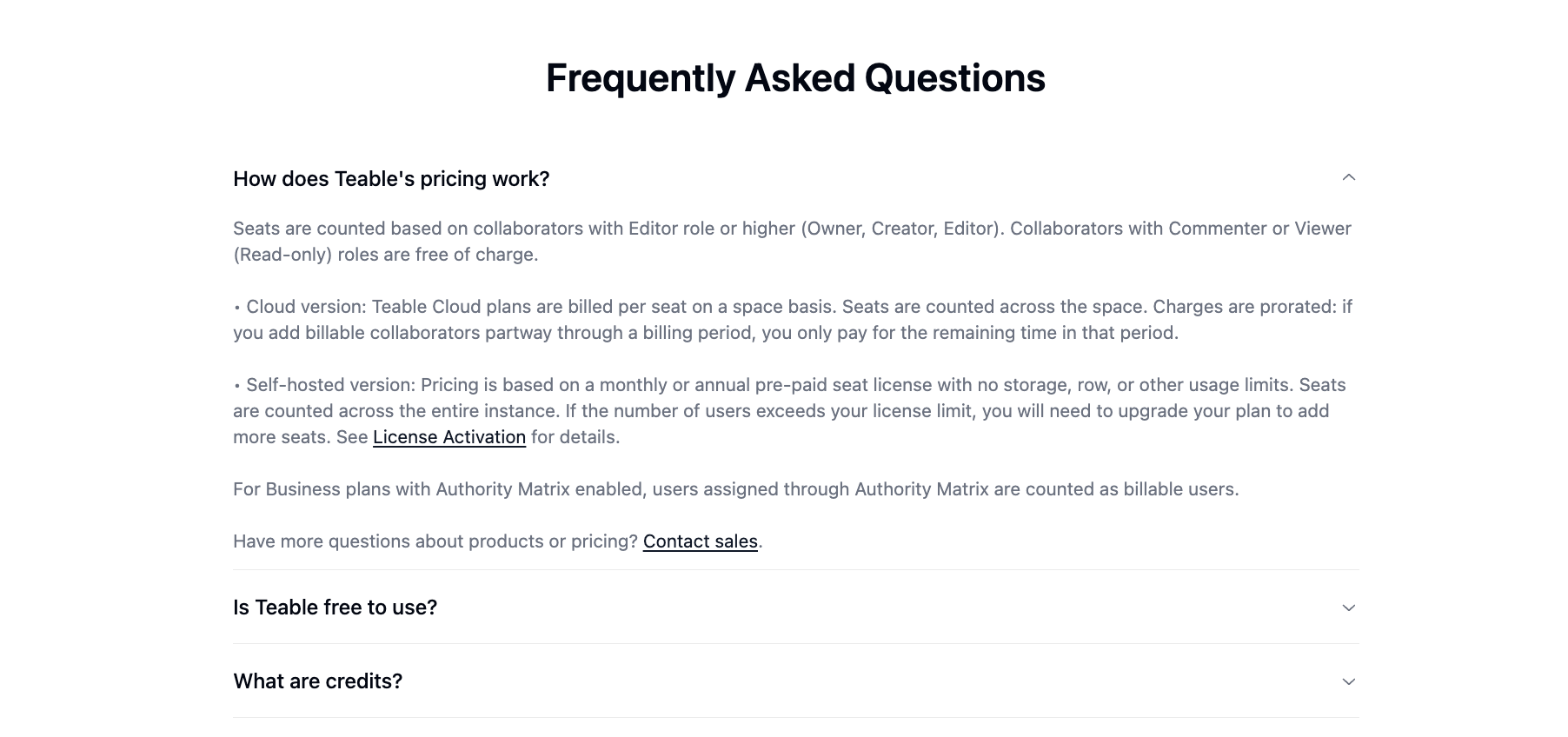
AI Credits Now Scale with Seats
AI credits are now allocated per paid seat, so your monthly credits grow proportionally as your team scales. So feel free to use it more. More use, more power.
Pricing & Plans Updated
Pricing & Plans Updated
- Plus → Pro
- Pro → Business
- Business now includes SSO (previously Enterprise-only)
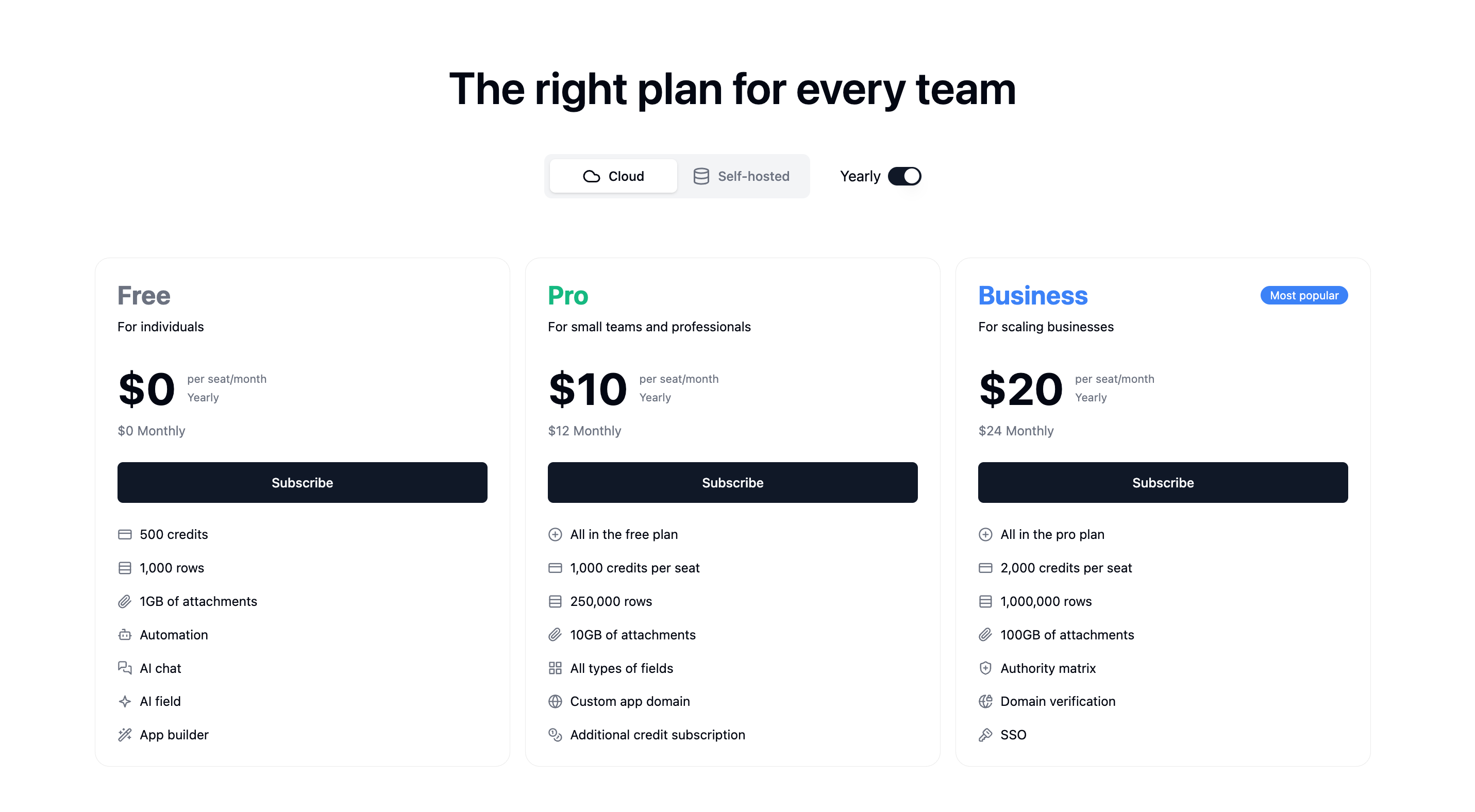
Clearer Credit Usage Tracking
Clearer Credit Usage Tracking
Billable Users, Clearly Labeled
Billable Users, Clearly Labeled
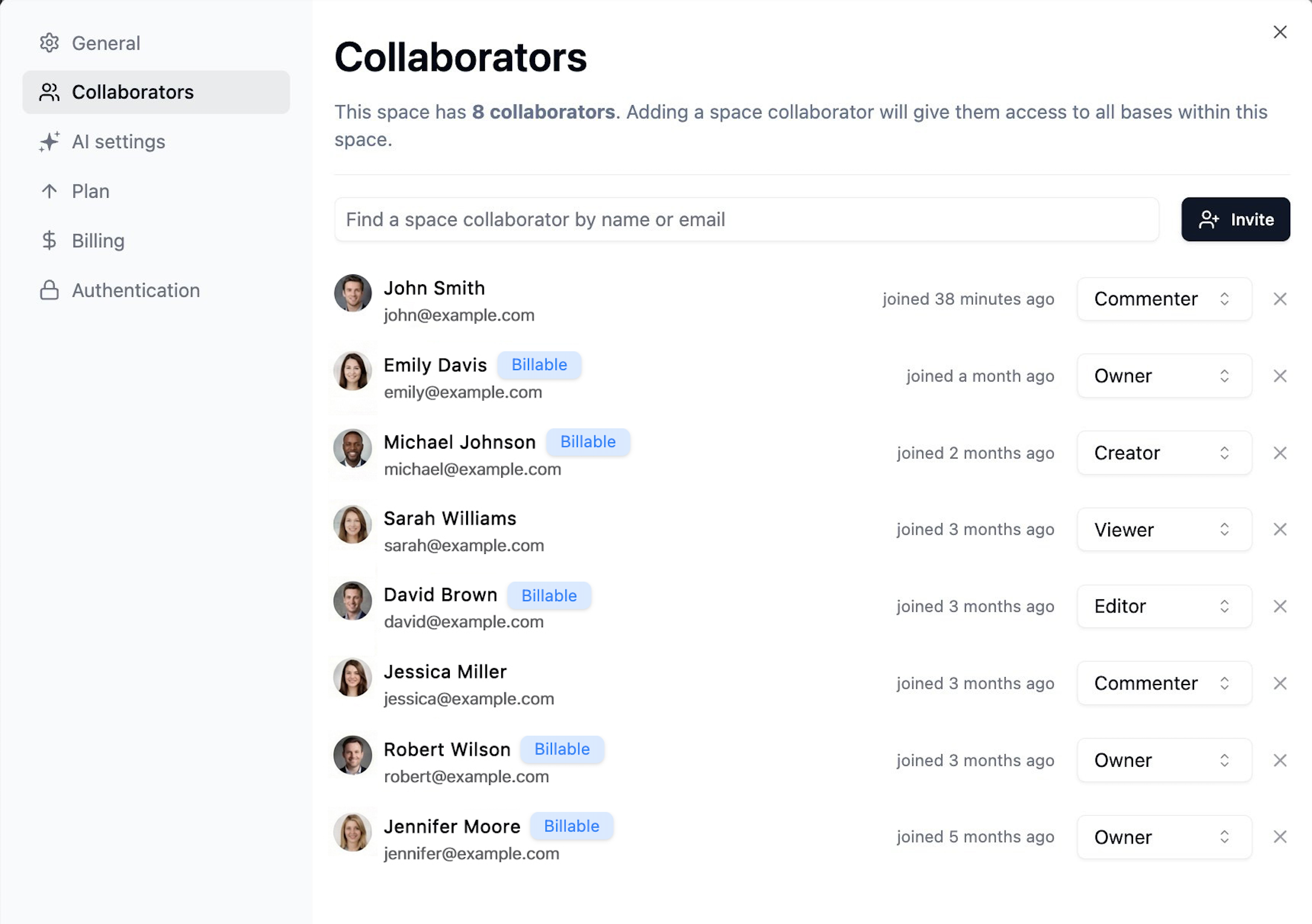
Earn 1,000 Free Credits Weekly
Earn 1,000 Free Credits Weekly
Simpler AI Credit Math
Simpler AI Credit Math
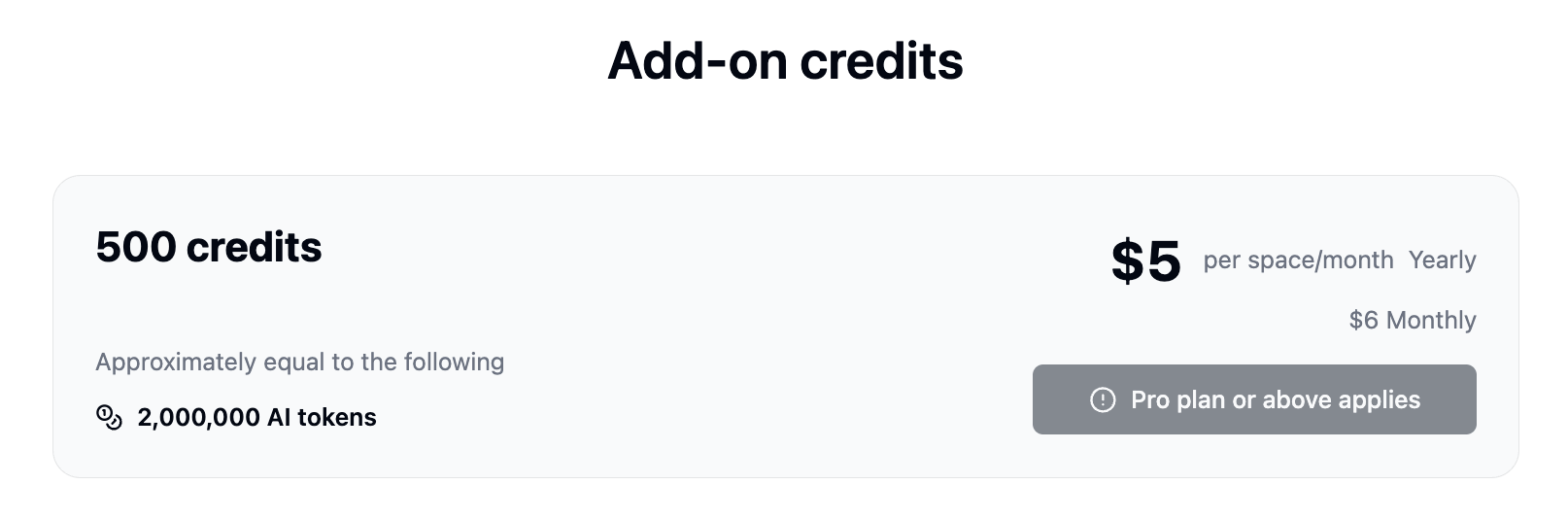
Introducing Teable App Builder 2.0
We’ve rebuilt the App Builder engine to significantly improve stability, accuracy, and build performance. Here’s what’s new:Note: This update applies only to apps created after December 17, 2025. Older apps should be recreated to benefit from the improvements.
Migration: The standalone Dashboard feature has been replaced by App Builder. You can now build more powerful, customizable dashboards directly within App Builder.
1. Auto Fix Button
When your app encounters a runtime error during preview, click the Auto Fix button to let AI automatically diagnose and fix the issue.2. Live Code Editing
Gain full control with live code editing capabilities. Watch the code generate in real-time and intervene instantly to fine-tune the logic.3. App Builder Vision
Image recognition is now precise and production-ready. You can now confidently upload screenshots for accurate UI editing or design mockups for 1:1 pixel-perfect replication. (File limits: images ≤50MB, other files ≤3MB)4. Stability & Reliability
- Generation Stability: Optimized the core code generation engine to drastically reduce the probability of producing unusable code, ensuring higher-quality outputs every time.
- Preview Stability: Fixed a critical bug where preview would fail when switching between apps. Multi-tasking across projects is now seamless.
- Chat Stability: Resolved rendering crash issues within the App Builder’s chat interface for a smoother, uninterrupted experience.
- State Isolation: Each app’s workspace is now fully isolated by appId, preventing data conflicts when managing multiple projects simultaneously.
- Error Self-Repair: Built-in error self-repair mechanisms that automatically detect and resolve generation issues, drastically reducing build failures.
5. Building Experience
- Real-Time Previews: New streaming generation engine provides instant previews as the app is being built, eliminating wait time and giving you immediate feedback.
- Rollback Optimizations: Safely experiment and instantly revert changes without losing your progress.
6. Performance
- Various under-the-hood performance optimizations to make the entire App Builder experience faster and more responsive.