

Documentation Index
Fetch the complete documentation index at: https://help.teable.ai/llms.txt
Use this file to discover all available pages before exploring further.
Sort, filter, and grouping settings are independent in each view. Changes in one view do not affect other views.
1. Add Filters
1. Add Filter Conditions
- Click
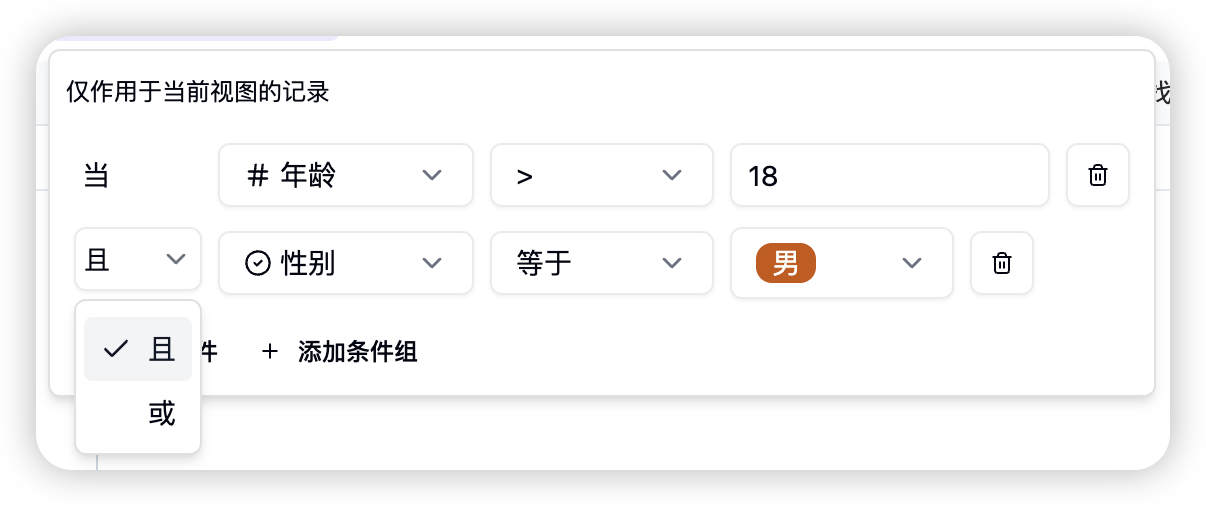
Filterin the toolbar to set filter conditions. - When you add multiple conditions, choose how they relate:
- AND: all conditions must be met
- OR: any one condition can be met
2. Condition Groups
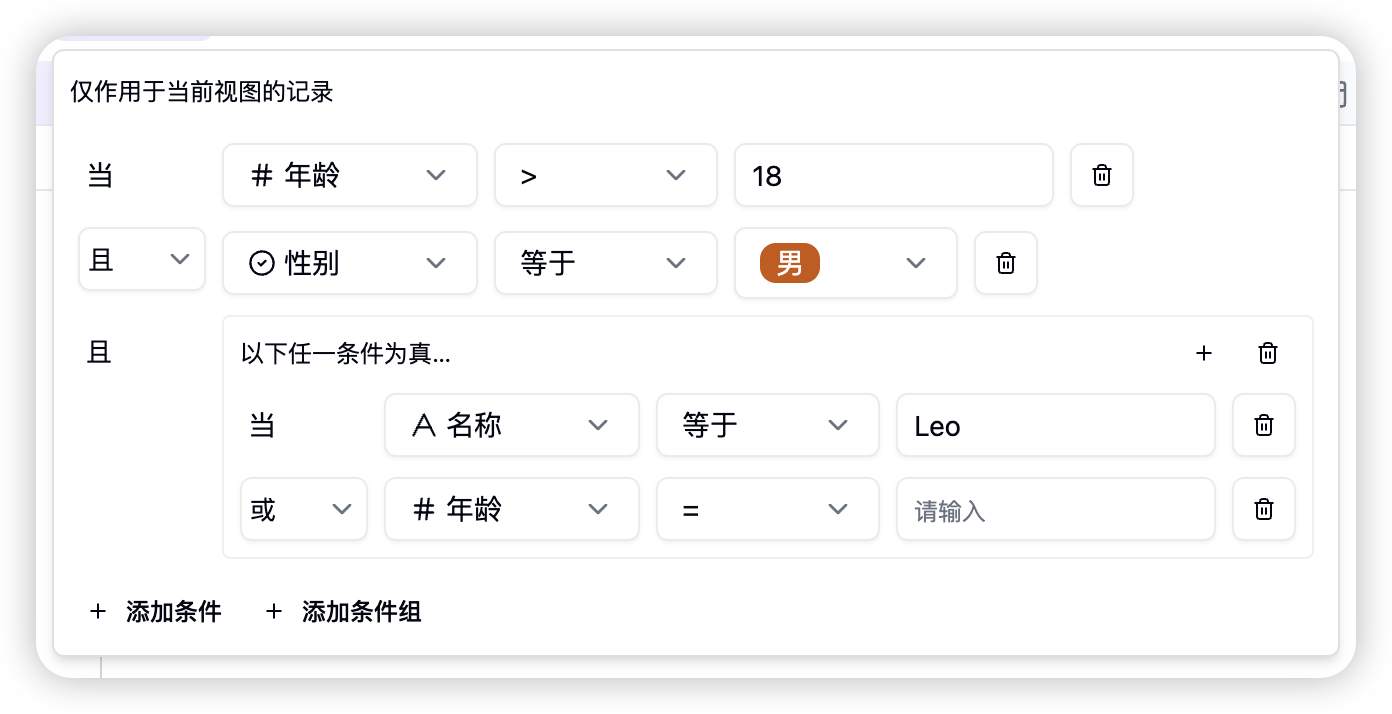
For more complex logic such as “A and B, or C and D,” use condition groups.- Click
Add condition groupto create a group and connect conditions with AND or OR. - Groups can contain more groups to build more complex logic.
- Condition groups support up to 3 levels of nesting.
3. Invalid Condition Warnings
If an existing filter becomes invalid because a field type changed, a field was deleted, or an older setup is no longer compatible, Teable automatically ignores that invalid condition so the view can still open normally.- The
Filterbutton in the toolbar shows a warning icon when there are filter conditions that need attention. - After you open the filter panel, the affected condition also shows a warning icon. Hover over it to see the explanation and fix the condition.
2. Field Types and Operators
Different field types support different filter logic. Here is a quick reference:| Field Type | Supported Operators | Input Data |
|---|---|---|
| Single Line Text | Equals, Does not equal, Contains, Does not contain, Is empty, Is not empty | Text input |
| Long Text | Equals, Does not equal, Contains, Does not contain, Is empty, Is not empty | Text input |
| User | Equals, Does not equal, Contains any, Does not contain any, Is empty, Is not empty | User selection list, and current user |
| Attachment | Is empty, Is not empty | - |
| Multiple Select | Contains any, Contains all, Exactly matches, Does not contain any, Is empty, Is not empty | Option selection list |
| Single Select | Equals, Does not equal, Contains any, Does not contain any | Option selection list |
| Date | Equals, Does not equal, Within, Before, After, On or before, On or after, Is empty, Is not empty | Preset range list, precise date picker |
| Number | =, ≠, >, ≥, <, ≤, Is empty, Is not empty | Number |
| Rating | Equals, Does not equal, Greater than, Greater than or equal to, Less than, Less than or equal to, Is empty, Is not empty | Number |
| Link | Equals, Does not equal, Contains, Does not contain, Contains any, Contains all, Exactly matches, Does not contain any, Is empty, Is not empty | Linked value selector |
| Created Time | Equals, Does not equal, Within, Before, After, On or before, On or after, Is empty, Is not empty | Preset range list, precise date picker |
| Last Modified Time | Equals, Does not equal, Within, Before, After, On or before, On or after, Is empty, Is not empty | Preset range list, precise date picker |
| Created By | Equals, Does not equal | User selection list, and current user |
| Last Modified By | Equals, Does not equal | User selection list, and current user |
| Auto Number | =, ≠, >, ≥, <, ≤ | Number |
| Button | - | - |